


Figure 1. Source Code Audit
Source code auditing is no longer that is required when you're ready for a major release. Code audits is a core part of building secure, reliable, and scalable software.
Today, hardly any software developer writes 100% code by hand. More than 55% of code is written by AI and by 2030, more than 90% of code will be generated by AI. With the rise of open-source software and AI tools writing code faster than humans ever could, the risk of hidden bugs, security flaws, IP and license violations, and logic errors has increased dramatically.
In this guide, you will learn how to audit source code the right way. Whether you are a developer, architect, startup founder, or enterprise team, this is the process professionals actually follow.
What Is a Source Code Audit?
A source code audit is a process or structured review of a software program's source code to identify security vulnerabilities, bugs, quality issues, compliance gaps, and architectural risks. It goes beyond simple code review.
A proper audit includes if the code is secure enough for production, does it follow best practices and standards, are there hidden vulnerabilities or backdoors, is the code compliant with licensing and regulations, and can we trust code written by third parties or AI tools. Also, points such as are there any third party open source libraries and code snippets are used that do not have proper license or may have vulnerabilities.
Why Do We Need Code Audit?
Modern software is written from a mix of human written code, AI generated code, open source libraries, and third party components and code snippets. Some of these may follow industry standards and guidelines and some may not. Some may introduce security flaws, logic errors, license violations, or hidden risks.
A code audit gives you a clear view of what your software is actually doing, not what you assume it does. It helps catch vulnerabilities early, before they turn into breaches, downtime, or costly fixes. While security is a major part of code audits, it also protect your business. Investors, enterprise customers, regulators, and acquirers all expect proof that software is safe, compliant, and well built. A proper audit reduces legal risk, improves reliability, and builds trust with everyone who depends on your product. In a world where code is written faster than ever, auditing is what slows things down just enough to make sure nothing breaks in ways that really matter.
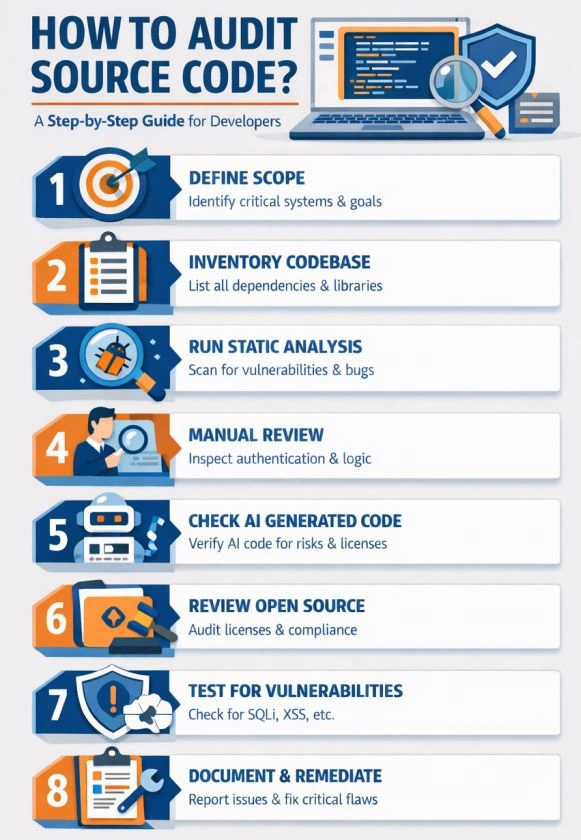
Figure 2. Code Audit Process
When Should You Audit Source Code?
If you or your team is responsible for code audits, consider code audit as an integral part of your deployment process. Most tech teams have peer code reviews and other reviews before a member checks-in their codes. You must audit code when:
The code is written by a non trusted party such as a contractor that is not a part of your trained team and doesn't understand your guidelines and best practices
Before releasing a production system or onboarding your customers
When inheriting legacy code that is not already audited
When using open source or third party libraries
When using AI generated code. This is a must.
Step 1. Understand the Scope of the Audit
Before you start code auding process, make sure to define what you are auditing and why.
Identify the application components that matter most
Focus on critical paths like authentication, payments, data access, SQL injection
Understand regulatory and compliance requirements if applicable
Clarify whether the audit is for security, compliance, quality, or all three
Step 2. Inventory the Codebase and Dependencies
Once you've identified the scope of audit, the next step is to identify dependencies. You'll be surprised how much hacking happens via third party libraries.
List all repositories and modules and create a dependency list including open source libraries
Check versions and update history and were they ever hacked or had any other issues
Identify third party and vendor supplied code
Step 3. Run Automated Static Code Analysis
Code analysis tools are the first thing can start with. Most of these tools are designed to capture several problems in the code such as:
Security vulnerabilities
Hardcoded secrets and credentials
Unsafe API usage
Memory and resource leaks
Common coding flaws
Note: These tools are not designed to audit for intent or business logic.
Step 4. Perform Manual Code Review
The next step is manual code reviews by experts who have experience with the code audit process.
Review authentication and authorization logic
Inspect input validation and data handling
Check encryption usage and key management
Look for insecure error handling
Verify business logic cannot be abused
Manual review is critical for detecting logic flaws, privilege escalation issues, and subtle vulnerabilities that tools cannot catch.
Step 5. Review AI Generated Code Carefully
When GenAI tools such as Copilot, ChatGPT, and Cloude write code, they do not understand intent or business logic. They write code based on the historic data they are trained on. In other words, if a model is trained on old version of a language, it will write old code. LLMs also don't understand code quality, vulnerabilities, and copyrights. With AI, you must start with the assumption that the code written by AI is not safe. Hence AI generated code must be placed under high priority audits for:
Assume nothing is safe by default
Verify that libraries and patterns are appropriate
Confirm licensing and usage rights
Validate business logic
Step 6. Validate Open Source and Licensing Risks
Once the previous audit risks are taken care of, the next big risk is legal. It includes copied or generated code that is IP or doesn't have copying and/or redistribution licenses.
Identify all open source licenses
Check for incompatible or restrictive licenses
Ensure license obligations are met
Confirm attribution and usage rights
Step 7. Test for Security Vulnerabilities
Cyber attacks are one of the biggest problems today. Millions of attacks happen every day and thousands of software are hacked almost every month. Before you put any software in production, you must audit it for security vulnerabilities.
Look for SQL injection and command injection risks
Check for cross site scripting and request forgery
Review authentication token handling
Verify rate limiting and abuse prevention
Data input validations and use verifications
Step 8. Document Findings and Risk Levels
Once the above steps are completed as a part of the code audit process, make sure to document everything and provide a complete report.
Classify issues by severity
Explain why each issue matters
Provide clear remediation guidance
Prioritize fixes based on risk
Executives and decision makers need clarity, not raw tool output.
Step 9. Fix Issues and Re Audit
Now, its time for the team to get to the work and re-audit the process again until everything passes.
How to Automate Code Audits
Manual code audits is very time consuming, costly, and requires experts to review it. However, there are several tools and services that have a proven track record of providing safe and reliable code audits at reasonable prices.
One of the tools I ran into is Code Registry that now I've been using for a few months.
The Code Registry is built for teams and developers who want to speed up their code audits with high quality, reliability, and trust. It is designed to audit code written by humans, AI tools, open source projects, and third-party vendors. The Code Registry automates the foundation of code auditing by creating a verifiable record of your source code, tracking changes over time, and establishing trust and provenance at the code level. Instead of auditing after something goes wrong, it enables continuous, proactive verification that your code is exactly what you think it is.
What makes the Code Registry stand out is that it goes beyond scanning for bugs or vulnerabilities. It focuses on trust, ownership, and integrity, which are the hardest problems in the AI era. By registering code, timestamping versions, and providing an auditable trail, it helps teams automate large parts of compliance, security reviews, and due diligence. This is especially critical when AI-generated code is involved, where authorship, intent, and accountability are often unclear. In short, The Code Registry turns code auditing from a painful one-time exercise into an automated, continuous trust layer for software.
Top 5 Benefits of Using Code Registry
Automated and Continuous Audits
Code is audited continuously, not just before releases, reducing risk early and often.Trust and Verification for AI Generated Code
Helps teams validate and audit AI written code instead of blindly trusting it.Proof of Code Ownership and Integrity
Creates a verifiable record of code origin, changes, and authorship.Enterprise and Compliance Ready
Supports security, compliance, and due diligence needs for regulated industries and large customers.Faster Decisions with Lower Risk
Reduces security, legal, and operational surprises by making code transparency the default.
To learn more about Code Registry, visit The Code Registry Home.
Final Thought
In a world where code is written by humans, AI, and third parties, knowing exactly what you are running is no longer optional. Unaudited code could lead to serious security and logical flaws and that could lead to serious loses. It is important to have code audits and using industry's proven tools such as Code Registry not only move things faster but also saves time and money.
Join the conversation! Your thoughts help the community grow.