

When working with databases in .NET, Language Integrated Query (LINQ) is one of the most elegant features ever introduced.
It allows you to query databases using pure C# code, while the framework automatically converts your LINQ expressions into SQL queries behind the scenes.
In this article, you'll learn exactly how LINQ translates your C# into SQL, with clear, step-by-step examples that'll make you a LINQ pro by the end.
What Is LINQ?
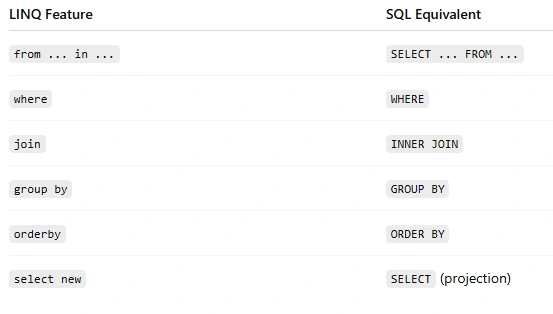
LINQ (Language Integrated Query) is a feature in C# that provides a consistent syntax for querying data from different sources — whether it's an in-memory collection, XML, or a database (via Entity Framework or LINQ to SQL).
With LINQ, you can write:
var result = from user in Users
             where user.Age > 25
             select user;
Instead of writing
SELECT * FROM Users WHERE Age > 25;
In short, LINQ is your bridge between C# and SQL.
How LINQ Translates C# to SQL
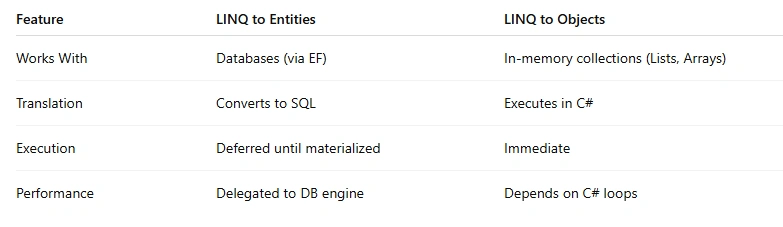
When you write a LINQ query against an IQueryable (like a DbSet in Entity Framework), you're not executing the query immediately.
Instead, you're building an expression tree — a representation of your query in code form.
Entity Framework then parses this expression tree, translates it into SQL, and sends it to your database for execution.
Let's break that down 👇
Example 1. Simple Where Clause
🔹 C# LINQ Code
var employees = from emp in context.Employees
                where emp.Salary > 50000
                select emp;
🔹 SQL Generated by EF Core
SELECT [e].[Id], [e].[Name], [e].[Salary]
FROM [Employees] AS [e]
WHERE [e].[Salary] > 50000
Explanation
The
from emp in context.Employeestells EF you're querying the Employees table.The
where emp.Salary > 50000becomes the WHERE clause.The
select empmeans return all columns (based on your model).
Example 2. Filtering and Projection
🔹 C# LINQ Code
var employeeNames = from emp in context.Employees
                    where emp.Department == "IT"
                    select emp.Name;
🔹 SQL Generated
SELECT [e].[Name]
FROM [Employees] AS [e]
WHERE [e].[Department] = N'IT';
What Happened
LINQ only selects
emp.Name, so EF generates a projection — only the Name column is fetched.This improves performance, as fewer columns are loaded into memory.
Join the conversation! Your thoughts help the community grow.