

Introduction
n8n is widely known as a low-code workflow automation tool, but most developers only interact with its UI. To build scalable, reliable, and production-ready workflows, it’s important to understand how n8n works internally - from workflow execution to data handling and persistence.
This article explains n8n’s internal architecture and execution engine in a simple yet technical way, with real-world examples.
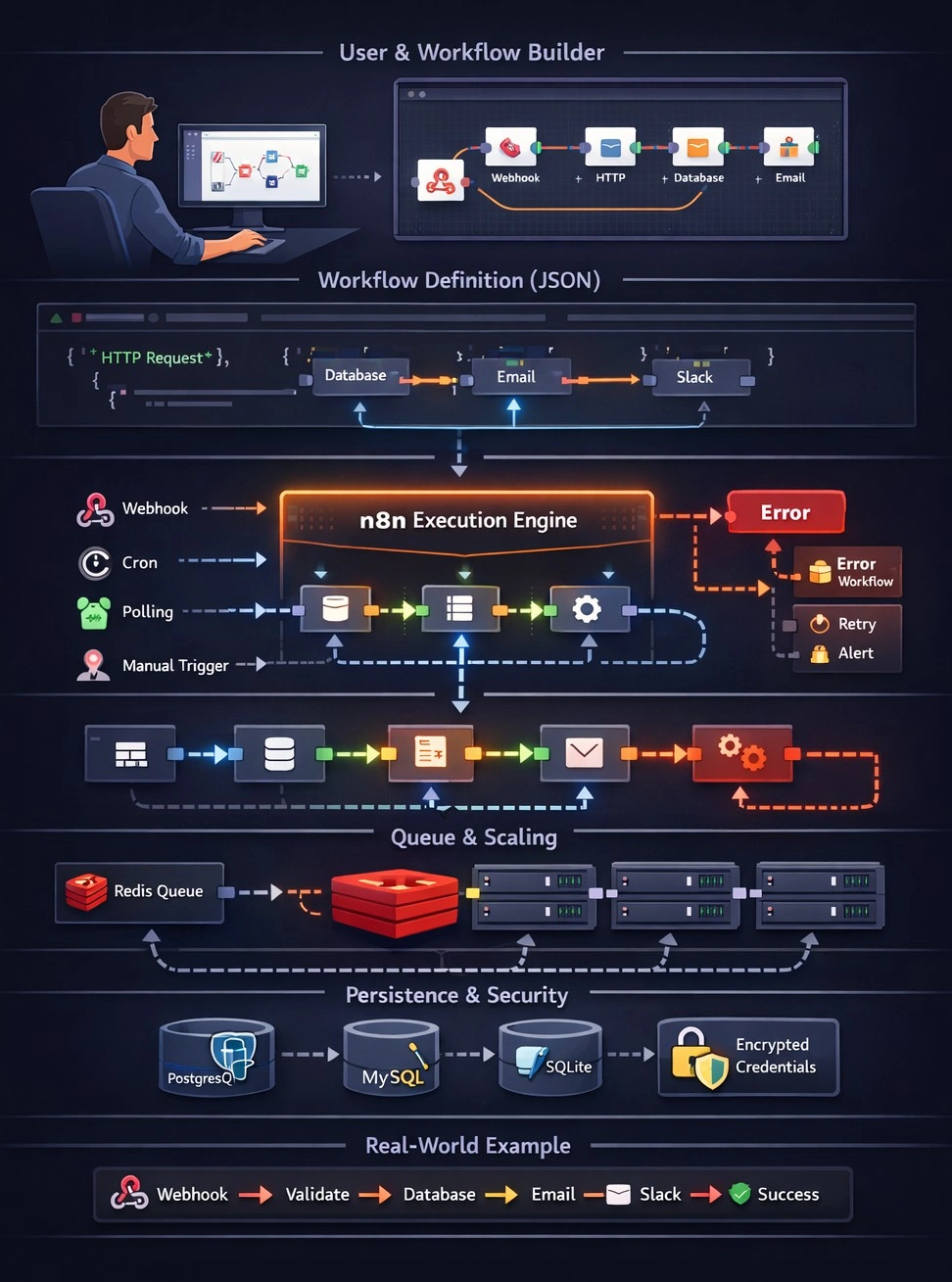
WHAT is n8n’s Internal Architecture?
Internally, n8n is a Node.js-based workflow orchestration engine that executes workflows defined as JSON objects.
Core Internal Components
| Component | Purpose |
|---|---|
| Editor UI | Visual workflow builder (frontend) |
| REST API | Controls workflows programmatically |
| Execution Engine | Runs workflows node-by-node |
| Node System | Modular logic units (Trigger / Action nodes) |
| Queue & Worker (optional) | Scales execution |
| Database | Stores workflows, credentials, executions |
WHY Understanding n8n Internals Matters
Understanding internals helps you:
✅ Build optimized workflows
✅ Avoid performance bottlenecks
✅ Handle errors properly
✅ Scale workflows safely
✅ Create custom nodes
✅ Deploy n8n for enterprise usage
Without this knowledge, workflows may work in development but fail in production.
WHERE n8n Runs & Stores Data
Runtime Environment
n8n can run:
Locally (Node.js)
Docker
Kubernetes
Cloud VM
Database Layer
n8n stores data in:
SQLite (default, dev)
PostgreSQL (recommended)
MySQL
Stored Data Includes:
Workflows (JSON)
Node configurations
Credentials (encrypted)
Execution history
WHEN the Execution Engine Is Triggered
A workflow execution starts when a Trigger Node fires.
Examples:
Webhook receives HTTP request
Cron schedule fires
Polling trigger fetches new data
Manual execution from UI
Once triggered:
➡ Execution Engine takes control
➡ Workflow is converted to an execution plan
HOW n8n Execution Engine Works (Step-by-Step)
🔹 Step 1: Workflow JSON Definition
Every workflow is stored as JSON:
{
  "nodes": [
    {
      "id": "1",
      "name": "Webhook",
      "type": "n8n-nodes-base.webhook"
    },
    {
      "id": "2",
      "name": "Set Data",
      "type": "n8n-nodes-base.set"
    }
  ],
  "connections": {
    "Webhook": {
      "main": [["Set Data"]]
    }
  }
}
Step 2: Execution Context Creation
n8n creates an Execution Context:
Execution ID
Input data
Node metadata
Run mode (manual / production)
Step 3: Node-by-Node Execution
Nodes are executed sequentially or in parallel depending on connections.
Each node:
Receives input data
Executes its logic
Returns output data
Passes data to the next node
Step 4: Data Flow Between Nodes
Data is passed as structured JSON:
[
  {
    "json": {
      "orderId": 123,
      "amount": 500
    }
  }
]
This allows:
Transformation
Filtering
Branching
Step 5: Error Handling
If a node fails:
Execution stops (default)
Error is logged
Error Trigger can catch failures
Example internal behavior:
try {
  executeNode();
} catch (error) {
  saveExecutionError(error);
  triggerErrorWorkflow();
}
REAL-TIME EXAMPLE: Order Processing System
Scenario
A real-time e-commerce order system using n8n.
Workflow Steps
Webhook receives order
Validate data
Store order in database
Send confirmation email
Notify admin on Slack
Architecture Flow
Webhook Trigger
   ↓
Validation Node
   ↓
Database Node
   ↓
Email Node
   ↓
Slack Node
Webhook Node (Sample Payload)
{
  "orderId": 789,
  "customer": "John",
  "total": 1200
}
Set Node (Data Transformation)
{
  "orderId": {{$json["orderId"]}},
  "status": "Confirmed",
  "processedAt": "{{$now}}"
}
Execution Internals
Webhook triggers execution
Execution ID generated
Data flows node-to-node
Execution stored in DB
Status updated (Success / Failed)
Execution Modes Inside n8n
| Mode | Description |
|---|---|
| Manual | Developer testing |
| Production | Real triggers |
| Queue Mode | Distributed execution |
| Sub-Workflow | Child execution |
Queue Mode Architecture
Main n8n
  ↓
Redis Queue
  ↓
Worker n8n Instances
Used for:
High traffic
Parallel workflows
Scalability
Credentials & Security Internals
Credentials stored encrypted
Encryption key stored as environment variable
Never exposed in workflow JSON
N8N_ENCRYPTION_KEY=my-secret-keyExtending the Execution Engine (Custom Nodes)
Custom nodes plug into the execution engine.
Basic Node Structure
export class MyNode implements INodeType {
  execute() {
    return [
      {
        json: { message: "Hello from custom node" }
      }
    ];
  }
}
Execution Engine:
Loads node
Executes
execute()Handles output
n8n is not just a visual automation tool, it’s a powerful execution engine built on Node.js with modular architecture, persistent execution tracking, and scalable processing.
Understanding its internals allows developers to:
Build production-grade automations
Scale safely
Debug effectively
Extend n8n beyond UI limits
Join the conversation! Your thoughts help the community grow.