

Introduction
Here we will implement a Windows Forms application to capture a screen using C#.
It is a very short demo especially for beginners.
Procedure
Step 1: Create a new “Windows Forms application” in Visual Studio and name it as you choose (I here named it ScreenCaptureDemo).
Now a new form is generated.
Step 2: Now go to the toolbox and add a Button Control to the project also resize the window size.
The form will look like this:
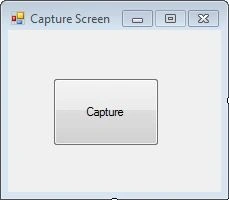
Step 3: Add the following using directives:
using System.Drawing.Imaging;
using System.Drawing;
using System;
Step 4: Now navigate to the code file Form1.cs and the following code in the Button Event Handler that we added to our project.
private void buttonCapture_Click(object sender, EventArgs e)
{
    //Creating a Method name CaptureMyScreen
    CaptureMyScreen();
}
private void CaptureMyScreen()
{
}
Step 5: Now add the following code into the method that we created (CaptureMyScreen()):
private void CaptureMyScreen()
{
    try
    {
        //Creating a new Bitmap object
        Bitmap captureBitmap = new Bitmap(1024, 768, PixelFormat.Format32bppArgb);
        //Bitmap captureBitmap = new Bitmap(int width, int height, PixelFormat);
        //Creating a Rectangle object which will
        //capture our Current Screen
        Rectangle captureRectangle = Screen.AllScreens[0].Bounds;
        //Creating a New Graphics Object
        Graphics captureGraphics = Graphics.FromImage(captureBitmap);
        //Copying Image from The Screen
        captureGraphics.CopyFromScreen(captureRectangle.Left,captureRectangle.Top,0,0,captureRectangle.Size);
        //Saving the Image File (I am here Saving it in My E drive).
        captureBitmap.Save(@"E:\Capture.jpg",ImageFormat.Jpeg);
        //Displaying the Successfull Result
        MessageBox.Show("Screen Captured");
    }
    catch (Exception ex)
    {
        MessageBox.Show(ex.Message);
    }
}
Step 6: Now compile it and run it.
You will get your captured screen.
That's all for this article. I am embedding the source file so that you can go through it.
Thank You.
ShaunPosted May 4, 2023, 4:12 PM
Very nice, for anyone facing an error GDI+ just change the result directory in screencapturedemo in form1.cs
Mike BreedenPosted Nov 30, 2022, 2:46 AM
Thanks, this worked so I touched it up a little. public static void ScreenCapFull_Clip(string strDestinationFolder, string strDestinationFile, bool bWriteToFile, bool bWriteToClipboard, out string strError) { strError = String.Empty; if (strDestinationFile.Trim() == String.Empty) // Sort of hokey bWriteToFile = false; // strDestinationFile = "c:\\temp\\clip.jpg"; int screenLeft = SystemInformation.VirtualScreen.Left; int screenTop = SystemInformation.VirtualScreen.Top; int screenWidth = SystemInformation.VirtualScreen.Width; int screenHeight = SystemInformation.VirtualScreen.Height; // Create a bitmap of the appropriate size to receive the full-screen screenshot. using (Bitmap bitmap = new Bitmap(screenWidth, screenHeight)) { // Draw the screenshot into our bitmap. using (Graphics g = Graphics.FromImage(bitmap)) { g.CopyFromScreen(screenLeft, screenTop, 0, 0, bitmap.Size); } //Save the screenshot as a Jpg image var uniqueFileName = strDestinationFile; // "C:\\temp\\a.Jpg"; try { if(bWriteToFile == true) bitmap.Save(uniqueFileName, ImageFormat.Jpeg); } catch (Exception ex) { strError = "Error: Could not write to file: " + uniqueFileName + "-" + ex.Message + "..."; } if (bWriteToClipboard == false) return; try { System.IO.MemoryStream ms = new System.IO.MemoryStream(); PictureBox pb = new PictureBox(); pb.Image = bitmap; //??? //Put the image in a memorystream. VpaResult.VpaImage is a picturebox. //VpaResult.VpaImage.Image.Save(ms, System.Drawing.Imaging.ImageFormat.Png); pb.Image.Save(ms, System.Drawing.Imaging.ImageFormat.Png); DataObject m_data = new DataObject(); m_data.SetData("PNG", true, ms); Clipboard.SetDataObject(m_data, true); } catch (Exception ex) { strError += "Error: Could not write to Clipboard: " + ex.Message + "..."; strError = ex.Message; } } } // End public static void ScreenCapFull_Clip
Hamid KhanPosted Nov 14, 2020, 1:38 PM
Very good you explain: Thanks for sharing
Nikhil BadhePosted Jun 22, 2020, 9:13 AM
Screen is not defined in current context Error i am facing? And How i can save image to Server?
shahul hameedPosted Aug 19, 2019, 7:31 AM
Thanks Bro
priyanka topiwalaPosted Dec 10, 2017, 4:11 AM
Can i upload the captured screenshot on server with this same code?if yes then can you please tell me how?