

- User interface layer. (Is our Form in Windows application and .aspx page in Web application)
- Data Access layer. (Which provides interface between Business logic layer and Database)
- Business Logic layer.(Which stores your application logic)
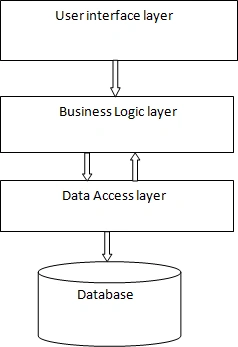
Fig. 3 Tier Architecture
Now we start how to create 3 tire architecture.
Step 1: Create blank Solution name 'test'.
Step 2: Add new Class Library project. Write name like 'BusinessLogiclayer'.
Step 3: Add new website. Write name like 'UserInterfacelayer'.
Step 4: Add new Class Library project. Write name like 'DataAccesslayer'.
Step 5: Now add reference in to BusinessLogiclayer
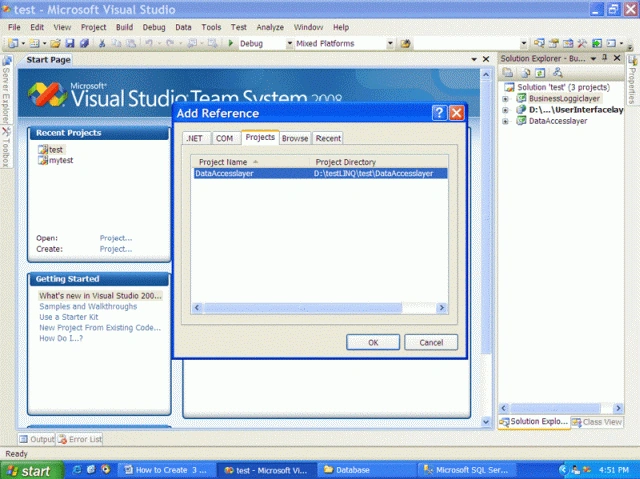
Step 6: And last Add reference to UserInterfacelayer
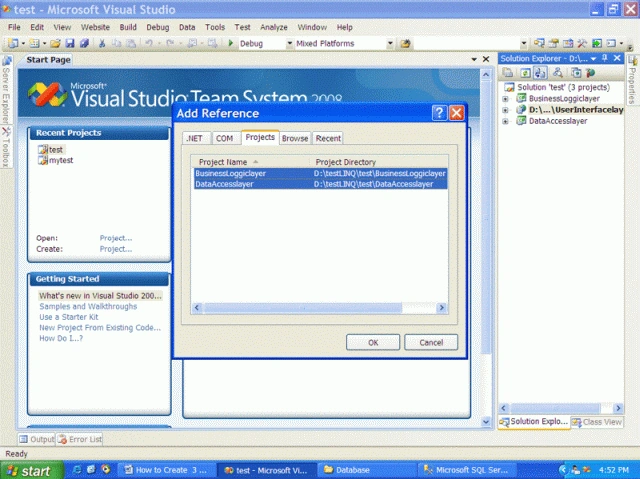
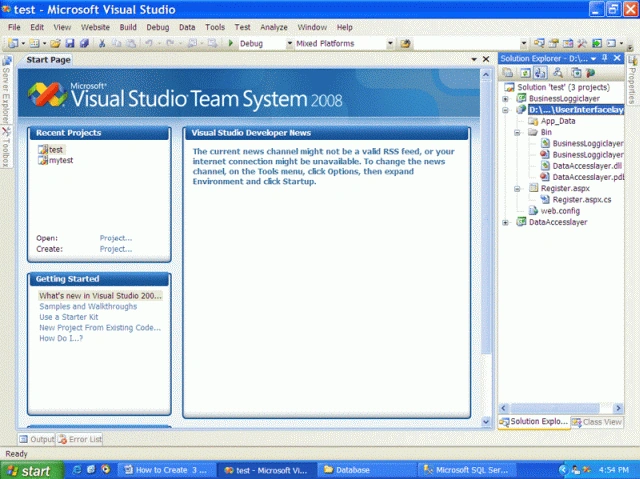
Here we add two references Businesslogiclayer and DataAccesslayer. So your window will look like this,
Now create Database name testLINQ and create a table name REGISTER.
CREATE TABLE [dbo].[REGISTER](
[ID] [int] IDENTITY(1,1) NOT NULL,
[FNAME] [nvarchar](50) NOT NULL,
[LNAME] [nvarchar](50) NOT NULL,
[EMAILID] [nvarchar](max) NOT NULL,
[PASSWORD] [nvarchar](50) NOT NULL,
CONSTRAINT [PK_REGISTER] PRIMARY KEY CLUSTERED
(
[ID] ASC
) WITH (PAD_INDEX = OFF, IGNORE_DUP_KEY = OFF) ON [PRIMARY]
) ON [PRIMARY]
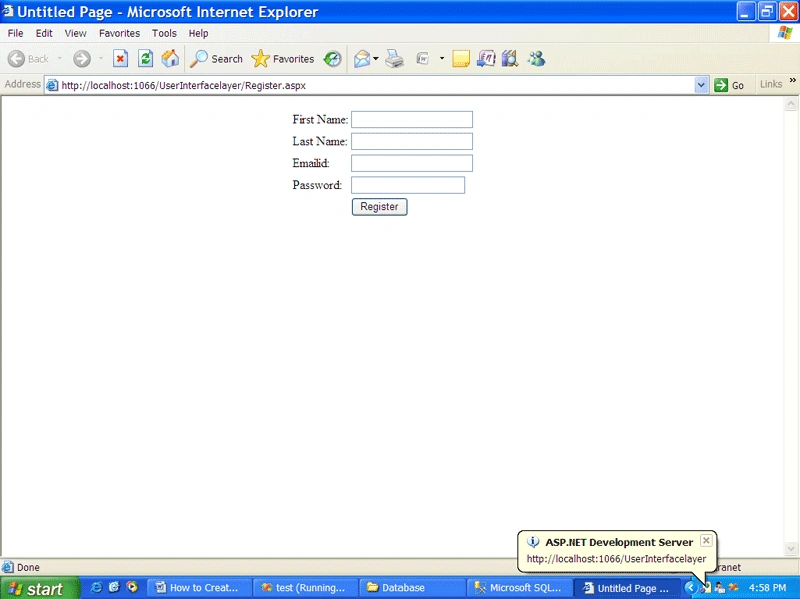
Step 7: Create a form Register.aspx
<%@ Page Language="C#" AutoEventWireup="true" CodeFile="Register.aspx.cs" Inherits="Register" %>
<!DOCTYPE html PUBLIC "-//W3C//DTD XHTML 1.0 Transitional//EN" "http://www.w3.org/TR/xhtml1/DTD/xhtml1-transitional.dtd">
<html xmlns="http://www.w3.org/1999/xhtml">
<head runat="server">
<title>Untitled Page</title>
</head>
<body>
<form id="form1" runat="server">
<div>
<asp:ScriptManager ID="ScriptManager1" runat="server">
</asp:ScriptManager>
<asp:UpdatePanel ID="UpdatePanel1" runat="server">
<ContentTemplate>
<table align="center">
<tr>
<td>
<asp:Label ID="lblfname" runat="server" Text="First Name:"></asp:Label></td>
<td>
<asp:TextBox ID="txtfname" runat="server"></asp:TextBox>
<asp:RequiredFieldValidator ID="RequiredFieldValidator1" runat="server"
ControlToValidate="txtfname" ErrorMessage="Firstname Required !">*</asp:RequiredFieldValidator>
</td>
</tr>
<tr>
<td>
<asp:Label ID="lbllname" runat="server" Text="Last Name:"></asp:Label>
</td>
<td>
<asp:TextBox ID="txtlname" runat="server"></asp:TextBox>
<asp:RequiredFieldValidator ID="RequiredFieldValidator2" runat="server"
ControlToValidate="txtlname" ErrorMessage="Last Name required !">*</asp:RequiredFieldValidator>
</td>
</tr>
<tr>
<td>
<asp:Label ID="lblemailid" runat="server" Text="Emailid:"></asp:Label>
</td>
<td>
<asp:TextBox ID="txtemailid" runat="server"></asp:TextBox>
<asp:RequiredFieldValidator ID="RequiredFieldValidator3" runat="server"
ControlToValidate="txtemailid" ErrorMessage="Email id required !">*</asp:RequiredFieldValidator>
<asp:RegularExpressionValidator ID="RegularExpressionValidator1" runat="server"
ControlToValidate="txtemailid" ErrorMessage="Invalid Email id !"
ValidationExpression="\w+([-+.']\w+)*@\w+([-.]\w+)*\.\w+([-.]\w+)*">*</asp:RegularExpressionValidator>
</td>
</tr>
<tr>
<td>
<asp:Label ID="lblpassword" runat="server" Text="Password:"></asp:Label>
</td>
<td>
<asp:TextBox ID="txtpassword" runat="server" TextMode="Password"></asp:TextBox>
<asp:RequiredFieldValidator ID="RequiredFieldValidator4" runat="server"
ControlToValidate="txtpassword" ErrorMessage="Password required !">*</asp:RequiredFieldValidator>
<asp:RegularExpressionValidator ID="RegularExpressionValidator2" runat="server"
ControlToValidate="txtpassword" ErrorMessage="Invalid Password !"
ValidationExpression="\w{6,10}">*</asp:RegularExpressionValidator>
</td>
</tr>
<tr>
<td>
</td>
<td>
<asp:Button ID="Btnregister" runat="server" onclick="Btnregister_Click"
Text="Register" />
</td>
</tr>
</table>
</ContentTemplate>
</asp:UpdatePanel>
</div>
</form>
</body>
</html>
Page will look like this in browser
Step 8: In DataAccesslogiclayer add LINQ TO SQL class name test.dbml
Step 9: Create Stored procedure sp_REGISTER.
-- ================================================
-- Template generated from Template Explorer using:
-- Create Procedure (New Menu).SQL
-- =============================================
-- Author: Jayendrasinh Gohil
-- Create date: 30/07/2009
-- Description: STORED PROCEDURE FOR REGISTER TABLE
-- =============================================
ALTER PROCEDURE sp_REGISTER
-- Add the parameters for the stored procedure here
(
@Task INT =0,
@FNAME nvarchar(50)='',
@LNAME nvarchar(50) = '',
@EMAILID nvarchar(MAX) = '',
@PASSWORD nvarchar(50)
)
AS
IF(@Task = 1)
BEGIN
INSERT INTO [testLINQ].[dbo].[REGISTER]
([FNAME]
,[LNAME]
,[EMAILID]
,[PASSWORD])
VALUES
(
@FNAME,
@LNAME,
@EMAILID,
@PASSWORD
)
END
Here we take @Task variable for running multiple SQL statement run in task wise. Pass @Task = 1 for insert, 2 for delete so on.
Step 10: In Businesslogic layer, create class REGISTER.cs like this
#region "Public Using"
using System;
using System.Collections.Generic;
using System.Linq;
using System.Text;
using System.Data.Linq;
#endregion
#region "Private Using"
using DataAccesslayer;
#endregion
namespace BusinessLoggiclayer
{
public class REGISTER
{
#region "Private variable"
string _FNAME;
string _LNAME;
string _EMAILID;
string _PASSWORD;
#endregion
#region "Public Property"
public string FNAME
{
get { return _FNAME; }
set { _FNAME = value; }
}
public string LNAME
{
get { return _LNAME; }
set { _LNAME = value; }
}
public string EMAILID
{
get { return _EMAILID; }
set { _EMAILID = value; }
}
public string PASSWORD
{
get { return _PASSWORD; }
set { _PASSWORD = value; }
}
#endregion
#region "Public Method"
public void Insert()
{
using (testDataContext db = new testDataContext())
{
db.sp_REGISTER(1, _FNAME, _LNAME, _EMAILID, _PASSWORD);
}
}
#endregion
}
}
Step 11: Write code in Register.aspx.cs
using System;
using System.Collections;
using System.Configuration;
using System.Data;
using System.Linq;
using System.Web;
using System.Web.Security;
using System.Web.UI;
using System.Web.UI.HtmlControls;
using System.Web.UI.WebControls;
using System.Web.UI.WebControls.WebParts;
using System.Xml.Linq;
#region "Private Using"
using BusinessLoggiclayer;
#endregion
public partial class Register : System.Web.UI.Page
{
protected void Page_Load(object sender, EventArgs e)
{
if(!IsPostBack)
{
}
}
protected void Btnregister_Click(object sender, EventArgs e)
{
REGISTER r = new REGISTER();
r.FNAME = txtfname.Text;
r.LNAME = txtlname.Text;
r.EMAILID = txtemailid.Text;
r.PASSWORD = txtpassword.Text;
r.Insert();
}
}
nallyaPosted Sep 6, 2012, 6:14 AM
How to Add new Class Library project in empty Solution
Vinyas A MPosted Feb 14, 2012, 3:29 AM
Thank you for the solution. But i need to retrieve the data from database and bind to the property and that property to UI controls
Chit Min MaungPosted Mar 4, 2011, 3:14 AM
Hi now i'd alrdy reading ur post. very nice i appreciate it. And i'm start learning about linq to sql. and i just want to show data with gridview. How to do? I think need to change in this place using (testDataContext db = new testDataContext()) { db.sp_REGISTER(1, _FNAME, _LNAME, _EMAILID, _PASSWORD); } but i've no idea... pls help me
Elavarasan DhayalanPosted Feb 5, 2011, 2:21 PM
Thanks Friend, It is very helpfull to me regards Elavarasan
ravinde reddPosted Mar 30, 2010, 1:08 PM
but how to bind values to grid using this method
Nhat Khanh NguyenPosted Dec 30, 2009, 11:45 PM
thank you very much!
your motherPosted Dec 30, 2009, 6:01 AM
3 tires? you mean like a tricycle? yay! Me first!
miram miramPosted Dec 9, 2009, 10:01 PM
Nice article However the linq part was quite thin.
ViktarPosted Sep 28, 2009, 4:53 PM
This is a very very basic article. What about modifing bussiness entity? Read my article about a subject: Convert Subsonic project to Linq to SQL
Tim FischerPosted Sep 8, 2009, 12:43 PM
I think you may be misunderstanding the differences between an n-tier application and an n-layer application. One reason that n-tier applications are rarely seen in "demo"/"tutorial" form is that they are extremely complex to create and are very dependent on the application being created. Your code is definitely not n-tier. it is a layer-based approach, but even still - it is lacking in it's implementation.
Sean FaoeditedPosted Sep 4, 2009, 9:56 AMEdited Sep 4, 2009, 10:02 AM
This is the most awful code I have seen on DotNetKicks in a LONG time. I would bury this trash if I could. Are you sure you're MCP? I don't even know where to start! First of all, the conventions you follow are AWFUL. Why are you capitalizing everything? Please stick to the C# convention that you claim to be an expert on. Next, you absolutely did NOT create a Business Layer, as you have suggested. It's a stripped down Data Access Layer that is missing a ton of functionality. But let me get this straight. You think that since you've added LINQ to SQL to a project that you have a full-blown DAL? What a waste. Why did you create the REGISTER class, in the first place? You've completely done away with the benefits of using LINQ to SQL because you've just duplicated your efforts by writing code that represents an entity. What was the point? LINQ to SQL does this for you! I really hope nobody follows this awful code.
Olly DsouzaPosted Sep 1, 2009, 10:03 AM
Hey, I figured it out! I had a local class with the same name in the UI layer that was being given prefrence. Qualifying the Class with the BusinessLogicLayer namespace did the job. Thanks for posting this very basic example. Its a good start. cheers, Olly
Olly DsouzaPosted Sep 1, 2009, 12:46 AM
hi Jai, I added the SP as a method in the .dbml file and the error was resloved, however now Im unable to see the public properties / method of the REGISTER class when I give the .Notation like r. what could I be doing wrong? Excuse me, an absoulte newbie! Thanks, Olly
Olly DsouzaeditedPosted Aug 31, 2009, 11:13 PMEdited Aug 31, 2009, 11:25 PM
There is no mention of how to configure the DAL. I get the following error: Error 2 'DataAccessLayer.testDataContext' does not contain a definition for 'sp_REGISTER' and no extension method 'sp_REGISTER' accepting a first argument of type 'DataAccessLayer.testDataContext' could be found (are you missing a using directive or an assembly reference?)