

Introduction
In this article, we will learn how to create a music player app in a flutter. Since flutter applications can run cross-platform using a single codebase, this application can also run on the iOS platform.

Prerequisite
- Having the latest version of Android Studio
- Having Installed Flutter and Dart in Android Studio
- Having Basic knowledge of Flutter Development
Let's start with Android Studio,
Create New Flutter Project In Android Studio
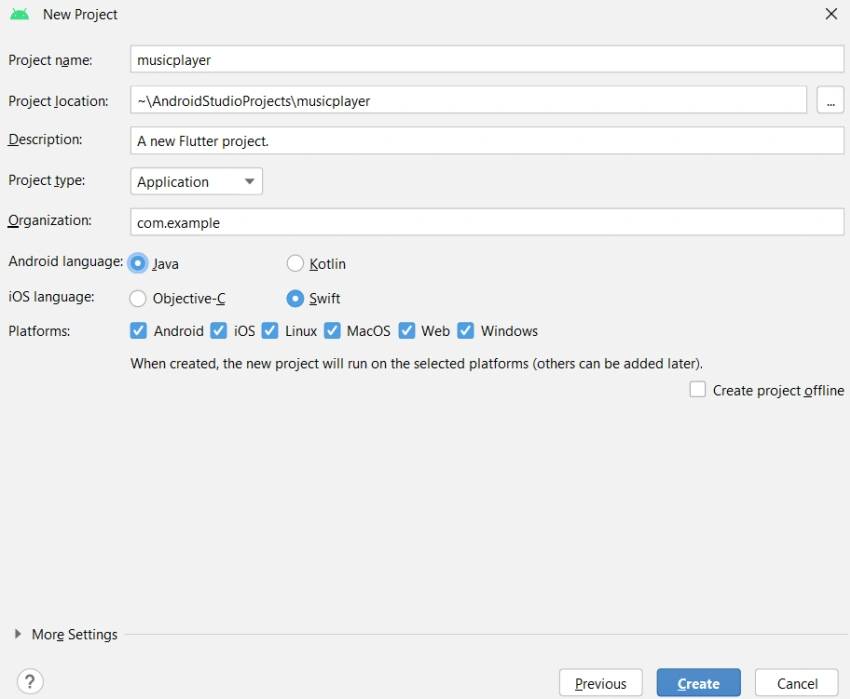
Open your Android Studio and create a new project. Edit the project name, android language, iOS language, and platform, and click Create button.
Add Required Dependancy In Pubspec.yaml
Add the following dependency in pubspec.yaml file, and please click on the pub get button.
  http: ^0.13.5
  audioplayers: ^3.0.1
HTTP Package -
HTTP is a network library that allows us to make HTTP requests to the web server and receive responses. HTTP package allows us to perform operations such as making GET and POST requests.
AudioPlayers Package -
This package allows us to play multiple audio files simultaneously. Using the audio player's package, we can play audio files from various sources, such as networks, file systems, and assets. We can use the AudioPlayer object to stop, play, pause, or complete a music file.
Open Main.dart
Go to main. dart and replace the existing code with the below code
import 'package:flutter/material.dart';
import 'Screens/HomePage.dart';

void main(){
  runApp(MyApp());
}

class MyApp extends StatelessWidget {
  const MyApp({Key? key}) : super(key: key);

  @override
  Widget build(BuildContext context) {
    return MaterialApp(
      debugShowCheckedModeBanner: false,
      theme: ThemeData.dark(),
      title: "Home Page",
      home: HomePage(),
    );
  }
}
Explanation
main.dart is the entry point of a Flutter application. When the Flutter application is launched, then the main method is executed. We must return the MaterialApp here and set basic properties such as theme, title name, debug banner, etc. Here, We are calling the HomePage class.
We are going to use the below API URL and response data
API URL - https://storage.googleapis.com/uamp/catalog.json
API Response
{
	"music": [{
			"id": "wake_up_01",
			"title": "Intro - The Way Of Waking Up (feat. Alan Watts)",
			"album": "Wake Up",
			"artist": "The Kyoto Connection",
			"genre": "Electronic",
			"source": "https://storage.googleapis.com/uamp/The_Kyoto_Connection_-_Wake_Up/01_-_Intro_-_The_Way_Of_Waking_Up_feat_Alan_Watts.mp3",
			"image": "https://storage.googleapis.com/uamp/The_Kyoto_Connection_-_Wake_Up/art.jpg",
			"trackNumber": 1,
			"totalTrackCount": 13,
			"duration": 90,
			"site": "http://freemusicarchive.org/music/The_Kyoto_Connection/Wake_Up_1957/"
		},
		{
			"id": "wake_up_02",
			"title": "Geisha",
			"album": "Wake Up",
			"artist": "The Kyoto Connection",
			"genre": "Electronic",
			"source": "https://storage.googleapis.com/uamp/The_Kyoto_Connection_-_Wake_Up/02_-_Geisha.mp3",
			"image": "https://storage.googleapis.com/uamp/The_Kyoto_Connection_-_Wake_Up/art.jpg",
			"trackNumber": 2,
			"totalTrackCount": 13,
			"duration": 267,
			"site": "http://freemusicarchive.org/music/The_Kyoto_Connection/Wake_Up_1957/"
		},
		{
			"id": "wake_up_03",
			"title": "Voyage I - Waterfall",
			"album": "Wake Up",
			"artist": "The Kyoto Connection",
			"genre": "Electronic",
			"source": "https://storage.googleapis.com/uamp/The_Kyoto_Connection_-_Wake_Up/03_-_Voyage_I_-_Waterfall.mp3",
			"image": "https://storage.googleapis.com/uamp/The_Kyoto_Connection_-_Wake_Up/art.jpg",
			"trackNumber": 3,
			"totalTrackCount": 13,
			"duration": 264,
			"site": "http://freemusicarchive.org/music/The_Kyoto_Connection/Wake_Up_1957/"
		},
		{
			"id": "wake_up_04",
			"title": "The Music In You",
			"album": "Wake Up",
			"artist": "The Kyoto Connection",
			"genre": "Electronic",
			"source": "https://storage.googleapis.com/uamp/The_Kyoto_Connection_-_Wake_Up/04_-_The_Music_In_You.mp3",
			"image": "https://storage.googleapis.com/uamp/The_Kyoto_Connection_-_Wake_Up/art.jpg",
			"trackNumber": 4,
			"totalTrackCount": 13,
			"duration": 223,
			"site": "http://freemusicarchive.org/music/The_Kyoto_Connection/Wake_Up_1957/"
		},
		{
			"id": "wake_up_05",
			"title": "The Calm Before The Storm",
			"album": "Wake Up",
			"artist": "The Kyoto Connection",
			"genre": "Electronic",
			"source": "https://storage.googleapis.com/uamp/The_Kyoto_Connection_-_Wake_Up/05_-_The_Calm_Before_The_Storm.mp3",
			"image": "https://storage.googleapis.com/uamp/The_Kyoto_Connection_-_Wake_Up/art.jpg",
			"trackNumber": 5,
			"totalTrackCount": 13,
			"duration": 229,
			"site": "http://freemusicarchive.org/music/The_Kyoto_Connection/Wake_Up_1957/"
		},
		{
			"id": "wake_up_06",
			"title": "No Pain, No Gain",
			"album": "Wake Up",
			"artist": "The Kyoto Connection",
			"genre": "Electronic",
			"source": "https://storage.googleapis.com/uamp/The_Kyoto_Connection_-_Wake_Up/06_-_No_Pain_No_Gain.mp3",
			"image": "https://storage.googleapis.com/uamp/The_Kyoto_Connection_-_Wake_Up/art.jpg",
			"trackNumber": 6,
			"totalTrackCount": 13,
			"duration": 304,
			"site": "http://freemusicarchive.org/music/The_Kyoto_Connection/Wake_Up_1957/"
		},
		{
			"id": "wake_up_07",
			"title": "Voyage II - Satori",
			"album": "Wake Up",
			"artist": "The Kyoto Connection",
			"genre": "Electronic",
			"source": "https://storage.googleapis.com/uamp/The_Kyoto_Connection_-_Wake_Up/07_-_Voyage_II_-_Satori.mp3",
			"image": "https://storage.googleapis.com/uamp/The_Kyoto_Connection_-_Wake_Up/art.jpg",
			"trackNumber": 7,
			"totalTrackCount": 13,
			"duration": 256,
			"site": "http://freemusicarchive.org/music/The_Kyoto_Connection/Wake_Up_1957/"
		},
		{
			"id": "wake_up_08",
			"title": "Reveal the Magic",
			"album": "Wake Up",
			"artist": "The Kyoto Connection",
			"genre": "Electronic",
			"source": "https://storage.googleapis.com/uamp/The_Kyoto_Connection_-_Wake_Up/08_-_Reveal_the_Magic.mp3",
			"image": "https://storage.googleapis.com/uamp/The_Kyoto_Connection_-_Wake_Up/art.jpg",
			"trackNumber": 8,
			"totalTrackCount": 13,
			"duration": 293,
			"site": "http://freemusicarchive.org/music/The_Kyoto_Connection/Wake_Up_1957/"
		}
	]
}
Create a Model Class
Create a new directory named Model inside the lib folder. Now create a new file named MusicDataResponse.dart inside the Model folder and add the below code.
import 'package:flutter/material.dart';

class MusicDataResponse{

  String? id;
  String? title;
  String? album;
  String? artist;
  String? genre;
  String? source;
  String? image;
  int? trackNumber;
  int? totalTrackCount;
  int? duration;
  String? site;

  MusicDataResponse({
    required this.id,
    required  this.title,
    required this.album,
    required this.artist,
    required this.genre,
    required this.source,
    required  this.image,
    required this.trackNumber,
    required  this.totalTrackCount,
    required this.duration,
    required this.site});

  factory MusicDataResponse.fromJson(Map<String,dynamic> json){

    return MusicDataResponse(
        id:json["id"],
        title:json['title'],
        album:json['album'],
        artist:json['artist'],
        genre:json['genre'],
        source:json['source'],
        image:json['image'],
        trackNumber:json['trackNumber'],
        totalTrackCount:json['totalTrackCount'],
        duration:json['duration'],
        site:json['site']);
  }

  Map<String, dynamic> toJson() {
    final Map<String, dynamic> data = new Map<String, dynamic>();
    data['id'] = this.id;
    data['title'] = this.title;
    data['album'] = this.album;
    data['artist'] = this.artist;
    data['genre'] = this.genre;
    data['source'] = this.source;
    data['image'] = this.image;
    data['trackNumber'] = this.trackNumber;
    data['totalTrackCount'] = this.totalTrackCount;
    data['duration'] = this.duration;
    data['site'] = this.site;
    return data;
  }
}
Explanation
Based on the API response data, we need to create a model class as above and define all the parameters we will use in our application.

Md SarfarajPosted Apr 10, 2023, 10:44 AM
Going good