
What you'll need
A host application, and a viewer application.
The host
private void Incoming(object Guest)
{
    IRDPSRAPIAttendee MyGuest = (IRDPSRAPIAttendee)Guest; //???
    MyGuest.ControlLevel = CTRL_LEVEL.CTRL_LEVEL_INTERACTIVE;
}
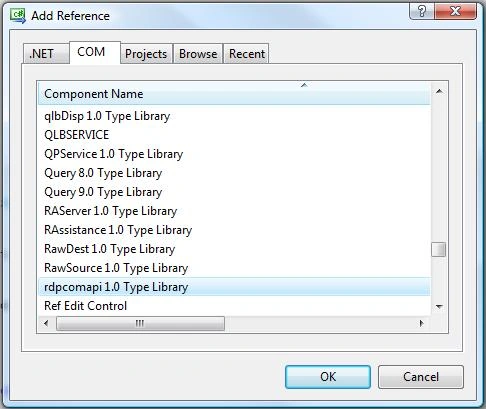
- Add reference, rdpcomapi 1.0 Type Library.
- Add using RDPCOMAPILib.
- Add this method.
- Add this class-level variable.
RDPSession x = new RDPSession();
Create three new buttons, and a textbox(don't rename the controls, make use of their default names)
Code
First button
private void button1_Click(object sender, EventArgs e)
{
    x.OnAttendeeConnected += Incoming;
    x.Open();
}
Second button
private void button2_Click(object sender, EventArgs e)
{
    IRDPSRAPIInvitation Invitation = x.Invitations.CreateInvitation("Trial", "MyGroup", "", 10);
    textBox1.Text = Invitation.ConnectionString;
}
Third button
private void button3_Click(object sender, EventArgs e)
{
    x.Close();
    x = null;
}
The viewer
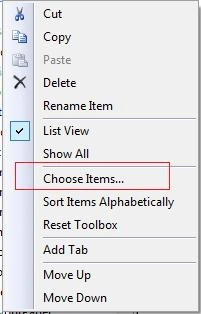
- Right-click on the toolbox and click Choose items.
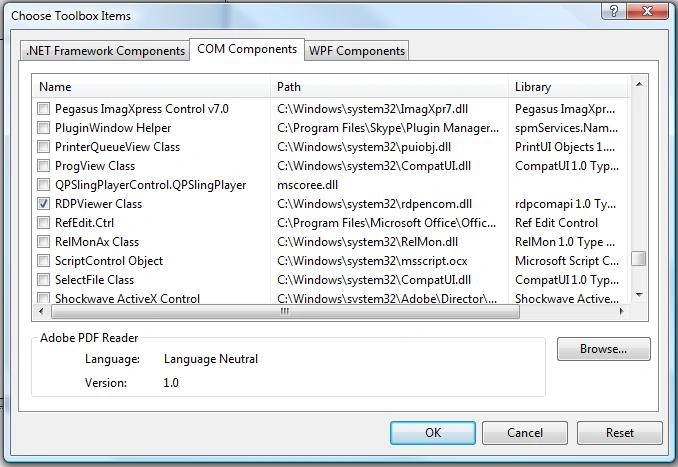
- In the dialog under COM components, check RDPViewer Class, and click OK.
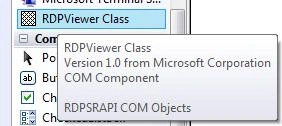
- Drag and Drop the RDPViewer object onto the form.
Create two new buttons and a textbox.
Code
First button
private void button1_Click(object sender, EventArgs e)
{
    string Invitation = textBox1.Text;// "";// Interaction.InputBox("Insert Invitation ConnectionString", "Attention");
    axRDPViewer1.Connect(Invitation, "User1", "");
}
Second button
private void button2_Click(object sender, EventArgs e)
{
    axRDPViewer1.Disconnect();
}
How to use
- On the host click button one, the start button
- On the host click button two, and they get the invite button
- On the host copy the text in the text box
- On the viewer paste it into the text box
- On the viewer click button one, the connect button
- To end click the Finish button on either side
Full source code
The viewer
using System;
using System.Collections.Generic;
using System.ComponentModel;
using System.Data;
using System.Drawing;
using System.Linq;
using System.Text;
using System.Windows.Forms;

namespace ScrS_viewer_
{
    public partial class Form1 : Form
    {
        public Form1()
        {
            InitializeComponent();
        }
        private void button1_Click(object sender, EventArgs e)
        {
            string Invitation = textBox1.Text;// "";// Interaction.InputBox("Insert Invitation ConnectionString", "Attention");
            axRDPViewer1.Connect(Invitation, "User1", "");
        }
        private void button2_Click(object sender, EventArgs e)
        {
            axRDPViewer1.Disconnect();
        }
        private void Form1_Load(object sender, EventArgs e)
        {
            panel1.Height = Screen.PrimaryScreen.Bounds.Height - 100;
        }
    }
}
The host
using System;
using System.Collections.Generic;
using System.ComponentModel;
using System.Data;
using System.Drawing;
using System.Linq;
using System.Text;
using System.Windows.Forms;
using System.Diagnostics;
using RDPCOMAPILib;

namespace ScrS_server_
{
    public partial class Form1 : Form
    {
        RDPSession x = new RDPSession();
        public Form1()
        {
            InitializeComponent();
        }
        private void Form1_Load(object sender, EventArgs e)
        {
        }
        private void Incoming(object Guest)
        {
            IRDPSRAPIAttendee MyGuest = (IRDPSRAPIAttendee)Guest;//???
            MyGuest.ControlLevel = CTRL_LEVEL.CTRL_LEVEL_INTERACTIVE;
        }
        private void button1_Click(object sender, EventArgs e)
        {
            x.OnAttendeeConnected += Incoming;
            x.Open();
        }
        private void button2_Click(object sender, EventArgs e)
        {
            IRDPSRAPIInvitation Invitation = x.Invitations.CreateInvitation("Trial", "MyGroup", "", 10);
            textBox1.Text = Invitation.ConnectionString;
        }
        private void button3_Click(object sender, EventArgs e)
        {
            x.Close();
            x = null;
        }
    }
}
MuhammadShaheryarkhanPosted Jun 5, 2024, 10:46 AM
Is this work live like on public ip
Himanshu GoelPosted Jun 11, 2020, 2:56 AM
Is it possible to get/shorten the invitation link just like TeamViewer ID in length?
Mohit PannuPosted Apr 27, 2020, 12:45 AM
System.BadImageFormatException HResult=0x8013101B Message=Could not load file or assembly 'Interop.RDPCOMAPILib, Version=1.0.0.0, Culture=neutral, PublicKeyToken=null' or one of its dependencies.
Gyan SinghPosted Nov 27, 2019, 11:01 AM
Thanks Its very Helpful and its working proper
Fatih BuralPosted Aug 27, 2018, 4:21 AM
This does not work if you're not connected via RDP already.
Sandeep JadhavPosted Dec 22, 2017, 3:25 AM
Can we able to share audio or sound through RdpSession ?? is this possible??
Veronica FernandesPosted Aug 1, 2017, 7:03 AM
What about audio is it possible
Rishi KalalPosted Jul 11, 2017, 11:31 AM
On the viewer I'm unable to see a full screen of host. It is only showing a small part of host. I'm running it on my local machine.
ASHWANI TIWARIPosted May 20, 2017, 6:23 AM
Please tell me why after creating setup through visual studio installer for this application, I am not able to access desktop over different network while we have closed firewall of both system.
Bhushan PawarPosted Nov 25, 2014, 10:20 AM
good work..
subhash jdPosted Sep 10, 2014, 3:32 AM
How to configure proxy in it. Because its not working in systems having proxy.
Nikhil ShettyPosted Feb 1, 2014, 2:01 AM
hey, can this application be used for remote access
sanjay mishraPosted Nov 21, 2013, 1:45 AM
please tell us how to stop aero features when this application running
Mihir TailorPosted Feb 8, 2013, 7:44 AM
help!!
Mihir TailorPosted Feb 8, 2013, 7:43 AM
not working
sami abdullahPosted Jul 21, 2012, 6:22 PM
thanks
Abid CastanedaPosted Jul 9, 2012, 1:23 AM
Hi, I used your code but it has compilation errors, Guest and Incoming is not declared, can you help me out with that?
kuldeep mecPosted Jul 3, 2012, 1:58 AM
I am trying to "share a single document" just like netmeeting "Share Program", where only one document should be shared at a time to "viewer". If any other "window" popup over the "document" at the "sharer" end then that part should be made "Opaque" at the "Viewer" end (in AxRDPViewer control). If the "document" is minimized at the "Sharer" end whole "AxRDPViewer" should be opaque at the "Viewer" end. Can you please help me out in knowing is there any method or property in AxRDPViewer to do this. Or is there any logic to achieve it. Thanks in advance.
Mahendra YadavPosted Jan 28, 2012, 1:13 AM
can i use this post in web application using asp.net
Nirali VoraPosted Sep 6, 2011, 9:18 AM
hi i used your code in silverlight but i have one prob. RDPViewerCalss component dosnt support in silverlight. so i m not able to create viewing application so pls help me out i was stuck from last 3 days
cherry charanPosted Jul 15, 2011, 6:42 AM
It was very useful. but it was not viewing correctly for 64bit systems. I am accessing my laptop(64bit) from My PC(32bit), it looks blur. Can you suggest me to solve this issue.
vovjkee pPosted May 29, 2011, 1:43 PM
haven't you got a similar code with virtual channels via IRDPSRAPIVirtualChannelManager ?
Sujith sPosted Dec 9, 2010, 1:27 AM
Hi, can i implement this in an asp.net website will RDPViewer available for aspx page? Thanks Sujith
Ulricht Von SchnellPosted Oct 16, 2010, 1:33 PM
"Creating an instance of the COM component with CLSID {9B78F0E6-3E05-4A5B-B2E8-E743A8956B65} from the IClassFactory failed due to the following error: 800700b7." I just cant find a way to stop this error from occuring. Does anyone know how I can fix this?
Mahesh ChandPosted Sep 10, 2010, 12:04 PM
Thank you for sharing. It is very useful.
Ulricht Von SchnellPosted Sep 10, 2010, 8:00 AM
i was searching for what seemed to be forever for a way to share whats displaying on my pc with other pcs connected to the network. So i was determined to post the answer when i figured it out.