

Introduction
In this article, you will learn about how to create a stored procedure in SQL. This article covers answers to the following questions,
- What is a stored procedure in SQL?
- Why do we use SET NOCOUNT ON in a stored procedure?
- How many types of stored procedures are there?
- How to write comments in SQL Server?
- What are the naming conventions for stored procedures?
- How to create a stored procedure to select data from a database table using SELECT SQL query?
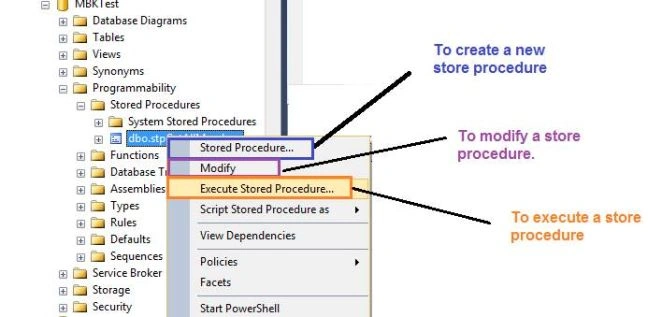
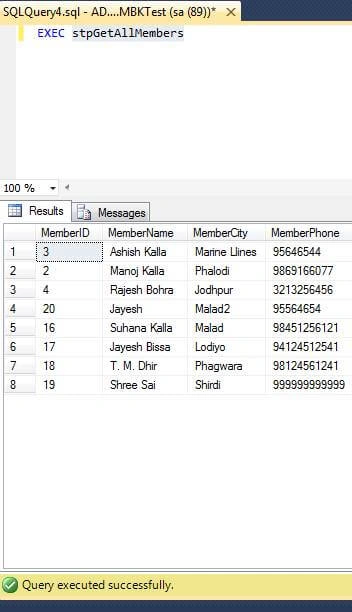
- How to execute stored procedures in SQL Server?
- What are the parameters in stored procedures?
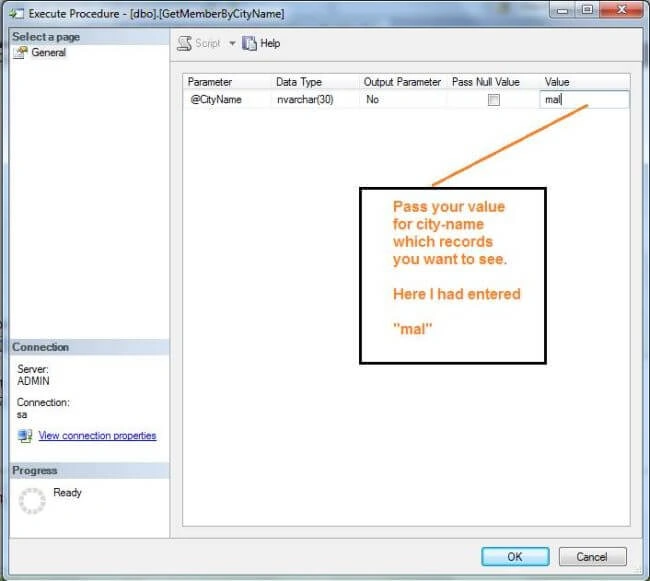
- How to create parameters in a SELECT query stored procedure which returns records as per the parameter passed?
- How to create an INSERT query-based stored procedure?
- How to create an UPDATE query-based stored procedure?
- How to create a stored procedure to delete records using the DELETE query?
What is a Stored Procedure?
A SQL stored procedure (SP) is a collection of SQL statements and SQL command logic, which is compiled and stored in the database. Stored procedures in SQL allow us to create SQL queries to be stored and executed on the server. Stored procedures can also be cached and reused. The main purpose of stored procedures is to hide direct SQL queries from the code and improve the performance of database operations such as select, update, and delete data. Here is a detailed article on Stored Procedures in SQL.
You can create and execute stored procedures using the Object Explorer in SQL Server or using SQL Server Management Studio (SSMS). If you're new to SSMS, try SQL Server Management Studio.
Why do we use SET NOCOUNT ON in a stored procedure?
While we set SET NOCOUNT ON it means there are no messages which show the number of rows affected.
NOCOUNT means do not count that is ON.
Now you will come to know what happened when SET NOCOUNT OFF.
Types of Stored Procedures in SQL Server
There are two types of stored procedures available in SQL Server.
- User-defined stored procedures
- System stored procedures
User-defined stored procedures
User-defined stored procedures are created by database developers or database administrators. These SPs contain one more SQL statements to select, update, or delete records from database tables. User-defined stored procedures can take input parameters and return output parameters. A user-defined stored procedure is a mixture of DDL (Data Definition Language) and DML (Data Manipulation Language ) commands.
User defined SPs are further classified into two types
- T-SQL stored procedures- T-SQL (Transact SQL) SPs receive and return parameters. These SPs process the Insert, Update and Delete queries with or without parameters and return data of rows as output. This is one of the most common ways to write SPs in SQL Server.
- CLR stored procedures- CLR (Common Language Runtime) SPs are written in a CLR-based programming language such as C# or VB.NET and are executed by the .NET Framework.
System stored procedures
System-stored procedures are created and executed by SQL Server for the server's administrative activities. Developers usually don't interfere with system SPs.
Login to SQL Server database
Let's log in to our SQL Server database, so we can achieve the following:
- How to create a SELECT QUERY-based stored procedure which returns all records?
- How to create a PARAMETER-based SELECT QUERY stored procedure which returns records based on parameters?
- How to create an INSERT query-based stored procedure?
- How to create an UPDATE query-based stored procedure?
- How to create a DELETE query-based stored procedure?
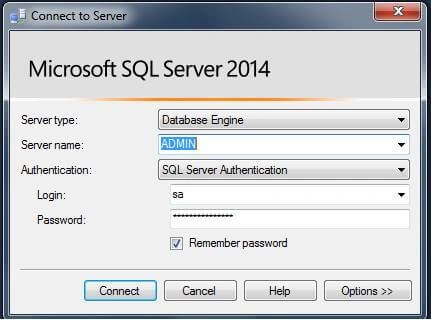
Login in SQL SERVER with your Server Name, Login, and Password.
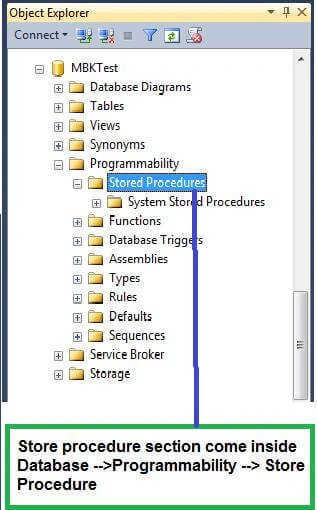
Switch to your database. My database name is MBKTest.
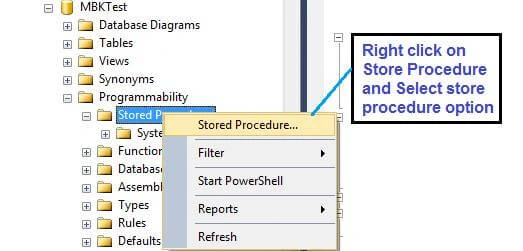
AN Empty stored procedure will be created using the following:
The empty template created by SQL Server for an SP looks like the following. The CREATE PROCEDURE SQL command is used to create a procedure, followed by an SP name and its parameters. The BEGIN and END area is used to define the query for the operation. This is where you will write select, update, insert, or delete queries.
-- ================================================
-- Template generated from Template Explorer using:
-- Create Procedure (New Menu).SQL
--
-- Use the Specify Values for Template Parameters
-- command (Ctrl-Shift-M) to fill in the parameter
-- values below.
--
-- This block of comments will not be included in
-- the definition of the procedure.
-- ================================================
SET ANSI_NULLS ON
GO
SET QUOTED_IDENTIFIER ON
GO
-- =============================================
-- Author:      <Author,,Name>
-- Create date: <Create Date,,>
-- Description: <Description,,>
-- =============================================
CREATE PROCEDURE <Procedure_Name, sysname, ProcedureName>
    -- Add the parameters for the stored procedure here
    <@Param1, sysname, @p1> <Datatype_For_Param1, , int> = <Default_Value_For_Param1, , 0>,
    <@Param2, sysname, @p2> <Datatype_For_Param2, , int> = <Default_Value_For_Param2, , 0>
AS
BEGIN
    -- SET NOCOUNT ON added to prevent extra result sets from
    -- interfering with SELECT statements.
    SET NOCOUNT ON;

    -- Insert statements for procedure here
    SELECT <@Param1, sysname, @p1>, <@Param2, sysname, @p2>
END
GO
How to write comments in SQL SERVER?
You can comment in the SQL server in the following ways,
-- (two hyphens / dash) for a single line of comment.
start with /* ……. end with  */    for multiline comments.
What is the naming convention for stored procedures?
We must follow standard naming conventions which may also depend on your project and coding policies.
For user-defined stored procedure naming conventions, my suggestions are to add one of the following prefixes to your SP names.
- sp
- stp
- stp_
- udstp
- udstp_
Naming conventions are just to identify objects. By adding these prefixes to the name, we can clearly identify that this object is a stored procedure.
Create a database table
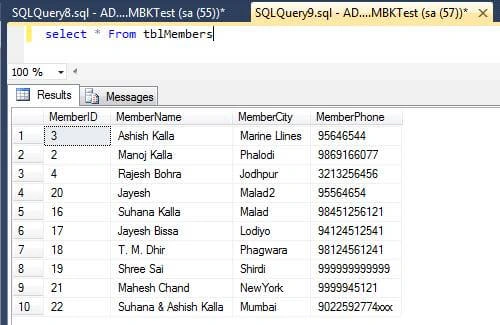
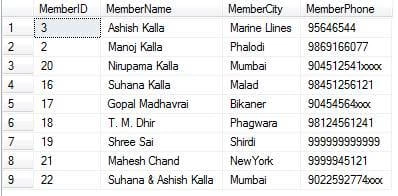
Before we can create and execute any SPs, we need a database table. I create a database table named, “tblMembers” using the following SQL query and execute it on the server. As you can see, my table has 4 columns where the first column is an identity column. Once the table is created, open table in your SSMS and add some data by manually entering data into the table.
USE [MBKTest]
GO

/****** Object:  Table [dbo].[tblMembers]    Script Date: 18-Nov-17,Sat 6:47:55 PM ******/
SET ANSI_NULLS ON
GO

SET QUOTED_IDENTIFIER ON
GO

SET ANSI_PADDING ON
GO

CREATE TABLE [dbo].[tblMembers](
    [MemberID] [int] IDENTITY(1,1) NOT NULL,
    [MemberName] [varchar](50) NULL,
    [MemberCity] [varchar](25) NULL,
    [MemberPhone] [varchar](15) NULL
)

GO

SET ANSI_PADDING OFF
GO
How to create a SELECT stored procedure?
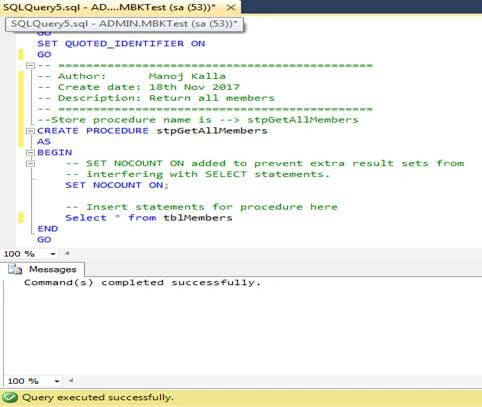
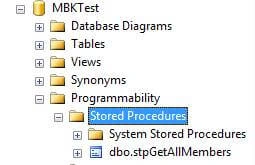
Click on your Database and expand the “Programmability” item and right-click on “Stored Procedures” or press CTRL + N to get a new query window. In the query area between BEGIN and END, type your SELECT statement to select records from the table. See the Select statement in the below code.
SET ANSI_NULLS ON
GO
SET QUOTED_IDENTIFIER ON
GO
-- =============================================
-- Author:      Manoj Kalla
-- Create date: 18th Nov 2017
-- Description: Return all members
-- =============================================
--Store procedure name is --> stpGetAllMembers
CREATE PROCEDURE stpGetAllMembers
AS
BEGIN
    -- SET NOCOUNT ON added to prevent extra result sets from
    -- interfering with SELECT statements.
    SET NOCOUNT ON;

    -- Select statements for procedure here
    Select * from tblMembers
END
GO 

Gyan KumarPosted Jun 19, 2021, 8:46 AM
Really nice explanation thanks!!!
Gyan KumarPosted Jun 19, 2021, 8:46 AM
Good Explanation, thanks!!
-------Posted Oct 24, 2020, 1:33 AM
Great article sir but which situation create store procedure and which situation not create store procedure?
Ashfaque BaigPosted Aug 23, 2019, 1:54 PM
very nice....explained in very detail
Harsh SrivastavaPosted Jun 25, 2019, 6:11 AM
What an amazing tutorial Ty!
Subin ThomasPosted Feb 12, 2019, 12:46 AM
Nice article thank you sir.
Assefa AschalewPosted Dec 1, 2018, 6:30 AM
How to create c++ programming
Sreerag SpPosted Sep 7, 2018, 2:06 AM
Thank you very much sir...
Rajesh KumarPosted Jul 6, 2018, 2:52 AM
Nice article sir
Sumit DeshmukhPosted Nov 25, 2017, 10:29 PM
Really helpful..Thanks for Sharing Sir