

Introduction
A custom template is a great thing if you are creating a website for the client. By using a custom template, you can create a template or webpage once and assign it to all your pages. You can change the layout in your way need to do edit the template.
The custom template is one of the best features of WordPress. The main objective of the custom template is reusability and layout consistency.
What is the custom template?
A custom template allows you to create custom layouts for all of your pages. These custom layouts are called templates.
Custom templates are an easy and useful way to particular dynamic webpages are displayed. Using them to add a large range of functionality to your site. In WordPress, you cannot customize in static web pages so resolve this issue custom template pages is a better option for you.
What is the importance of a custom template?
Once you create a custom template/dynamic page, then there are many benefits like you can use the same layout for newly created pages, also it reduces the time for design new pages again, and also users like Consistent layout of pages, meaning attractive pages so that traffic on a website is also increased.
In the custom template, you can load only js which you need or required so page speed is also good of custom pages which is helpful in search engine optimization.
A custom template/dynamic page is an important benefit of maintaining webpage consistency. A business reproduces and uses multiple custom templates large numbers. Having a ready-made template that you prefer and trust can help streamline the entire process-saving you time and stress.
Benefits of Custom Templates
- Save time and money
- Consistency and clarity
- Customer satisfaction
- Faster Load Times
- Higher Security
- Speed
- Attraction
- More Scalable
- More customizable and easy to update
- Free of bugs
- Comes with more support
There are many more benefits.
So, let’s start with the easy steps on how to create a custom template/dynamic webpages in WordPress. This is very easy steps for creating dynamic webpages and in this article, I will show how to store dynamic webpages data in the table this article is good for WordPress Beginners.
Step 1
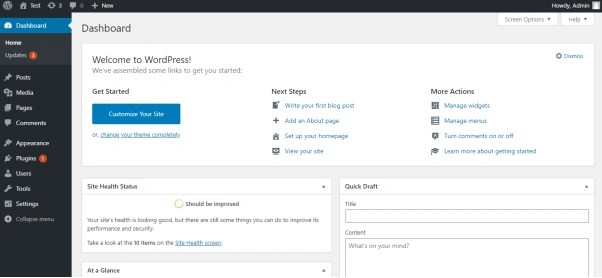
First, you need to login to your WordPress admin. After the login, your admin dashboard looks like the below image.
Step 2
After completing the 1st step successfully -> Afterwards you need to create a dynamic page in your current active theme
Ex. WordPress (Your Project Name)-> wp-content -> themes -> twentytwenty (Your Activated Theme) -> Create file Ex. Custome-page.php and put given below code in this file.
- <?php
- /*
- Template Name: Custom Page Template (Your Template Name)
- */
- get_header();
- // Here is your custom form whatever you want to add field.
- ?><form action="" method="post">
- Name : <input type="text" name="postTitle" value=""><br>
- Title : <input type="text" name="postContent" value="">
- <input type="submit" name="submit" value="submit">
- </form><?php
- get_footer();
- ?>
Step 3
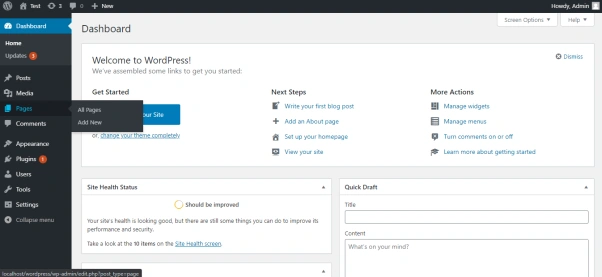
After completing the 2nd step -> Then you need to create a page from the admin dashboard.
Step 4
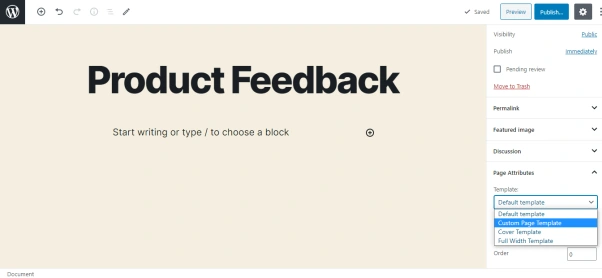
In the 4th step webpage created by you in this, select your template or web page from template dropdown given in the below image.
Step 5
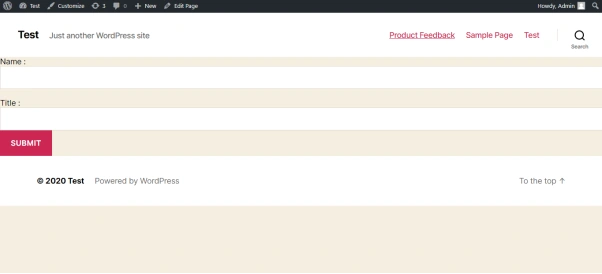
In this step, you just need to publish your page and view page in the front. It looks like the below image.
Step 6
In the last step, I will tell you how to store dynamic webpage data in the database?
Go in your project folder WordPress (Your Project Name) -> wp-content -> themes -> twentytwenty (Your Activated Theme) -> function.php in this file just paste code given below.
- if(isset($_REQUEST['submit'])){
- $post_information = array(
- 'post_title' => $_POST['postTitle'] ,
- 'post_content' => $_POST['postContent'],
- 'post_type' => 'page',
- 'post_status' => 'pending'
- );
- $post_id = wp_insert_post( $post_information );
- if ( $post_id ) {
- wp_redirect( home_url() );// Here give your thank you page url.
- exit;
- }
- }
Now I hope you guys follow the above step and easily create custom template/ dynamic page in WordPress
Summary
In this article, we have learned to create a custom template/dynamic web pages in WordPress.
I hope that you found this tutorial easy to follow and understand.
Jay WankhedePosted Jul 30, 2020, 11:17 PM
Nice article it is very useful to beginner!
Pankajkumar PatelPosted Jul 29, 2020, 7:30 AM
Nice article and easy to understand!