

Introduction
JSON Web Token (JWT) is a compact and secure method for transmitting information between parties as a JSON object. JWTs are widely used for authentication and authorization in modern APIs and web applications.
In this guide, you will learn how to create or encode a JWT using JWT.io (maintained by Auth0) and how to test the generated token using Postman. You will also see a complete workflow example and learn common mistakes to avoid.
Create or Encode Your JWT
You can easily generate a JWT using the online debugger at jwt.io.
Step 1: Open the Website
Visit jwt.io in your browser. The page provides a live JWT encoder and decoder interface.
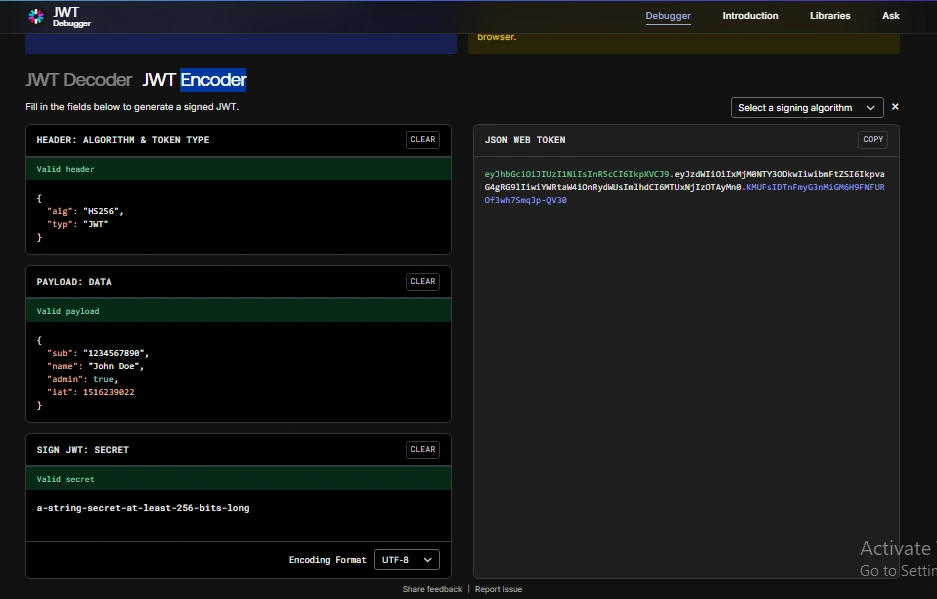
Step 2: Set the Payload
In the Payload section, enter your request data. For example:
{
  "sub": "1234567890",
  "name": "John Doe",
  "admin": true,
  "iat": 1516239022
}
The payload contains claims (data) that you want to securely transmit between the client and server.
Step 3: Enter Secret or Private Key
In the “Verify Signature” section:
Enter your Secret Key if you are using the HS256 algorithm.
Enter your Private Key if you are using RSA-based algorithms like RS256.
The secret or private key must match exactly what your API server uses to validate the token.
Step 4: Copy the Encoded JWT
After entering the payload and secret, the encoded JWT will appear on the right panel. It will look like this:
eyJhbGciOiJIUzI1NiIsInR5cCI6IkpXVCJ9...
A JWT consists of three parts separated by dots:
Header.Payload.Signature
Once copied, your JWT is ready for API testing.
Test the JWT in Postman
You can test the encoded JWT using Postman. Most APIs expect the JWT to be sent in the Authorization header as a Bearer token.
Using Authorization Header (Recommended Method)
Step 1: Open Postman
Launch the Postman application.
Step 2: Create a New Request
Select your HTTP method such as GET, POST, PUT, or DELETE.
Step 3: Configure Authorization
Click the Authorization tab.
Select Type → Bearer Token.
Paste your encoded JWT into the token field.
Postman will automatically add this header:
Authorization: Bearer eyJhbGciOiJIUzI1NiIsInR5cCI6IkpXVCJ9...
Alternative Method: Manually Add Header
Go to the Headers tab and add:
Key: Authorization
Value: Bearer <your_token>
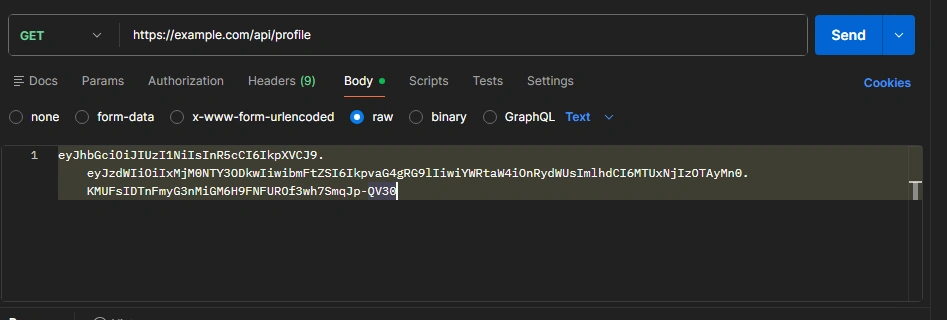
Optional Method: Sending JWT in Body
If your API is designed to accept the token in the body:
Go to Body
Select raw
Choose Text
Paste the encoded JWT
However, most secure APIs use the Authorization header instead of the body.
Example Workflow with a Mock API
Assume your endpoint is:
https://example.com/api/profile
And the JWT you generated is:
eyJhbGciOiJIUzI1NiIsInR5cCI6IkpXVCJ9...
In Postman:
Method: GET
URL: https://example.com/api/profile
Authorization: Bearer Token → Paste JWT
If the token is valid and properly signed, the API might return:
{
  "id": 123,
  "name": "John Doe",
  "email": "[email protected]",
  "role": "Admin",
  "message": "Authentication successful"
}
If the token is invalid, expired, or signed with the wrong key, you may receive:
401 Unauthorized
{
  "error": "Invalid or expired token"
}
Or:
403 Forbidden
{
  "error": "Access denied"
}
How JWT Validation Works on the Server
When you send a JWT to an API:
The server verifies the signature using its configured secret or public key.
It checks whether the algorithm matches (for example, HS256 or RS256).
It validates important claims such as:
exp (expiration time)
iat (issued at)
aud (audience)
iss (issuer)
If all validations pass, the server allows access to the requested resource.
Notes
You can test any JWT you generate on JWT.io in Postman.
If the API backend verifies the signature using a different secret or private key, the token will be rejected.
You must ensure that the algorithm, secret or private key, and claim structure match exactly what the server expects.
Conclusion
Using JWT.io to generate a token and testing it in Postman is a simple and effective way to validate your authentication workflow. By ensuring that the secret key, algorithm, and claims are correctly configured, you can successfully authenticate API requests and troubleshoot issues efficiently.
Join the conversation! Your thoughts help the community grow.