

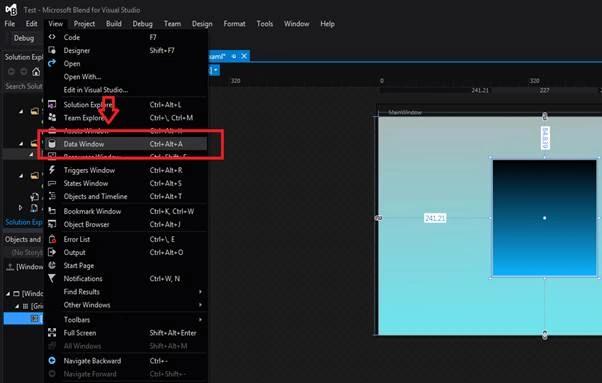
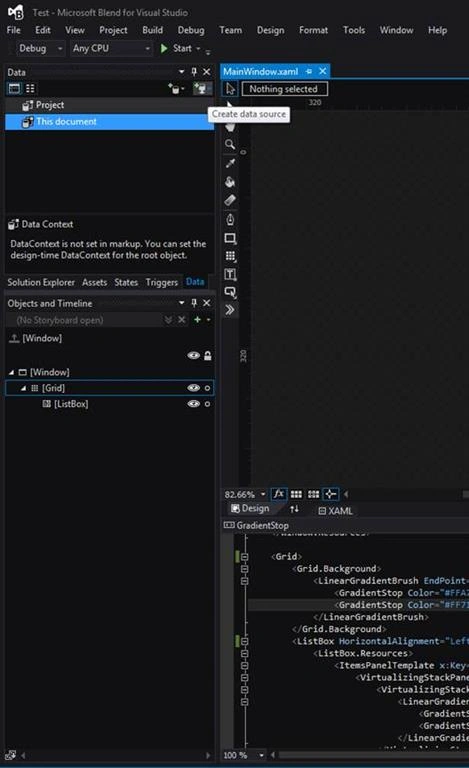
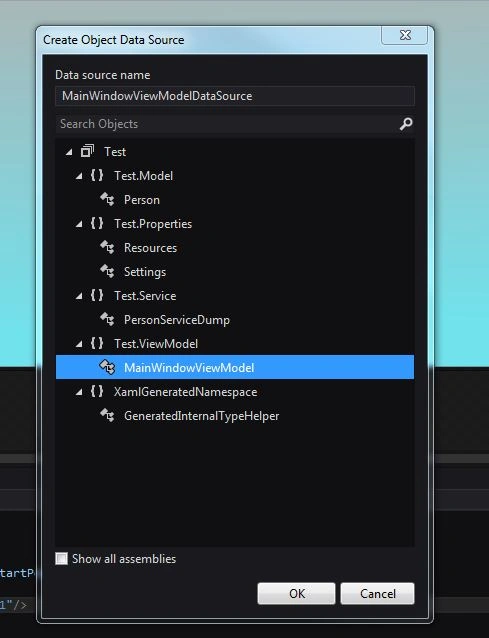
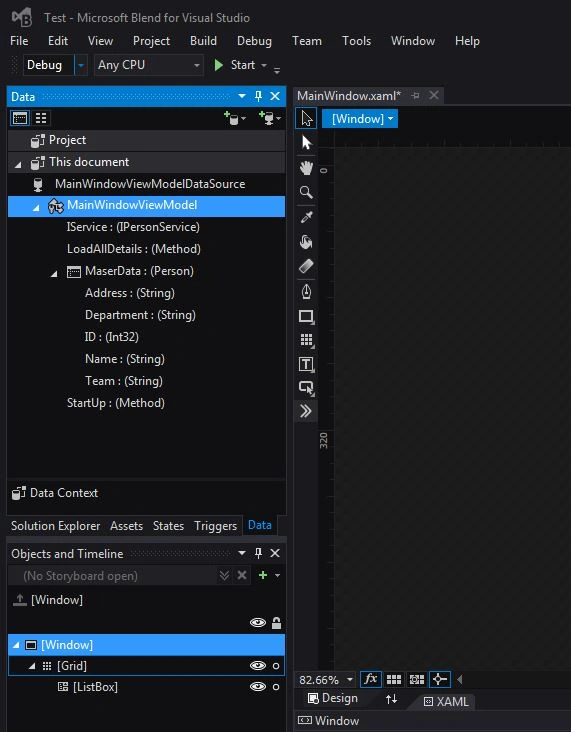
In this article, you will learn how to create object data source for UI elements, using Visual Studio and Microsoft Blend.
Before starting the tutorial, I assume that you are familiar with .NET 4.5 and Microsoft Blend for Visual Studio.
I have followed four principles along with MVVM pattern, in this article.
- Simplicity
- Blendability
- Designability
- Testability
Step 1
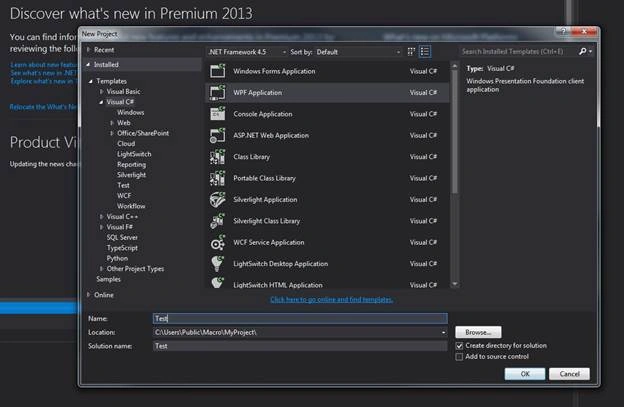
- Create a new WPF Application project. Here, I have created a project named as "Test".
Step 2
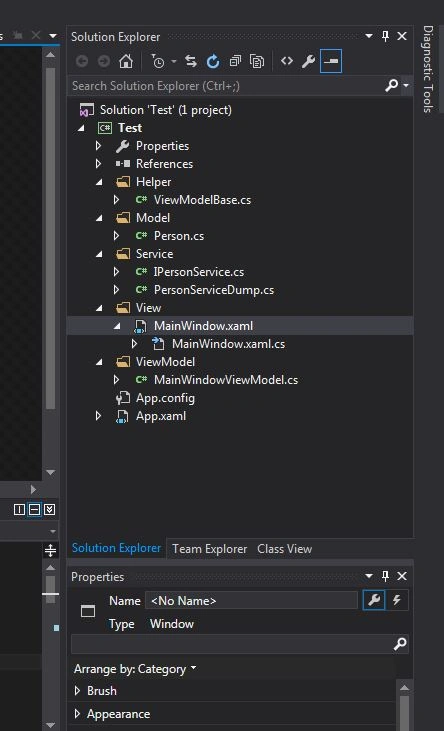
- Add a new folder to the project and rename it as "Model".
- Add a new class in "Model" folder, and rename it as "Person".
- Now, add the following code in "Person" class.
- using System;
- using System.Collections.Generic;
- using System.Linq;
- using System.Text;
- using System.Threading.Tasks;
- namespace Test.Model {
- publicclass Person {
- private int _ID;
- publicint ID {
- get {
- return _ID;
- }
- set {
- _ID = value;
- }
- }
- private string _Name;
- publicstring Name {
- get {
- return _Name;
- }
- set {
- _Name = value;
- }
- }
- private string _Address;
- publicstring Address {
- get {
- return _Address;
- }
- set {
- _Address = value;
- }
- }
- }
- }
- Again, add a new folder in the project, named as "Helper".
- Add a new class, "ViewModelBase" in Helper folder.
- Now, add the following code in ViewModelBase class.
-
- usingSystem;
- usingSystem.Collections.Generic;
- usingSystem.Linq;
- usingSystem.Text;
- usingSystem.Threading.Tasks;
- usingSystem.ComponentModel;
- usingSystem.Runtime.CompilerServices;
- namespaceTest.Helper {
- public abstract class ViewModelBase: INotifyPropertyChanged {
- public eventPropertyChangedEventHandler PropertyChanged;
- protected voidIPropertyChanged(string PropertyName) {
- PropertyChangedEventHandlerHandler = this.PropertyChanged;
- if (Handler != null) PropertyChanged(this, newPropertyChangedEventArgs(PropertyName));
- }
- protected boolSetProperty < T > (ref T Storage, T Value, [CallerMemberName] stringPropertyName = null) {
- if (EqualityComparer < T > .Default.Equals(Storage, Value)) return false;
- Storage = Value;
- IPropertyChanged(PropertyName);
- return true;
- }
- }
- }
With the release of Microsoft Visual Studio 2012 and .NET 4.5, the company has introduced some lovely features; for example, [CallerMemberName] makes its entrance.
With this new feature, you can write INotifyPropertyChanged (Interface) code without having to worry about renaming the properties.
- Add a new folder, "Service", in the project.
- Add new Interface named as "IPersonService" in Service folder.
- Add the following code in IPersonService.
- using System;
- usingSystem.Collections.Generic;
- using System.Linq;
- using System.Text;
- usingSystem.Threading.Tasks;
- namespace Test.Service {
- public interface IPersonService {
- IEnumerable < Model.Person > GetAllDetails();
- }
- }
- Add a new class in Service folder, named "PersonServiceDump".
- Add the following code in PersonServiceDump class.
- usingSystem;
- usingSystem.Collections.Generic;
- usingSystem.Linq;
- usingSystem.Text;
- usingSystem.Threading.Tasks;
- namespaceTest.Service {
- public class PersonServiceDump: IPersonService {
- public IEnumerable < Model.Person > GetAllDetails() {
- var List = new List < Model.Person > ();
- List.Add(new Model.Person() {
- ID = 101,
- Name = "Karthik",
- Address = "Pune",
- Department = "Tech",
- Team = "Dev"
- });
- return List;
- }
- }
- }
- Add another folder, "ViewModel", in the Test project, along with a new class "MainWindowViewMode".
- Add the following code in MainWindowViewModel.
- usingSystem;
- usingSystem.Collections.Generic;
- usingSystem.Linq;
- usingSystem.Text;
- usingSystem.Threading.Tasks;
- usingSystem.Collections.ObjectModel;
- namespaceTest.ViewModel {
- public class MainWindowViewModel: Helper.ViewModelBase {
- public MainWindowViewModel() {
- StartUp();
- }
- public void StartUp() {
- LoadAllDetails();
- }
- public void LoadAllDetails() {
- var Data = IService.GetAllDetails();
- MaserData = new ObservableCollection < Model.Person > (Data);
- }
- private ObservableCollection < Model.Person > _MaserData;
- public ObservableCollection < Model.Person > MaserData {
- get {
- return _MaserData;
- }
- set {
- SetProperty(ref _MaserData, value);
- }
- }
- private Service.IPersonService_IService;
- public Service.IPersonServiceIService {
- get {
- if (_IService == null) {
- _IService = new Service.PersonServiceDump();
- }
- return _IService;
- }
- set {
- _IService = value;
- }
- }
- }
- }
- Add a new folder named as "View", move the MainWindow.Xaml file in View folder, and change the namespace accordingly.
- Save all the changes.
Vignesh ManiPosted Oct 13, 2016, 10:44 AM
Nice oNE