

Introduction
The PRIMEREACT UI framework has Over 80 React UI Components with top-notch quality to help you implement all your UI requirements in style.
Splitter is utilized to separate and resize panels.Splitters can be configured as stateful so that when the user visits the page again, the adjusted sizes can be restored
Preconditions
- Javascript
- Basic knowledge of React js
- Node.js
- V.S. Code,Visual Studi
We cover the below things,
- Create React application
- Installation of Primeface
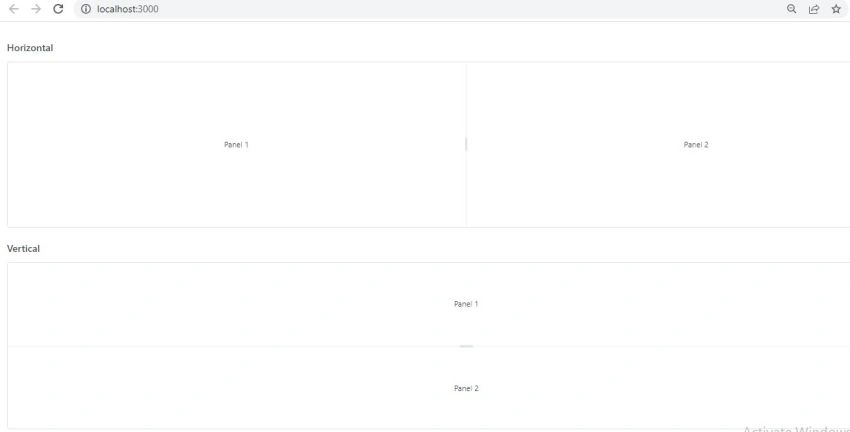
- How to Apply Splitter of Primeface in React js
Step 1
npx create-react-app prime-app
cd prime-app
npm start
Step 2
Run the below command for installing PrimeReact
npm install primereact primeicons
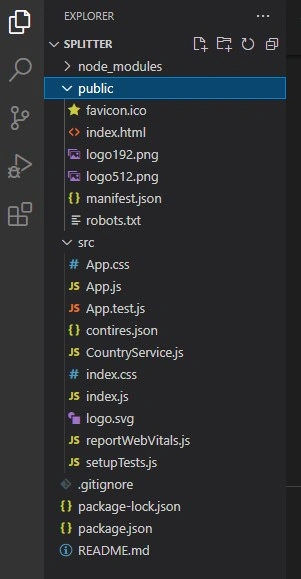
Create files according to the below image
Step 3
import 'primeicons/primeicons.css';
import 'primereact/resources/themes/lara-light-indigo/theme.css';
import 'primereact/resources/primereact.css';
import React from 'react';
import { Splitter, SplitterPanel } from 'primereact/splitter';

function App() {

    return (
        <div className="App">
         <div className="card">
                    <h5>Horizontal</h5>
                    <Splitter style={{height: '300px'}} className="mb-5">
                        <SplitterPanel className="flex align-items-center justify-content-center">
                            Panel 1
                        </SplitterPanel>
                        <SplitterPanel className="flex align-items-center justify-content-center">
                            Panel 2
                        </SplitterPanel>
                    </Splitter>
                </div>

                <div className="card">
                    <h5>Vertical</h5>
                    <Splitter style={{height: '300px'}} layout="vertical">
                        <SplitterPanel className="flex align-items-center justify-content-center">
                            Panel 1
                        </SplitterPanel>
                        <SplitterPanel className="flex align-items-center justify-content-center">
                            Panel 2
                        </SplitterPanel>
                    </Splitter>
                </div>

                <div className="card">
                    <h5>Nested</h5>
                    <Splitter style={{height: '300px'}}>
                        <SplitterPanel className="flex align-items-center justify-content-center" size={20} minSize={10}>
                            Panel 1
                        </SplitterPanel>
                        <SplitterPanel size={80}>
                            <Splitter layout="vertical">
                                <SplitterPanel className="flex align-items-center justify-content-center" size={15}>
                                    Panel 2
                                </SplitterPanel>
                                <SplitterPanel size={85}>
                                    <Splitter>
                                        <SplitterPanel className="flex align-items-center justify-content-center" size={20}>
                                            Panel 3
                                        </SplitterPanel>
                                        <SplitterPanel className="flex align-items-center justify-content-center" size={80}>
                                            Panel 4
                                        </SplitterPanel>
                                    </Splitter>
                                </SplitterPanel>
                            </Splitter>
                        </SplitterPanel>
                    </Splitter>
                </div>
        </div>
      );
}
export default App;
Step 4
Add the below code in index.html
Join the conversation! Your thoughts help the community grow.