

Introduction
Android is one of the most popular operating systems for mobile. In this article, I will show you how to create a Simple EMI Calculator Android application using Android Studio.
Requirements
- Android Studio version 2.3.3
- Little bit XML and JAVA knowledge.
- Android Emulator (or) Android mobile
- Download link (Android Studio)
Steps to be followed
These steps are required to create a simple EMI Calculator Android application using Android Studio and I have included the source code below.
Step 1
Open Android Studio and Start a New Android Studio Project.
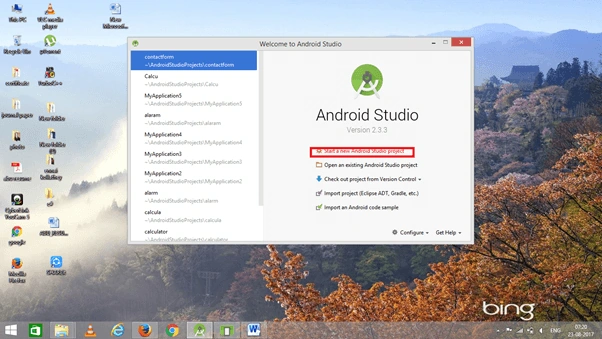
Step 2
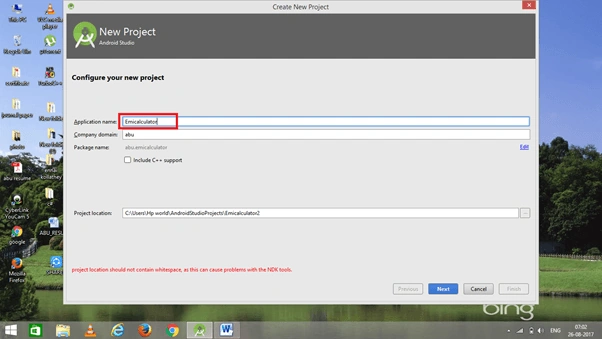
You can choose your application name and choose where your project is stored on the location. If you wish to use C++ for coding the project, mark the "Include C++ support", and click the "Next" button.
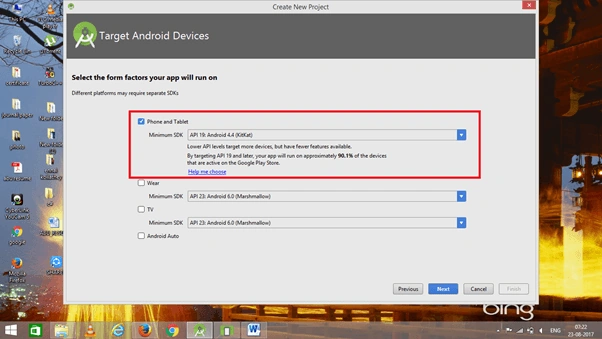
 Now, select the version of Android and select the target Android devices.
Step 3
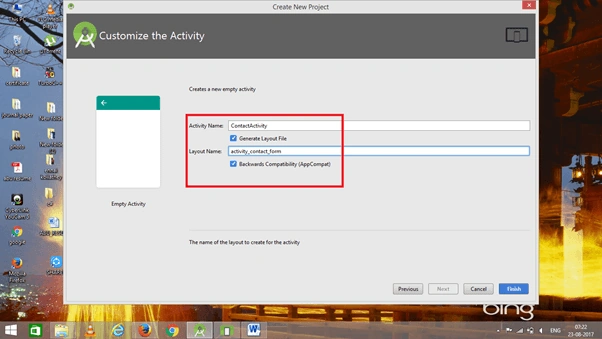
Now, add the activity and click the "Next" button.
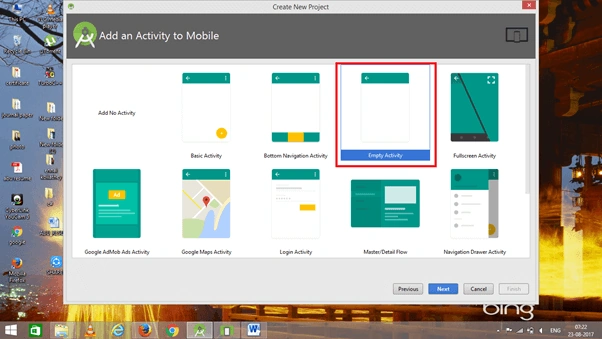 Add Activity name and click "Finish".
Formula
Here’s the formula to calculate EMI,
 where,
- E is EMI
- P is Principal Loan Amount
- r is the rate of interest calculated on a monthly basis.
- n is loan term/tenure/duration in number of months
Step 4
Go to activity_main.xml. This XML file contains the designing code for an Android app in the activity_main.xml,
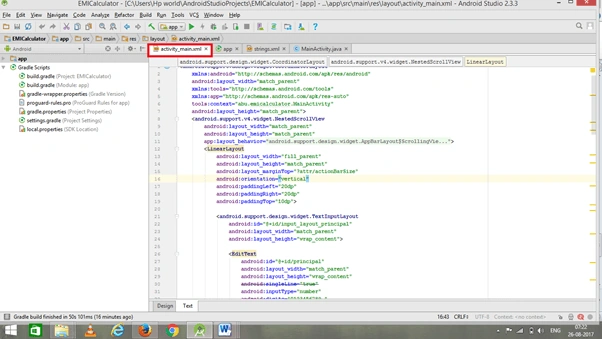 The XML code is given below.
- <android.support.design.widget.CoordinatorLayout
- xmlns:android="http://schemas.android.com/apk/res/android"
- android:layout_width="match_parent"
- xmlns:tools="http://schemas.android.com/tools"
- xmlns:app="http://schemas.android.com/apk/res-auto"
- tools:context="abu.emicalculator.MainActivity"
- android:layout_height="match_parent">
- <android.support.v4.widget.NestedScrollView
- android:layout_width="match_parent"
- android:layout_height="match_parent"
- app:layout_behavior="@string/appbar_scrolling_view_behavior">
- <LinearLayout
- android:layout_width="fill_parent"
- android:layout_height="match_parent"
- android:layout_marginTop="?attr/actionBarSize"
- android:orientation="vertical"
- android:paddingLeft="20dp"
- android:paddingRight="20dp"
- android:paddingTop="10dp">
- <android.support.design.widget.TextInputLayout
- android:id="@+id/input_layout_principal"
- android:layout_width="match_parent"
- android:layout_height="wrap_content">
- <EditText
- android:id="@+id/principal"
- android:layout_width="match_parent"
- android:layout_height="wrap_content"
- android:singleLine="true"
- android:inputType="number"
- android:digits="0123456789."
- android:hint="@string/hint_principal" />
- </android.support.design.widget.TextInputLayout>
- <android.support.design.widget.TextInputLayout
- android:id="@+id/input_layout_interest"
- android:layout_width="match_parent"
- android:layout_height="wrap_content">
- <EditText
- android:id="@+id/interest"
- android:layout_width="match_parent"
- android:layout_height="wrap_content"
- android:singleLine="true"
- android:inputType="number"
- android:digits="0123456789."
- android:hint="@string/hint_interest" />
- </android.support.design.widget.TextInputLayout>
- <android.support.design.widget.TextInputLayout
- android:id="@+id/input_layout_tenure"
- android:layout_width="match_parent"
- android:layout_height="wrap_content">
- <EditText
- android:id="@+id/years"
- android:layout_width="match_parent"
- android:layout_height="wrap_content"
- android:inputType="number"
- android:digits="0123456789."
- android:hint="@string/hint_years" />
- </android.support.design.widget.TextInputLayout>
- <Button android:id="@+id/btn_calculate2"
- android:layout_width="fill_parent"
- android:layout_height="wrap_content"
- android:text="Calculate"
- android:background="@color/colorPrimary"
- android:layout_marginTop="40dp"
- android:textColor="@android:color/white"/>
- <android.support.design.widget.TextInputLayout
- android:id="@+id/input_layout_emi"
- android:layout_width="match_parent"
- android:layout_height="wrap_content"
- android:layout_marginTop="40dp">
- <EditText
- android:id="@+id/emi"
- android:layout_width="match_parent"
- android:layout_height="wrap_content"
- android:maxEms="0"
- android:inputType="number"
- android:hint="@string/hint_emi" />
- </android.support.design.widget.TextInputLayout>
- <android.support.design.widget.TextInputLayout
- android:id="@+id/input_layout_total_Interest"
- android:layout_width="match_parent"
- android:layout_height="wrap_content"
- android:layout_marginTop="10dp">
- <EditText
- android:id="@+id/interest_total"
- android:layout_width="match_parent"
- android:layout_height="wrap_content"
- android:inputType="number"
- android:hint="@string/hint_interest_total" />
- </android.support.design.widget.TextInputLayout>
- </LinearLayout>
- </android.support.v4.widget.NestedScrollView>
- </android.support.design.widget.CoordinatorLayout>
shrishak shresthaPosted Oct 19, 2019, 11:27 AM
Can you upload the project file.
Abubackkar ShithikPosted Jun 27, 2019, 11:29 PM
Its working
Redha 1830Posted Jun 23, 2019, 7:47 PM
What wrong with this code?
Prabakaran MPosted Aug 29, 2017, 5:07 AM
Nice article.......thanks for sharing