

Introduction
In this article, I am going to explain to you how to find the second highest salary in various ways. This is one of the most common questions asked in an SQL interview.
Below are the several ways of finding the Nth highest salary:
- How to find the second highest salary in SQL Server using a Sub-Query
- How to find the second highest salary in SQL Server using a CTE
- How to find the 3rd, 5th highest salary
Here we will be using SQL Server 2017, or you can use SQL Server 2008 or above.
Read my previous Joins in SQL Server 2017 part of this article using the below links before reading this article:
- Joins In SQL Server 2017
- Self Join In SQL Server 2017
- Advanced Joins In SQL Server 2017
- Joining Three Or More Tables In SQL Server 2017
- Difference Between Union & Union All In SQL Server 2017
- Find The Nth Highest Salary In SQL Server 2017
- Difference Between Inner Join And Left Join In SQL Server
- Difference Between Inner Join And Right Join In SQL Server
- How To Find The Highest Salary In SQL Server 2017
Prerequisites
SQL Server 2017 or you can use SQL server 2008 or above version.
First, we will create a Database and a table.
Creating a Database and One Table
Step 1 - Create a Database
Open your SQL Server and use the following script to create the “chittadb” Database.
- Create database chittadb
Now, select the script query then press F5 or click on the Execute button to execute the above script.
You should see a message, “Command(s) completed successfully.” This means your new database has been created.
Step 2 - Create a table
Open your SQL Server and use the following script to create a table “tbl_Employees”.
- Create table tbl_Employees
- (
- Id int primary key not null identity(1,1),
- FirstName varchar(50),
- LastName varchar(20),
- Location varchar(20),
- Gender varchar(50),
- Salary int
- )
Execute the above query to create “tbl_Employees “.
You should see a message, “Command(s) completed successfully.”
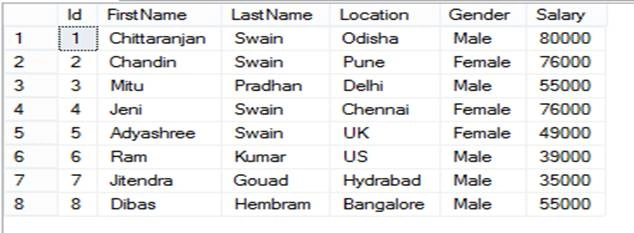
Now, the data has been inserted into the table.
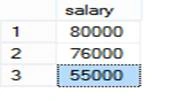
- Insert into tbl_Employees values ('Chittaranjan', 'Swain','Odisha', 'Male', 80000)
- Insert into tbl_Employees values ('Chandin', 'Swain', 'Pune','Female', 76000)
- Insert into tbl_Employees values ('Mitu', 'Pradhan','Delhi', 'Male', 55000)
- Insert into tbl_Employees values ('Jeni', 'Swain','Chennai', 'Female', 76000)
- Insert into tbl_Employees values ('Adyashree', 'Swain','UK', 'Female', 49000)
- Insert into tbl_Employees values ('Ram', 'Kumar','US', 'Male', 39000)
- Insert into tbl_Employees values ('Jitendra', 'Gouad','Hydrabad', 'Male', 35000)
- Insert into tbl_Employees values ('Dibas', 'Hembram','Bangalore', 'Male', 55000)

Rajan KumarPosted Aug 8, 2022, 12:25 PM
Best example
sachin gaikwadPosted Sep 18, 2021, 5:05 AM
Nice explain the query
shubhangi kumarPosted Jul 26, 2021, 6:20 PM
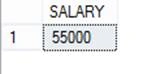
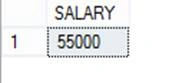
I think below would be the right ans. Correct me if I am wrong - SELECT TOP 1 SALARY FROM ( SELECT DISTINCT TOP 3 SALARY FROM tbl_Employees ORDER BY SALARY Asc ) RESULT ORDER BY SALARY