

Introduction
This article is about how to generate or find and where to find or how to know the correct Database Connection String for your application. Now you all might think, what will be the big deal about knowing what the actual Connection String is? Most of the people will do a web search and copy and paste into the project, there will be a 50-50 chance of successful working of the Connection String. This article will help and show a simple way to generate or find the correct Connection String that will run without an error for the project. Also, I will list a couple of ways to find the correct Connection String.
Getting Started
Let's say, you are looking for a job change and got shortlisted, during the technical round the company asked you to create an application that does simple insertions into a Database table. You are provided with Visual Studio and an SQL Client. If it's your lucky day then the Connection String you used will work for you like a charm. But, if that doesn't work what will you do, how will I find the correct Connection String?
So how will you find the correct Connection String? It's simple, a couple of ways there. Check below.
Step 1. Use the Connect to Database method from the Tools Menu.
Open Visual Studio, create a Web Site, and click on Tools --> Connect to Database option. Add a new data connection from
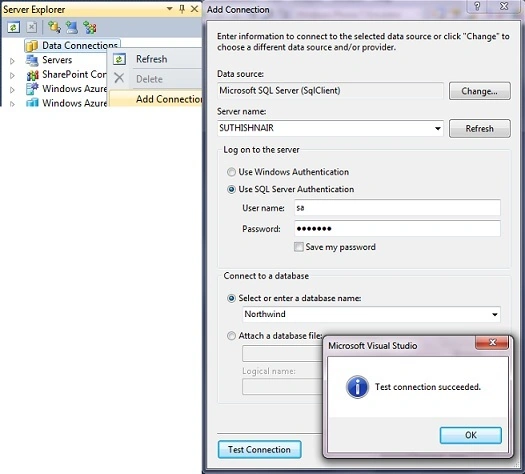
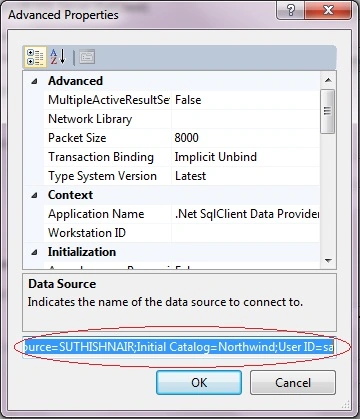
If the connection is successful then click on Advanced; that will open the properties window. Below the Data Source, you can find the actual Connection String. So your Connection String got generated, it simple huh?
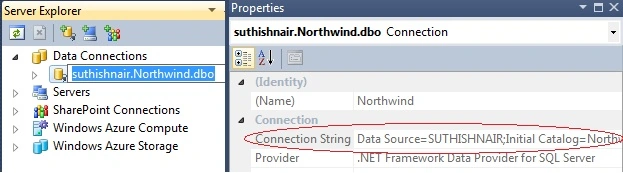
Another way is to right-click on the newly created connection and select properties. The Connection String property will show the actual value.
Step 2. Using a web control (let's try with or use DropDownList)
Drag and drop a DropDownList control to your form. Click on Choose Data Source from the task list; this will open the Data Source Configuration Wizard.
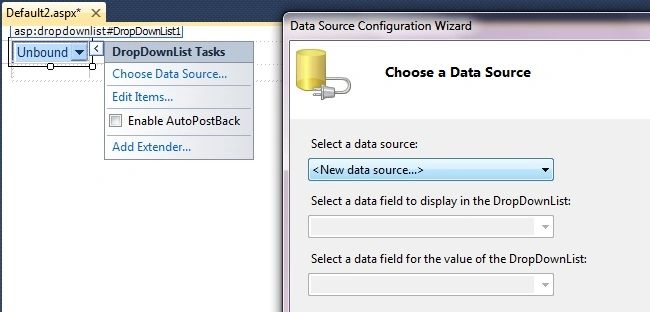
Select a New data source from the dropdown, choose a Data Source Type (example: SQL Database), and click Next.
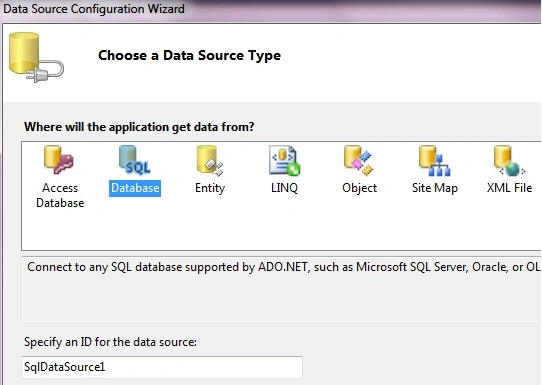
From the Choose Your Data Connection window you can create a new connection (refer to above point 1) or select an existing one.
The following Connection String area will show the actual value.
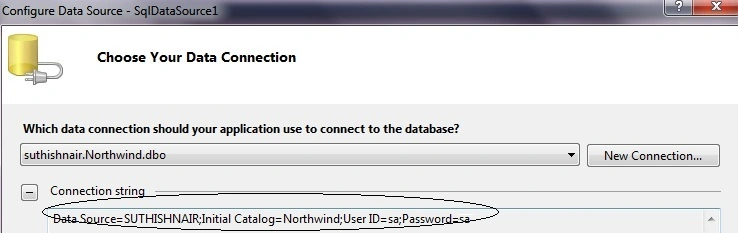
That's it. You can even test the database connection with the preceding process without writing a single line of code.
Conclusion
I tried to show different ways to generate the correct Connection String using Visual Studio.
Hope this article helped you. If you know any other way, please free to post below.
Please post your comments and rate the article. Also, post your questions in our Forum section.
Thank You!
Phil GraysonPosted Sep 26, 2020, 3:32 PM
We've spent ages on a free tool for .NET and JDBC which hopefully helps. https://aireforge.com/tools/sql-server-connection-string-generator
Saka AladePosted Jul 4, 2020, 12:51 PM
My dataSource is not working in VB.NET. It is displaying this error. The Microsoft.VisualStudio.Data.Interop.IVsDataProviderManager service could not be found.
マーク ブライオネPosted Jun 23, 2018, 6:32 AM
Hi Suthish Nair, I have problem with my codes it cant go through in my database Imports System.Data.OleDb Public Class PatientInformation Dim provider As String Dim dataFile As String Dim connString As String Private Sub Label13_Click(ByVal sender As System.Object, ByVal e As System.EventArgs) Handles Label13.Click End Sub Private Sub Button3_Click(ByVal sender As System.Object, ByVal e As System.EventArgs) Handles Button3.Click End Sub Private Sub Button4_Click(ByVal sender As System.Object, ByVal e As System.EventArgs) Handles Button4.Click Me.TextBox2.Enabled = True Me.TextBox3.Enabled = True Me.TextBox4.Enabled = True Me.TextBox5.Enabled = True Me.TextBox6.Enabled = True Me.TextBox7.Enabled = True Me.TextBox8.Enabled = True Me.TextBox9.Enabled = True Me.TextBox10.Enabled = True Me.TextBox11.Enabled = True Me.TextBox12.Enabled = True Me.TextBox13.Enabled = True Me.TextBox14.Enabled = True Me.Button7.Visible = True End Sub Private Sub PatientInformation_Load(ByVal sender As System.Object, ByVal e As System.EventArgs) Handles MyBase.Load End Sub Private Sub Button1_Click(ByVal sender As System.Object, ByVal e As System.EventArgs) Handles Button1.Click End Sub Private Sub Button5_Click(ByVal sender As System.Object, ByVal e As System.EventArgs) Handles Button5.Click Me.TextBox1.Text = "" Me.TextBox2.Text = "" Me.TextBox3.Text = "" Me.TextBox4.Text = "" Me.TextBox5.Text = "" Me.TextBox6.Text = "" Me.TextBox7.Text = "" Me.TextBox8.Text = "" Me.TextBox9.Text = "" Me.TextBox10.Text = "" Me.TextBox11.Text = "" Me.TextBox12.Text = "" Me.TextBox13.Text = "" Me.TextBox14.Text = "" End Sub Private Sub Button6_Click(ByVal sender As System.Object, ByVal e As System.EventArgs) Handles Button6.Click Me.TextBox2.Enabled = True Me.TextBox3.Enabled = True Me.TextBox4.Enabled = True Me.TextBox5.Enabled = True Me.TextBox6.Enabled = True Me.TextBox7.Enabled = True Me.TextBox8.Enabled = True Me.TextBox9.Enabled = True Me.TextBox10.Enabled = True Me.TextBox11.Enabled = True Me.TextBox12.Enabled = True Me.TextBox13.Enabled = True Me.TextBox14.Enabled = True Me.Button6.Visible = True End Sub Private Sub Button7_Click(ByVal sender As System.Object, ByVal e As System.EventArgs) Handles Button7.Click End Sub Private Sub Button8_Click(ByVal sender As System.Object, ByVal e As System.EventArgs) Handles Button8.Click provider = "Provider=Microsoft.ACE.OLEDB.12.0;Data Source=" dataFile = "C:\Users\JJASGH2\Desktop\PROGRAM\ERDatabase1.accdb" connString = provider & dataFile Dim myConnection As OleDbConnection = New OleDbConnection myConnection.ConnectionString = connString myConnection.Open() myConnection.Close() Dim str As String str = "INSERT INTO tblPatientInformation(HOSPITALNO, FIRSTNAME, MIDDLENAME, LASTNAME, ADDRESS, AGE, CONTACTPERSON, CONTACTNO, [DATE], ADMITTINGTIMEIN, TIMETRIAGE, TOTALHOURS, TIMEOFDISCHARGE, [TOTAL TIME IN]) VALUES(?,?,?,?,?)" Dim cmd As OleDbCommand = New OleDbCommand(str, myConnection) cmd.Parameters.Add(New OleDbParameter("HOSPITALNO", CType(TextBox1.Text, String))) cmd.Parameters.Add(New OleDbParameter("FIRSTNAME", CType(TextBox2.Text, String))) cmd.Parameters.Add(New OleDbParameter("MIDDLENAME", CType(TextBox3.Text, String))) cmd.Parameters.Add(New OleDbParameter("LASTNAME", CType(TextBox4.Text, String))) cmd.Parameters.Add(New OleDbParameter("ADDRESS", CType(TextBox5.Text, String))) cmd.Parameters.Add(New OleDbParameter("AGE", CType(TextBox6.Text, String))) cmd.Parameters.Add(New OleDbParameter("CONTACTPERSON", CType(TextBox7.Text, String))) cmd.Parameters.Add(New OleDbParameter("CONTACTNO", CType(TextBox8.Text, String))) cmd.Parameters.Add(New OleDbParameter("DATE", CType(TextBox9.Text, String))) cmd.Parameters.Add(New OleDbParameter("ADMITTINGTIME IN", CType(TextBox10.Text, String))) cmd.Parameters.Add(New OleDbParameter("TIME TRIAGE", CType(TextBox11.Text, String))) cmd.Parameters.Add(New OleDbParameter("TOTAL HOURS", CType(TextBox12.Text, String))) cmd.Parameters.Add(New OleDbParameter("TIME DISCHARGE", CType(TextBox13.Text, String))) cmd.Parameters.Add(New OleDbParameter("TOTAL TIME IN", CType(TextBox14.Text, String))) Try cmd.ExecuteNonQuery() cmd.Dispose() myConnection.Close() TextBox1.Clear() TextBox2.Clear() TextBox3.Clear() TextBox4.Clear() TextBox5.Clear() TextBox6.Clear() TextBox7.Clear() TextBox8.Clear() TextBox9.Clear() TextBox10.Clear() TextBox11.Clear() TextBox12.Clear() TextBox13.Clear() TextBox14.Clear() Catch ex As Exception MsgBox(ex.InnerException) End Try End Sub End Class
KRISHNA KANTPosted Oct 18, 2011, 4:20 PM
NICE QOUTES
Mohammad Ajmal AmirzadPosted Jul 30, 2011, 6:29 PM
Even i am doing the same since the beginning of my programming career. I am already familiar with it. But its good to provide such easiness for programmer.
James CrowleyeditedPosted Mar 22, 2011, 5:26 PMEdited Mar 22, 2011, 5:27 PM
There's a simple online tool for generating sql connection strings on devfusion. http://www.developerfusion.com/tools/sql-connection-string/ It only works for SQL Server/Express right now but makes it nice and simple.
Jaganathan BantheswaranPosted Feb 16, 2011, 12:13 PM
Thanks for giving an another way to get the connection string.
Blocked AccountPosted Feb 9, 2011, 11:28 PM
Good work, Keep it up.
Sam HobbseditedPosted Feb 8, 2011, 2:50 PMEdited Feb 8, 2011, 2:51 PM
In the past, I was able to use the Data Sources window to create a data source and I canceled before it got to the end. I thought that I was able to create a data source setting that way but now I don't see how I did that, so maybe it only works if the data source dialog completes and the complete source code for the data source is generated. Another possibility is to use the program that is the sample code in my "Using Dynamic Database Connections" article at: http://www.c-sharpcorner.com/UploadFile/SamTomato/3769/Default.aspx?ArticleID=e7fbbd8e-051e-445b-bdbf-de3a8d49196e
knightsPosted Feb 8, 2011, 10:20 AM
Its good and would like to mention the following link by Microsoft.It guides to create connection string in a more generic way, incase if multiple server connections are required which are available on internet and intranet.Thanks https://blogs.msdn.com/b/sqlforum/archive/2010/12/20/faq-how-do-i-find-the-correct-quot-server-quot-or-quot-data-source-quot-value-for-an-sql-server-instance-in-a-connection-string.aspx