

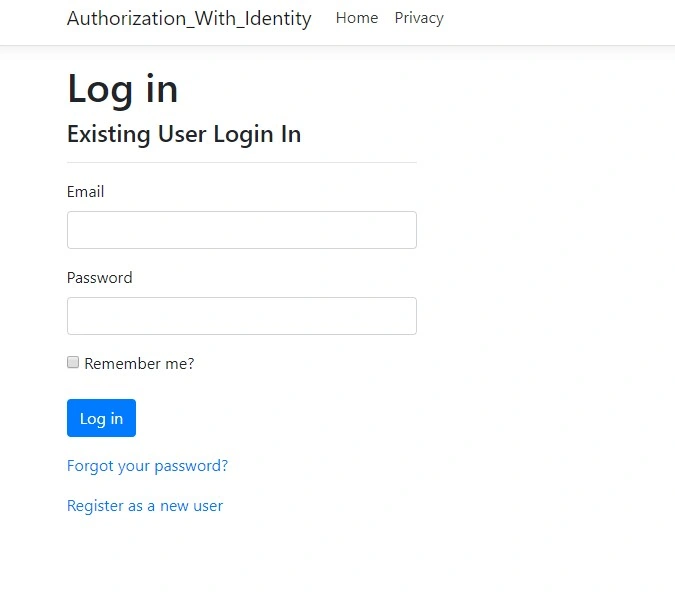
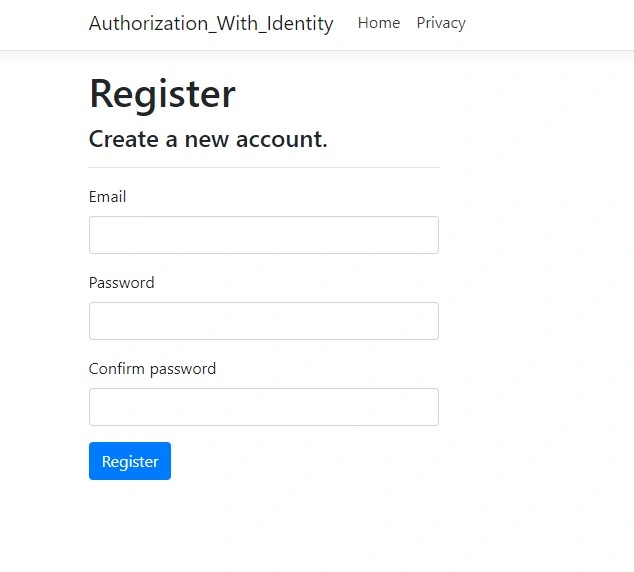
In the recent new releases of the .NET Framework, Microsoft provides a new authentication process or mechanism called ASP.NET Core Identity. ASP.NET Core Identity is a membership system that provides login functionality including user registration in any ASP.NET Core applications. This new authentication system is intended to replace the existing membership system of classic ASP.NET. This new authentication system is based on the OWIN (Open Web Interface for . NET) library. In this article, we will discuss the below topics
- Overview of ASP.NET Identity
- Benefits of ASP.NET Core Identity
- Limitations of ASP.NET Identity
- How to create an application using Identity Authentication in ASP.NET Core
OVERVIEW OF ASP.NET IDENTITY
In ASP.NET, developers normally use Forms Authentication or Windows Authentication along with Membership, Roles, and Profile features to maintain the security of their web application. But as the years passed, these techniques became inefficient to deal with the new changing requirements related to web application security. Like today, most websites provide us login authentication along with social site authentication like Facebook, Google, etc. Also, some applications or websites provide a custom authentication mechanism like OAuth-based authentication. ASP.NET membership techniques do not have any process to deal with this type of authentication requirement. Besides this, there are also some other disadvantages of ASP.NET Membership techniques like rigid database structure, and complex object models.
So, to overcome this situation, Microsoft introduced a new authentication technique called ASP.NET Identity. This authentication technique is based on the OWIN (Open Web Interface for . Net) Library. In the ASP.NET Identity system, there is a total of six important parts available as related to the local user accounts. They are –
- User
- Role
- User Manager
- Role Manager
- Authentication Manager
- Entity Framework DBContent
User Objects always represent the Login User information which contains the user ID, password, as well as, profile information of any user. In ASP.NET Identity, the IdentityUser class always is used to capture the basic authentication information related to the user. If we want to store any custom information like profile details etc., then we can create our custom class which must be inherited from the IdentityUser as a base class.
Role Objects represent user role objects. In ASP.NET Identity, the IdentityRole class is used to provide the information related to the user role.
User Manager represents how to operate or manage the user information or account like creating user accounts, removing user accounts, changing the password, adding a role to the user, removing a role from the user, etc. These types of user-related operations can be performed by using a user manager. In Asp.Net Identity, the UserManager class can be used for this purpose.
Role Manager is representing how to manage the roles related to the user. Using Role Manager, we can perform different role-related operations like creating a role, removing a role, etc. In ASP.NET Identity, the RoleManager class can be used for this purpose.
So, in the above discussion, all the classes are related to users and roles. These classes do not perform any authentication operations. Authenticating a user login or signing depends on the Authentication Manager. In ASP.NET Identity, the IAuthenticationManager interface represents an authentication manager.
Benefits of ASP.NET Core Identity
ASP.NET Core Identity has many advantages or benefits like the following.
- ASP.NET Core Identity provides separation of storage. It means ASP.NET Core Identity provides a separate storing concept for identity information (like username, and password) and code for security implementations (like password hashing, password validation, etc.).
- Most of the APIs in the ASP.NET Core Identity are asynchronous.
- In ASP.NET Core Identity, we can implement custom password hashing using UserManager APIs with the help of the IPasswordHasher interface.
- ASP.NET Core Identity supports any type of external login provider like Facebook, Google, etc. to authenticate user details.
- Now, ASP.NET Core Identity implements Entity Framework to store the user information.
Drawbacks of ASP.NET Core Identity
Despite the above benefits, ASP.NET Core Identity has some drawbacks like,
- In this system, if a user is authenticated, then we can retrieve the custom-defined user properties in the claims collections of the ClaimsIdentity.
- There are no APIs to perform any custom-based query.
- It does not support the systems that use Non-Entity Framework or use NoSql Databases.
Create an application using Identity Authentication in ASP.NET Core
Step 1. First, open Visual Studio 2017 and click File --> New --> Project.
Step 2. Select the Web Application project and click the OK button.

Step 3. Now, in the Project Template Dialog box, Select Web Application (Model-View-Controller) Project Template.
Step 4. After selecting the Project Template, click on the "Change Authentication" button.
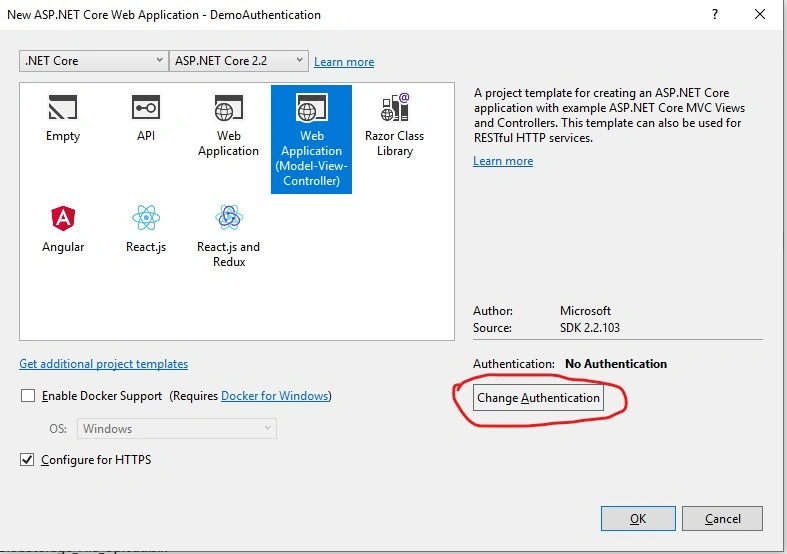
Step 5. In the "Change Authentication" box, Select the individual User Accounts options and then click the OK button.
Step 6. After the above step, Visual Studio creates projects with default templates.
Step 7. Now, open the appsettings.json file and provide the database name, database server name, and related credentials to establish the connection with the database.
{
  "ConnectionStrings": {
    "DefaultConnection": "Server=xxx;Database=DemoAuthentication;Trusted_Connection=True;MultipleActiveResultSets=true;user id=sa;password=xxxxxx;"
  },
  "Logging": {
    "LogLevel": {
      "Default": "Warning"
    }
  },
  "AllowedHosts": "*"
}
Step 8. Now, open the Package Manager Console from the Tools menu and run the below commands one by one.
add migration test1
update-database
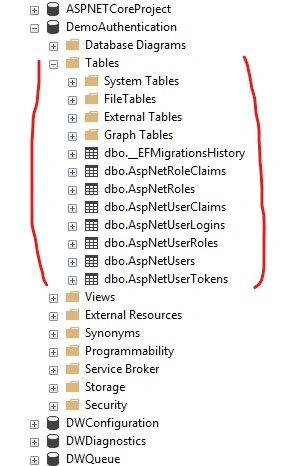
Step 9. After successfully running the above commands, go to the SQL Server and check that a related database has been created.




Kunal BhosalePosted Jun 9, 2022, 6:16 AM
Is it mandatory to create Identity tables? Can we have our own custom tables and make identity work on based on that tables?
Sarthak PatelPosted May 12, 2020, 3:09 PM
How can i authenticate user when i am using owin middle ware in my MVC5 Net Framework 4.6 application? I don't need to check for the role or authorization pt art for my method. I just like to verify that current user is authenticated or not ?
Former memberPosted Apr 28, 2020, 9:07 AM
Https://youtu.be/7IusuX4R7no
Adrian MonteroPosted Mar 30, 2020, 9:34 AM
In step 8 there is a typo, took me a while to spot it. Command should be add-migration, it is missing the "-". Once you fix that, runs smoothly
Pradeep KumarPosted Jan 28, 2020, 9:07 PM
Good article, Debasis!! It was quite easy to follow the steps and understand the implementation. It would be helpful if you can add the implementation of customizing the registration view by adding some additional fields fields to it.
Travis LoydPosted Jan 15, 2020, 6:43 AM
Could you make a similar article without the GUI? As in, you have a webapi using IdentityModel ADFS and you decide to switch it to use ASP.NET Identity. (Not looking to for something on switching, just to implement ASP.NET Identity on an established project.)
Dak PanPosted Aug 14, 2019, 7:05 AM
Amazing tutorial! Is there another one where this works the same but in an API enviroment?
Mallesh kumarPosted Jun 24, 2019, 7:43 AM
Excellent tutorial
Asmaa AhmedPosted Jun 17, 2019, 4:28 AM
Please if I am working on .net Core API Project and I already have My OWn SQL Serve DB.. Can I Add those Identity Tables To My Existing BD and use it in My Project . thanks
Hemant MalavPosted Apr 24, 2019, 4:57 AM
Very nice and simple explanation.
Shailesh NikamPosted Apr 9, 2019, 1:58 AM
Very informative article. Thanks a lot!!