

Introduction
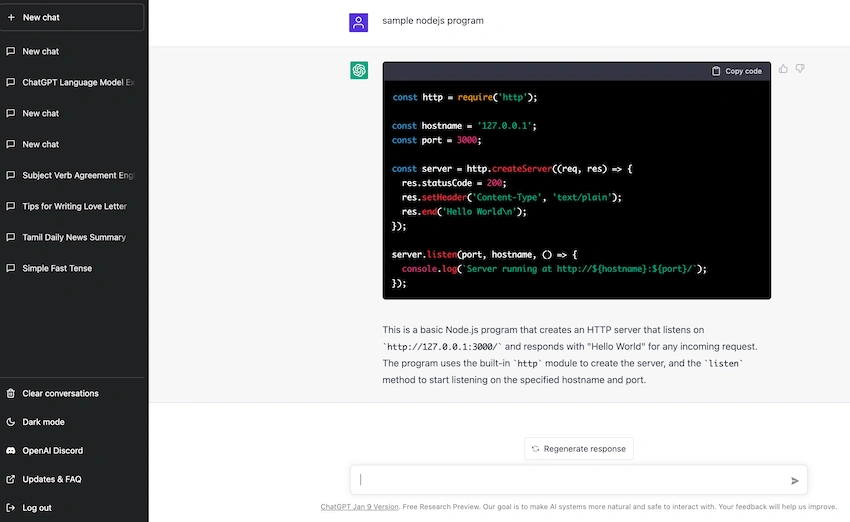
In this article, I am going to explain how to implement ChatGPT into a NodeJS application. First, I am going to explain chatGPT. ChatGPT is an Artificial Intelligence chatbot. We can use it as a search engine also. For example, if we want a simple nodejs program we can ask a question after that it will accumulate and give an answer. Another example is if want to learn about stacks here also it will accumulate and give answers. Below I mentioned the example screenshot. So here I will explain how can we use ChatGPT in our web application.
Requirements
- VS code
- Nodejs v18.9.0(https://nodejs.org/en/download/)
- npm openai package (https://www.npmjs.com/package/openai)
Nodejs
Node.js is an open-source server-side runtime environment built on Chrome’s V8 JavaScript engine. Node.js is a single-threaded application. It is a non-blocking I/O. It is an event-driven programming language as per the Nodejs document.
Implementing ChatGPT in NodeJS
Step 1
First, we have to create nodejs server application using express framework. So here I am going to nodejs project
npm init
Then it will create package.json file. After that, we should create app.js file for creating the server. Below I mention a code snippet for creating nodejs server.
var express = require("express");
var bodyParser = require("body-parser");
var http = require("http");
var app = express();
var cors = require('cors')
var server = http.createServer(app);
app.use(bodyParser.urlencoded({ extended: false }));
app.use(bodyParser.json());
app.use(cors());
app.use(function(err, req, res, next) {
    res.header("Access-Control-Allow-Origin", "https://www.sandbox.paypal.com");
    res.header("Access-Control-Allow-Headers", "Origin, X-Requested-With, Content-Type, Accept");
    next(err);
    });
server.listen(4000, function () {
    console.log('Example app listening on port 4000!');
});
Next, we will create controllers and routes. Here I am creating a controller file chatController.js
const methods = {};

methods.getAnswer = (req) => {
    console.log(req.body);
    return new Promise(async(resolve, reject) => {
      resolve(success);
    })
}
module.exports = methods;
After that, I will create a route file for mapping to functionality to Rest API chatRoute.js
var express = require("express");
var router = express.Router();
var chatController = require("./chatController");
router.post("/getAnswer", (req, res) => {
    console.log("req.body",req.body);
    chatController.getAnswer(req).then(data => res.json(data)).catch(err => res.send(err))
});
module.exports = router;
Mahesh ChandPosted Jan 25, 2023, 1:20 PM
Nice! Good once. Great question by Sourabh.
Sourabh SomaniPosted Jan 25, 2023, 9:27 AM
Hi, Why you added Access-Control-Allow-Origin", "https://www.sandbox.paypal.com"