

Introduction
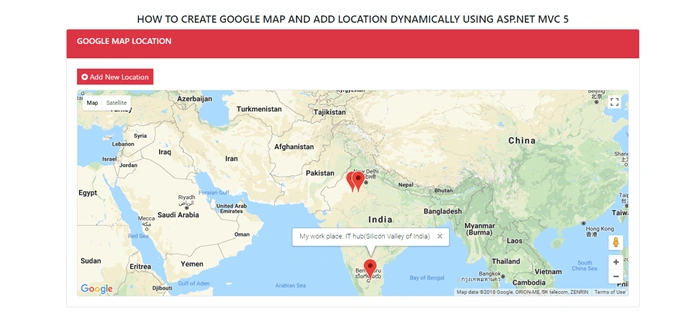
This article will demonstrate how to create a Google map and add location dynamically by inserting latitude and longitude of a location. I will save the name of the location, latitude, longitude and some description about location in SQL server database table. I will call saved data through JavaScript and display it in the Google map.
Step 1
Open MS SQL server 2014 or choice create database table.
- CREATE TABLE [dbo].[GoogleMap](
- [ID] [int] IDENTITY(1,1) NOT NULL,
- [CityName] [nvarchar](50) NULL,
- [Latitude] [numeric](18, 0) NULL,
- [Longitude] [numeric](18, 0) NULL,
- [Description] [nvarchar](100) NULL,
- CONSTRAINT [PK_GoogleMap] PRIMARY KEY CLUSTERED
- (
- [ID] ASC
- )WITH (PAD_INDEX = OFF, STATISTICS_NORECOMPUTE = OFF, IGNORE_DUP_KEY = OFF, ALLOW_ROW_LOCKS = ON, ALLOW_PAGE_LOCKS = ON) ON [PRIMARY]
- ) ON [PRIMARY]
- GO
- CREATE procedure [dbo].[spAddNewLocation]
- (
- @CityName nvarchar(50),
- @Latitude numeric(18, 0),
- @Longitude numeric(18, 0),
- @Description nvarchar(100)
- )
- as
- begin
- insert into [dbo].[GoogleMap](CityName,Latitude,Longitude,Description)
- values(@CityName,@Latitude,@Longitude,@Description)
- end
- CREATE procedure [dbo].[spGetMap]
- as
- begin
- select CityName,Latitude,Longitude,Description from [dbo].[GoogleMap]
- end
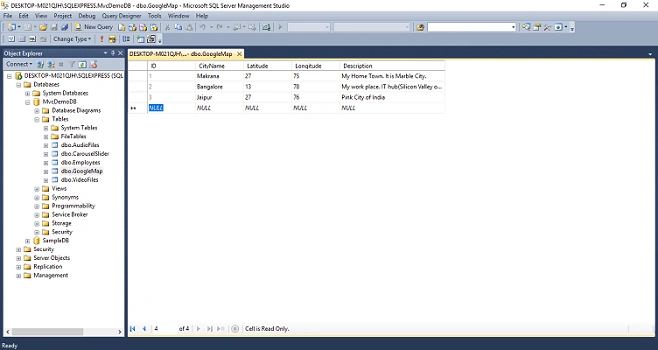
Screenshot of database table with inserted data.
Step 2
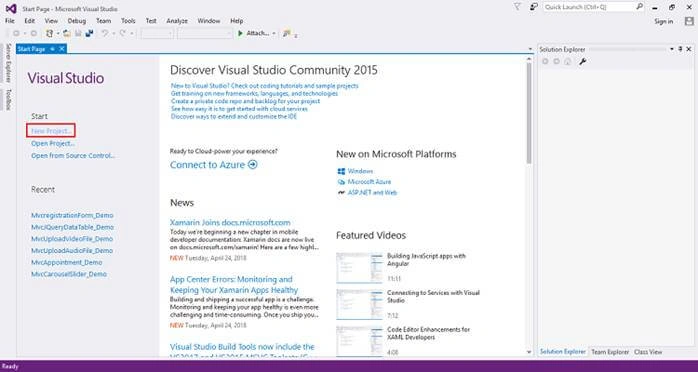
Open visual studio 2015 or your choice and click on New Project.
Screenshot for creating new project-1
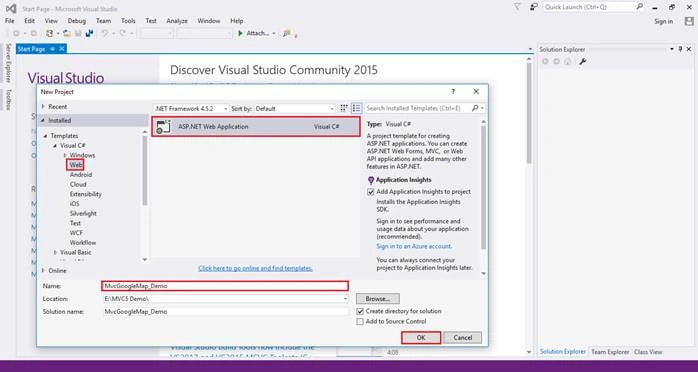
After that one window will appear; select web from left panel choose ASP.NET Web Application, give a meaningful name to your project then click on OK as shown in the below screenshot.
Screenshot for creating new project-2
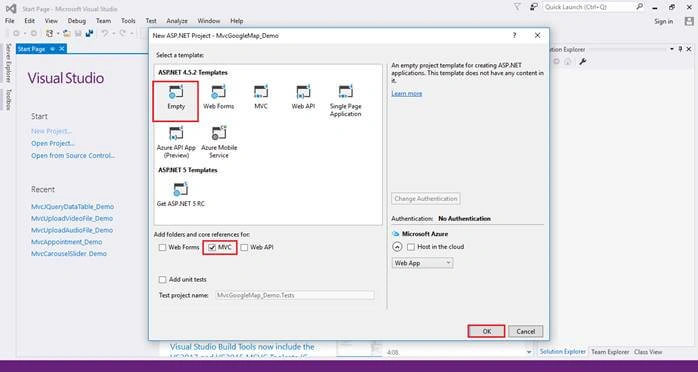
After clicking on OK one more window will appear choose Empty check on MVC checkbox and click on OK as shown in the below screenshot.
Screenshot for creating new project-3
Step 3
Double click on webconfig file in created project and add the following line of code for database connection.
- <connectionStrings>
- <add name="DBCS" connectionString="data source=DESKTOP-M021QJH\SQLEXPRESS; database=MvcDemoDB; integrated security=true;" />
- </connectionStrings>
Step 4
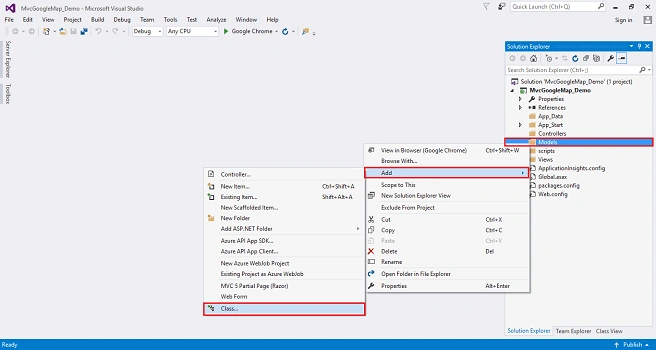
Right click on Models folder in project solution explorer; select Add, then select Class.
Screenshot for creating Model class-1
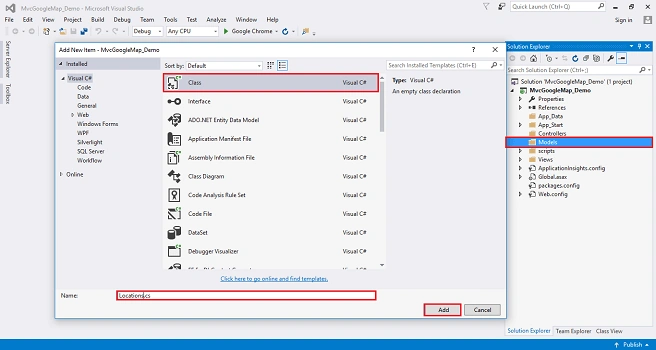
After selecting class click on it. One window will appear, choose class and give it the name Locations then click on Add. A class will be added under models folder with name Locations.cs as shown in the below screenshot.
Screenshot for creating Model class-1
Write a class field and properties as we have done in the database table.
- using System;
- using System.Collections.Generic;
- using System.ComponentModel.DataAnnotations;
- using System.Linq;
- using System.Web;
- namespace MvcGoogleMap_Demo.Models
- {
- public class Locations
- {
- public int ID { get; set; }
- [Required(ErrorMessage ="Please enter city name")]
- [Display(Name ="City Name")]
- public string CityName { get; set; }
- [Required(ErrorMessage = "Please enter city latitude")]
- public double Latitude { get; set; }
- [Required(ErrorMessage = "Please enter city longitude ")]
- public double Longitude { get; set; }
- public string Description { get; set; }
- }
- }
Step 5
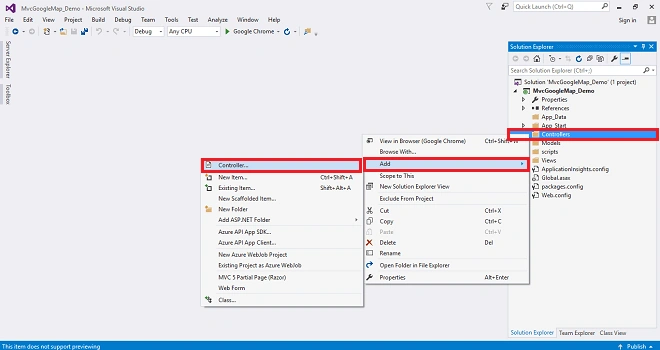
Right click on Controllers folder select Add then choose Controller as shown in the below screenshot.
After clicking on controller a window will appear choose MVC5 Controller-Empty an click on Add.
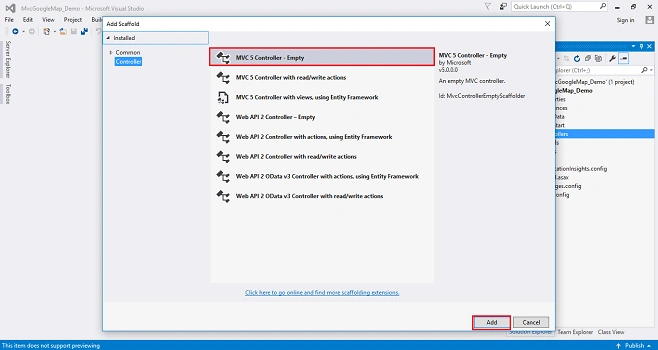
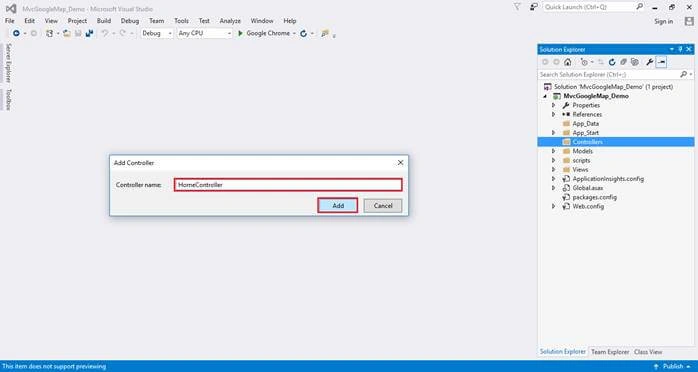
After clicking on Add another window will appear with DefaultController. Change the name HomeController then click on Add. HomeController will be added under Controllers folder. See the below screenshot.
Add the following namespace in controller
- using MvcGoogleMap_Demo.Models;
- using System.Configuration;
- using System.Data;
- using System.Data.SqlClient;
Create action method with name Location to get data.
- public ActionResult Location()
- {
- string markers = "[";
- string CS = ConfigurationManager.ConnectionStrings["DBCS"].ConnectionString;
- using (SqlConnection con = new SqlConnection(CS))
- {
- SqlCommand cmd = new SqlCommand("spGetMap", con);
- cmd.CommandType = CommandType.StoredProcedure;
- con.Open();
- SqlDataReader sdr = cmd.ExecuteReader();
- while (sdr.Read())
- {
- markers += "{";
- markers += string.Format("'title': '{0}',", sdr["CityName"]);
- markers += string.Format("'lat': '{0}',", sdr["Latitude"]);
- markers += string.Format("'lng': '{0}',", sdr["Longitude"]);
- markers += string.Format("'description': '{0}'", sdr["Description"]);
- markers += "},";
- }
- }
- markers += "];";
- ViewBag.Markers = markers;
- return View();
- }
Create action method with name Location to insert data.
- public ActionResult Location(Locations location)
- {
- if (ModelState.IsValid)
- {
- string CS = ConfigurationManager.ConnectionStrings["DBCS"].ConnectionString;
- using (SqlConnection con = new SqlConnection(CS))
- {
- SqlCommand cmd = new SqlCommand("spAddNewLocation", con);
- cmd.CommandType = CommandType.StoredProcedure;
- con.Open();
- cmd.Parameters.AddWithValue("@CityName", location.CityName);
- cmd.Parameters.AddWithValue("@Latitude", location.Latitude);
- cmd.Parameters.AddWithValue("@Longitude", location.Longitude);
- cmd.Parameters.AddWithValue("@Description", location.Description);
- cmd.ExecuteNonQuery();
- }
- }
- else
- {
- }
- return RedirectToAction("Location");
- }
Complete code for controller
- using MvcGoogleMap_Demo.Models;
- using System.Configuration;
- using System.Data;
- using System.Data.SqlClient;
- using System.Web.Mvc;
- namespace MvcGoogleMap_Demo.Controllers
- {
- public class HomeController : Controller
- {
- // GET: Home
- public ActionResult Index()
- {
- return View();
- }
- public ActionResult Location()
- {
- string markers = "[";
- string CS = ConfigurationManager.ConnectionStrings["DBCS"].ConnectionString;
- using (SqlConnection con = new SqlConnection(CS))
- {
- SqlCommand cmd = new SqlCommand("spGetMap", con);
- cmd.CommandType = CommandType.StoredProcedure;
- con.Open();
- SqlDataReader sdr = cmd.ExecuteReader();
- while (sdr.Read())
- {
- markers += "{";
- markers += string.Format("'title': '{0}',", sdr["CityName"]);
- markers += string.Format("'lat': '{0}',", sdr["Latitude"]);
- markers += string.Format("'lng': '{0}',", sdr["Longitude"]);
- markers += string.Format("'description': '{0}'", sdr["Description"]);
- markers += "},";
- }
- }
- markers += "];";
- ViewBag.Markers = markers;
- return View();
- }
- [HttpPost]
- public ActionResult Location(Locations location)
- {
- if (ModelState.IsValid)
- {
- string CS = ConfigurationManager.ConnectionStrings["DBCS"].ConnectionString;
- using (SqlConnection con = new SqlConnection(CS))
- {
- SqlCommand cmd = new SqlCommand("spAddNewLocation", con);
- cmd.CommandType = CommandType.StoredProcedure;
- con.Open();
- cmd.Parameters.AddWithValue("@CityName", location.CityName);
- cmd.Parameters.AddWithValue("@Latitude", location.Latitude);
- cmd.Parameters.AddWithValue("@Longitude", location.Longitude);
- cmd.Parameters.AddWithValue("@Description", location.Description);
- cmd.ExecuteNonQuery();
- }
- }
- else
- {
- }
- return RedirectToAction("Location");
- }
- }
- }
Rizwan AliPosted May 11, 2022, 4:08 PM
Hy Farhan Sir Hope so You are fine. First of all thanks for this aritcle . Sir how can i draw shpaes dynamically Means to get the lat long from database and draw a shapes like circle rectangle polygon etc
Sajina N SPosted Oct 21, 2021, 9:38 AM
Can we show Map of a Particular Country only?
greenglassPosted Feb 21, 2021, 11:52 AM
RouteConfig must be changed as this: public class RouteConfig { public static void RegisterRoutes(RouteCollection routes) { routes.IgnoreRoute("{resource}.axd/{*pathInfo}"); routes.MapRoute( name: "Default", url: "{controller}/{action}/{id}", defaults: new { controller = "Home", action = "Location", id = UrlParameter.Optional } ); } }
greenglassPosted Feb 21, 2021, 10:54 AM
On the start: Can't find view "Index", Search was in ~/Views/Home/Index.aspx~/Views/Home/Index.ascx ~/Views/Shared/Index.aspx ~/Views/Shared/Index.ascx ~/Views/Home/Index.cshtml ~/Views/Home/Index.vbhtml ~/Views/Shared/Index.cshtml ~/Views/Shared/Index.vbhtml
Mbuyiselo DubePosted Jun 10, 2020, 8:39 PM
Which function ca i use just to retrieve data from a database and display them?
Warsame JabartiPosted Aug 8, 2019, 3:52 PM
Great tutorial Farhan and i just wanted to know if i could create a menu on the side ? this the best tutorials i have been for asp.net mvc applications....
Simranjeet SinghPosted Jul 26, 2019, 2:04 AM
Nice Tutorial. Thanks for sharing.
Nick StavrouPosted Jun 10, 2019, 5:25 PM
Can this been done by adding address and find Latitude and Longitude?
peiman orujiPosted Apr 24, 2019, 2:03 AM
Hi Mr.Ahmed . How can I Replace Location Points With Arrow? For Display Travel Route. For Exaple in Map Ofcourse: Istanbul -------> London
Sithembiso GoqoPosted Sep 25, 2018, 4:24 PM
Thank you for your tutorial. how can i implement this using code first?
onais ahmerPosted Sep 24, 2018, 12:31 AM
Nice one bro
Prakash VasaikarPosted Sep 22, 2018, 12:50 AM
Sir i have question i need mega menu but i have mega menu but i add the third sub menu but not span so plz tell me
Prakash VasaikarPosted Sep 22, 2018, 12:50 AM
Thank u sir
Jaff BanjoPosted Sep 3, 2018, 9:01 AM
Nice one, it is really helpful, thanks greatly
Sithembiso GoqoPosted Jul 19, 2018, 10:47 AM
Good afternoon sir, can you please show me how to do it with code first in the controller classes. because my project is code first
Stavros SkamagkisPosted Apr 28, 2018, 4:04 AM
Great tutorial, thanks a lot!