

Introduction
In this article, we will learn how to integrate color picker in reactjs application.
- How To Create A Signature Pad In ReactJS Application
- How To Use Syncfusion Multiselect Dropdown In React Application
You can check my previous articles from the above links,
Prerequisites
- We should have a basic knowledge of HTML and ReactJS.
- Visual Studio Code installed
- Node and NPM installed
Step 1
Let's create a new React project by using the following command:
npx create-react-app colorpicker
Open this project in Visual Studio Code and install following package.
npm install @syncfusion/ej2-react-inputs –save
Now install Bootstrap by using the following command.
npm install bootstrap --save
Now, open the index.js file and add import Bootstrap.
import 'bootstrap/dist/css/bootstrap.min.css';
Now go to src folder and create a new component 'ColorPpicker.js'. Add the following code to this component
import React, { Component } from 'react'
import { ColorPickerComponent } from '@syncfusion/ej2-react-inputs';
export default class ColorPpicker extends Component {
    render() {
        return (
            <div className='control-section'>
                <div id='default-control'>
                <div class="row"  style={{margin: "8px"}}>
                    <div class="col-sm-12 btn btn-info">
                    How To Add Color Picker In ReactJS Application
                    </div>
                </div>
                    <ColorPickerComponent id='color-picker'></ColorPickerComponent>
                </div>
            </div>
        )
    }
}
Add a reference of this component in app.js file
import logo from './logo.svg';
import './App.css';

import ColorPpicker from './ColorPpicker';
function App() {
  return (
    <div className='control-pane'>
      <ColorPpicker></ColorPpicker>
    </div>);
}
export default App;
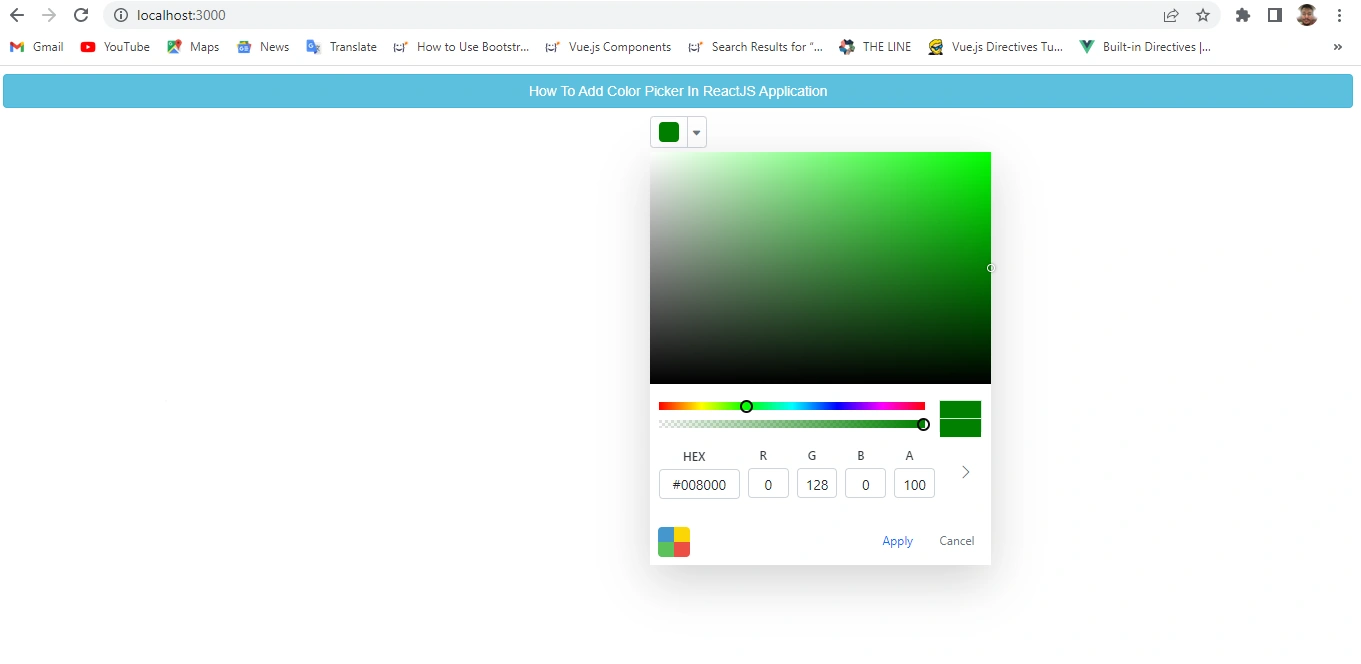
Now, run the project by using 'npm start' command and check the result.
Summary
In this article, we learned how to integrate a color picker in Reactjs application.
Join the conversation! Your thoughts help the community grow.