

Using TreeView control and XML file to create a help file.
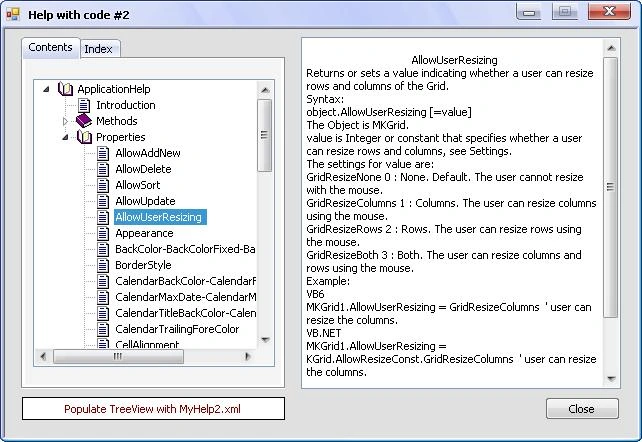
Would you like to add a help file to your application? I think it is easy to do with C#.
This is an uncomplicated trial to add a help to your project; it is easy to create.
I wrote an article before about the new ActiveX control (MKGrid), and wrote its help using Microsoft HTML Workshop and it was necessary to write more than sixty HTML files because every item of my help needs one file, and that was so boring!
I think It's probably a good idea to make my help file by myself, this trial will not be costing me more than a TreeView control and XML file.
Now, this article to create a help for my ActiveX MKGrid, you need little code to create a help using the TreeView control and populate it with a XML file.
Step 1:
Write the XML file:
Use "MS FrontPage" or "MS Word" or any word processor to write XML file for the help; see my sample MyHelp1.xml and MyHelp2.xml in the folder (DataFiles) which I wrote for the MKGrid control.
Step 2:
Add the following reference to your code:
Using System.Xml;
Step 3:
Design the help form.
My project has three forms.
frmMain form: this form is an example of the main form of your project.
I used this form to show the ActiveX control MKGrid which I wrote help for it, you can add MKGrid control to the ToolBox as (COM Components) from (MyActiveX) folder.
frmHelp1 form: my article about this form; this form has the following controls:
TextBox (its name: txtHelp, to display help)
Button (its name: btnClose, to close help form)
TabControl (its name:tabHelp)
This tab has two pages: ContentsPage, IndexPage
TreeView (its name: tvHelp) put on (ContentsPage)
ComboBox (its name: cmbHeading, its type: Simple) put on (IndexPage)
Label (its name: lblHint, its text: Type Keyword to find) put on (IndexPage)
Button (its name: btnDisplay) put on (IndexPage)
frmHelp2 form: has the same controls of the frmHelp1 form.
Please add the following variables to frmHelp1 and frmHelp2:
private string MyHelpFile;
private XmlDocument XmlDoc = new XmlDocument();
Add the following code after InitializeComponent():
//init TreeView
tvHelp.Nodes.Clear();
tvHelp.ImageList = IconImages;
tabHelp.SelectedTab = ContentsPage;
cmbHeading.Items.Clear();
Add the following code to the Form_Load procedure:
in frmHelp1:
MyHelpFile = Application.StartupPath + "\DataFiles\" + "MyHelp1.xml"
in frmHelp2:
MyHelpFile = Application.StartupPath + "\DataFiles\" + "MyHelp2.xml"
XmlDoc.Load(MyHelpFile);
LoadTreeView();
Code for frmHelp1:
We shall set a nodes name to tvHelp TreeView control by the following procedure:
private void LoadTreeView()
{
XmlNodeList xNodeList;
string strNode;
try
{
// set root node of TreeView.
tvHelp.Nodes.Add("Application Help");
tvHelp.Nodes[0].Tag = "AppHelp";
tvHelp.Nodes[0].ImageIndex = 0;
tvHelp.Nodes[0].SelectedImageIndex = 0;
// set Introduction node to TreeView.
tvHelp.Nodes[0].Nodes.Add("Introduction");
tvHelp.Nodes[0].Nodes[0].Tag = "Introduction";
tvHelp.Nodes[0].Nodes[0].ImageIndex = 2;
tvHelp.Nodes[0].Nodes[0].SelectedImageIndex = 2;
// set Methods node to TreeView.
tvHelp.Nodes[0].Nodes.Add("Methods");
tvHelp.Nodes[0].Nodes[1].Tag = "Methods";
tvHelp.Nodes[0].Nodes[1].ImageIndex = 0;
tvHelp.Nodes[0].Nodes[1].SelectedImageIndex = 0;
// set Properties node to TreeView.
tvHelp.Nodes[0].Nodes.Add("Properties");
tvHelp.Nodes[0].Nodes[2].Tag = "Properties";
tvHelp.Nodes[0].Nodes[2].ImageIndex = 0;
tvHelp.Nodes[0].Nodes[2].SelectedImageIndex = 0;
// set all Method nodes to TreeView.
xNodeList = XmlDoc.SelectNodes("//Method");
foreach (XmlNode xNode in xNodeList)
{
strNode = xNode.SelectSingleNode("title").InnerText;
tvHelp.Nodes[0].Nodes[1].Nodes.Add(strNode);
// add Method title to ComboBox;
cmbHeading.Items.Add(strNode);
}
// set Method nodes image
for (int i = 0; i < tvHelp.Nodes[0].Nodes[1].Nodes.Count; i++)
{
tvHelp.Nodes[0].Nodes[1].Nodes[i].ImageIndex = 2;
tvHelp.Nodes[0].Nodes[1].Nodes[i].SelectedImageIndex = 2;
}
// set all Property nodes to TreeView.
xNodeList = XmlDoc.SelectNodes("//Property");
foreach (XmlNode xNode in xNodeList)
{
strNode = xNode.SelectSingleNode("title").InnerText;
tvHelp.Nodes[0].Nodes[2].Nodes.Add(strNode);
// add Property title to ComboBox;
cmbHeading.Items.Add(strNode);
}
mallesh sPosted Jun 1, 2015, 1:50 AM
AxkGrid error.how to add the reference.please help me out,for Visual studio 13
Matt ThompsonPosted May 28, 2015, 2:49 PM
Great Article, I used it as a basis for my help articles. I made one change though and used html markup in my xml file, and then used a web browser control to display the information instead of a text box. This way you can control the formatting a little better. Thank you,
Miroslav MalekPosted Apr 5, 2014, 3:22 PM
Thank you very much for this article!
mostafa osmanPosted Mar 22, 2013, 2:23 PM
thanx
shegzy abPosted Nov 13, 2012, 10:00 PM
Thanks got it working. cheers
Mostafa KaisounPosted Oct 29, 2012, 7:19 PM
With VS-2008: 1- Go to ToolBox and click on (Common Controls) with right mouse. 2- From PopUp menu, click (Choose Items...). 3- From (Choose Toolbox Components Items) dialog, click (COM Components). 4- From (COM Components) page, click (Browse...) button. 5- From (MyActiveX) folder, choose the ActiveX (KGrid.ocx). Now you can go to (References) page and do what you know. Remark: You can use frmHelp1 form or frmHelp2 form in any project without (KGrid.ocx).
wistful minePosted Oct 29, 2012, 7:30 AM
Hi Thanks for your useful code, I need exactly this. But I have some problem with it. When I open the EasyHelp file, in the references part of .NET, KGrid and AxKGrid have error and when I try to add again these items to reference, from “MyActive X” folder of you, it show the messege that it counldn’t be added! How can I run this project in .NET 2008? Do I need extra file? Please help me?
dddddd ssssssssPosted Apr 1, 2012, 9:08 AM
Schade dass ich die .ocz nicht in Windows einbinden kann. Verwende VS 2010 64 Bit. Gibt es Hilfe.. mfg o.
Arjun PanwarPosted Mar 22, 2012, 12:05 AM
Very Nice work...thanks for sharing.