

Introduction
You can download and use all amCharts products for free. The only limitation of the free version is that a small link to this web site will be displayed in the top left corner of your charts.
You can download the free version from here
First of all, add a container on the HTML page. I have added a div and provided an id.
<body>
    <div id="chartdiv"></div>
</body>
Now add JavaScript library references in HTML tag.
<script src="https://www.amcharts.com/lib/3/amcharts.js"></script>
<script src="https://www.amcharts.com/lib/3/serial.js"></script>
<script src="https://www.amcharts.com/lib/3/plugins/dataloader/dataloader.min.js"></script>
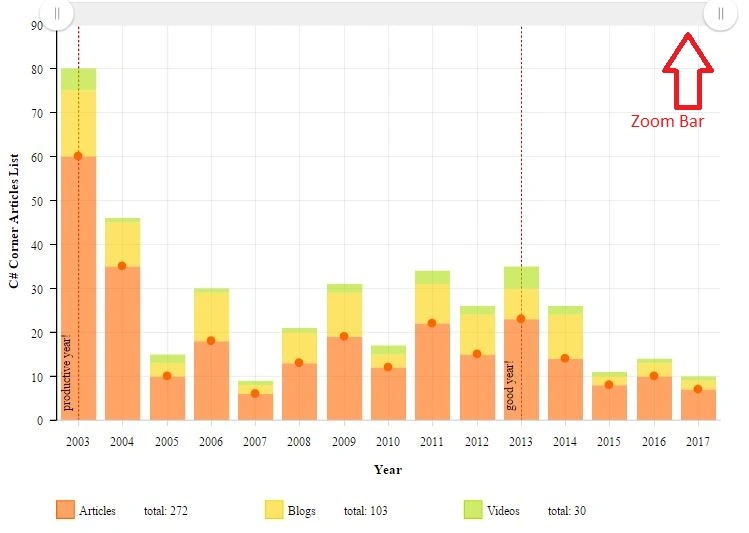
Now add a new JSON file and provide a name and add some dummy data like this.
[
    {
        "articles": 60,
        "blogs": 15,
        "videos": 5,
        "year": 2003
    },
    {
        "articles": 35,
        "blogs": 10,
        "videos": 1,
        "year": 2004
    },
    {
        "articles": 10,
        "blogs": 3,
        "videos": 2,
        "year": 2005
    },
    {
        "articles": 18,
        "blogs": 11,
        "videos": 1,
        "year": 2006
    },
    {
        "articles": 6,
        "blogs": 2,
        "videos": 1,
        "year": 2007
    },
    {
        "articles": 13,
        "blogs": 7,
        "videos": 1,
        "year": 2008
    },
    {
        "articles": 19,
        "blogs": 10,
        "videos": 2,
        "year": 2009
    },
    {
        "articles": 12,
        "blogs": 3,
        "videos": 2,
        "year": 2010
    },
    {
        "articles": 22,
        "blogs": 9,
        "videos": 3,
        "year": 2011
    },
    {
        "articles": 15,
        "blogs": 9,
        "videos": 2,
        "year": 2012
    },
    {
        "articles": 23,
        "blogs": 7,
        "videos": 5,
        "year": 2013
    },
    {
        "articles": 14,
        "blogs": 10,
        "videos": 2,
        "year": 2014
    },
    {
        "articles": 8,
        "blogs": 2,
        "videos": 1,
        "year": 2015
    },
    {
        "articles": 10,
        "blogs": 3,
        "videos": 1,
        "year": 2016
    },
    {
        "articles": 7,
        "blogs": 2,
        "videos": 1,
        "year": 2017
    }
]
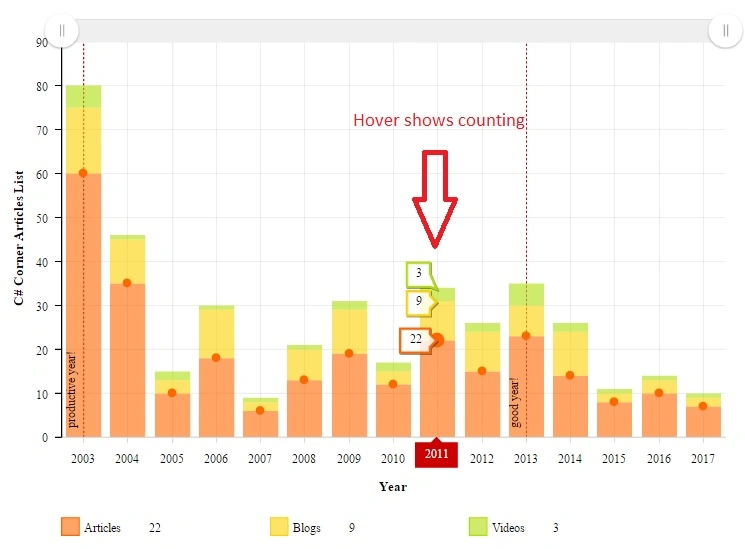
Now add amChart code inside script tag and pass your JSON path in the data Loader URL attribute and other properties.
Vishal PrajapatiPosted Feb 19, 2017, 10:39 PM
Nice one..Thanks for sharing..
Nishan AryalPosted Feb 19, 2017, 5:44 AM
Very Helpful Article.