Introduction
Power Apps Formulas Deep Dive: ForAll(), Sequence(), and Concurrent()
Power Apps provides several powerful functions for working with tables, generating dynamic records, and improving app performance. Among them, ForAll(), Sequence(), and Concurrent() are especially useful when building scalable and responsive canvas apps.
Although these functions can be used independently, combining them can unlock powerful patterns for bulk operations, dynamic processing, and faster app initialization.
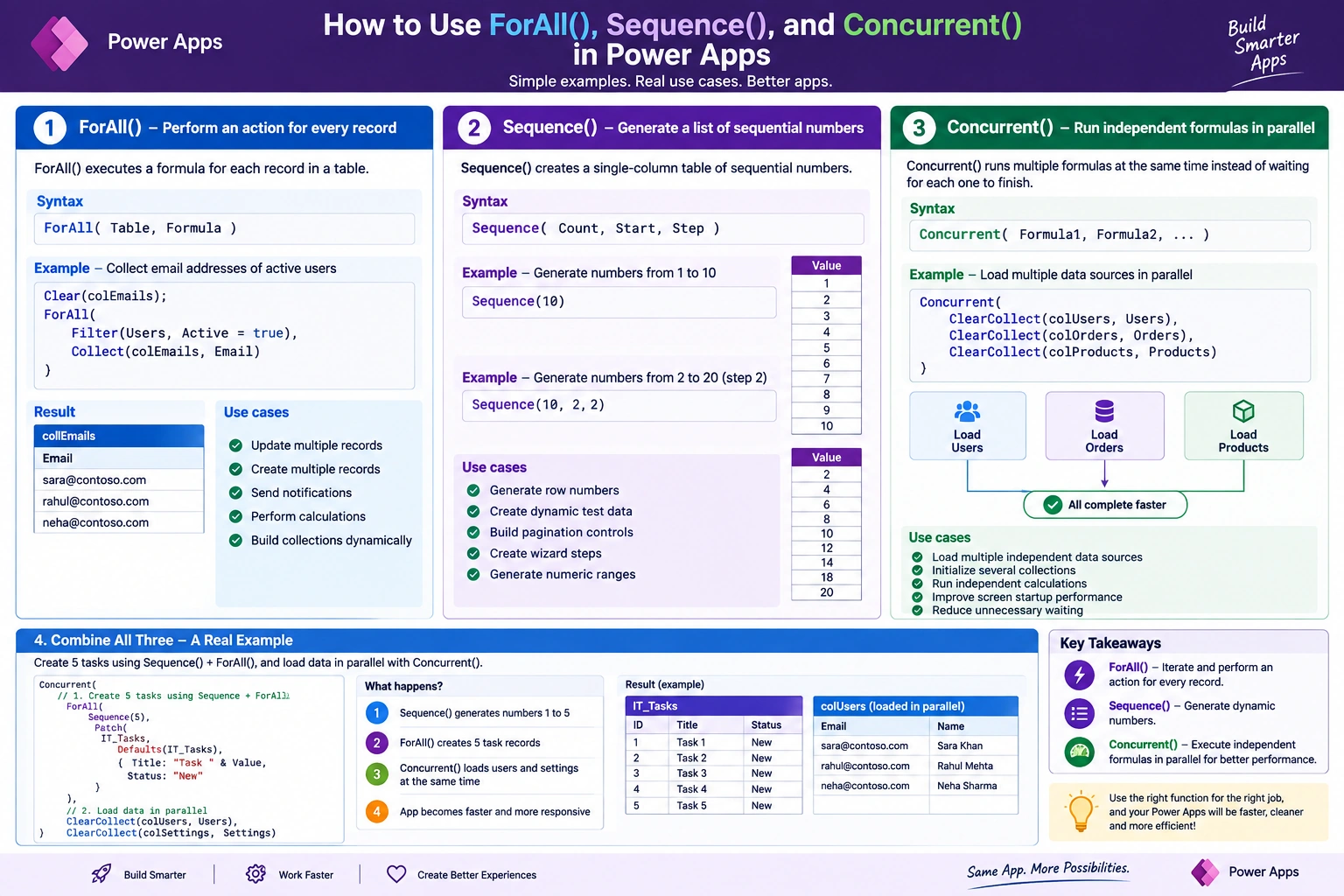
1. ForAll() — Perform an Action for Every Record
The ForAll() function evaluates a formula for each record in a table.
Syntax
ForAll(
    Table,
    Formula
)
Example
Suppose we want to collect the email addresses of all active users:
ForAll(
    Filter(
        Users,
        Active = true
    ),
    Collect(
        colEmails,
        Email
    )
)
Here, ForAll() iterates through every record returned by the Filter() function and performs the specified operation.
Common Use Cases
ForAll() is useful for:
Updating multiple records
Creating multiple SharePoint items
Processing records individually
Sending notifications for multiple records
Performing calculations for every record
Building collections dynamically
Bulk Update Example
ForAll(
    Gallery1.AllItems,
    Patch(
        IT_InvoiceDetails,
        ThisRecord,
        {
            Status: "Updated"
        }
    )
)
This updates every record displayed in Gallery1.
Important Consideration
ForAll() is primarily intended for performing an operation on each record. When the formula produces results, Power Apps can return a table of those results, but you should not assume that the results are processed in a particular order.
Also, when working with SharePoint or other external data sources, be careful with large ForAll() operations because every Patch() or connector operation can result in network activity.
2. Sequence() — Generate Dynamic Numbers
Sequence() creates a single-column table containing sequential numbers.
Syntax
Sequence(
    Count,
    Start,
    Step
)
The parameters are:
| Parameter | Description |
|---|
| Count | Number of records to generate |
| Start | Starting number; default is 1 |
| Step | Increment between numbers; default is 1 |
Example: Generate 1 to 10
Sequence(10)
Result:
1
2
3
4
5
6
7
8
9
10
The generated column is named Value.
Example: Generate Numbers from 2 to 20
Sequence(
    10,
    2,
    2
)
Result:
2
4
6
8
10
12
14
16
18
20
Creating Dynamic Steps
You can combine Sequence() with ForAll() to execute an operation a specific number of times.
ForAll(
    Sequence(5),
    Patch(
        IT_Tasks,
        Defaults(IT_Tasks),
        {
            Title: "Task " & Value,
            Status: "New"
        }
    )
)
This creates five task records.
Common Use Cases
Sequence() is useful for:
Generating row numbers
Creating dynamic test data
Building pagination controls
Generating wizard steps
Creating numeric ranges
Creating repeating records
Driving loops when there is no existing table
3. Concurrent() — Run Independent Operations in Parallel
Concurrent() allows multiple formulas to execute concurrently rather than waiting for each formula to complete sequentially.
Syntax
Concurrent(
    Formula1,
    Formula2,
    Formula3
)
For example, an app may need to load data from several independent sources during startup.
Instead of:
ClearCollect(
    colUsers,
    Users
);

ClearCollect(
    colOrders,
    Orders
);

ClearCollect(
    colProducts,
    Products
);
You can use:
Concurrent(
    ClearCollect(colUsers, Users),
    ClearCollect(colOrders, Orders),
    ClearCollect(colProducts, Products)
)
The independent operations can execute concurrently, potentially reducing the time required to initialize the screen.
Common Use Cases
Concurrent() is particularly useful for:
Loading multiple independent data sources
Initializing several collections
Running independent calculations
Improving screen startup performance
Reducing unnecessary sequential waiting
Important Rule
Only put independent operations inside Concurrent().
For example, this is unsafe if Formula2 depends on the collection created by Formula1:
Concurrent(
    ClearCollect(colUsers, Users),
    ClearCollect(
        colUserOrders,
        Filter(
            Orders,
            UserID in colUsers.ID
        )
    )
)
The second operation should not depend on the first operation completing.
4. Combining ForAll(), Sequence(), and Concurrent()
The real power comes from combining these functions appropriately.
Consider a scenario where an application needs to create five tasks and then refresh independent data sources.
Concurrent(
    ForAll(
        Sequence(5),
        Patch(
            IT_Tasks,
            Defaults(IT_Tasks),
            {
                Title: "Task " & Value,
                Status: "New"
            }
        )
    ),

    Notify(
        "Task creation started",
        NotificationType.Information
    ),

    Refresh(IT_Tasks)
)
The pattern is:
Sequence() → Generate records
ForAll() → Process each generated record
Concurrent() → Execute independent formulas concurrently
However, there is an important design consideration: if Refresh(IT_Tasks) needs to happen after all five Patch() operations complete, it should not be placed as an independent concurrent branch. In that case, the refresh belongs after the ForAll() operation.
A safer pattern would be:
ForAll(
    Sequence(5),
    Patch(
        IT_Tasks,
        Defaults(IT_Tasks),
        {
            Title: "Task " & Value,
            Status: "New"
        }
    )
);

Refresh(IT_Tasks);
Notify(
    "Tasks created successfully",
    NotificationType.Success
)
5. Practical Example — Bulk Update
Suppose a gallery contains invoice records and we want to update their status.
ForAll(
    Gallery1.AllItems,
    Patch(
        IT_InvoiceDetails,
        ThisRecord,
        {
            Status: "Updated"
        }
    )
)
This is a useful pattern for bulk processing.
For larger datasets, however, consider whether the operation can be expressed as a delegable data-source operation or handled by Power Automate instead of sending many individual Patch() requests from the client.
6. Practical Example — Dynamic Wizard Steps
Sequence() can be used to generate dynamic steps.
ClearCollect(
    colSteps,
    AddColumns(
        Sequence(3),
        Step,
        "Step " & Value
    )
)
The resulting collection can drive a gallery:
Step 1
Step 2
Step 3
This is useful for:
7. Practical Example — Fast App Startup
Suppose an invoice application needs to load several independent datasets when a screen opens.
Concurrent(
    ClearCollect(
        colUsers,
        Users
    ),
    ClearCollect(
        colDepartments,
        Departments
    ),
    ClearCollect(
        colSettings,
        Settings
    )
)
Because these collections do not depend on each other, Concurrent() is a good candidate for this scenario.
The general pattern is:
Screen OnVisible
       |
       +---- Load Users
       |
       +---- Load Departments
       |
       +---- Load Settings
Instead of unnecessarily waiting for each independent operation, the app can initiate them concurrently.
8. Error Handling with Concurrent()
When using Concurrent(), error handling becomes especially important.
For critical operations, consider wrapping individual formulas with IfError():
Concurrent(
    IfError(
        ClearCollect(colUsers, Users),
        Notify(
            "Failed to load users.",
            NotificationType.Error
        )
    ),

    IfError(
        ClearCollect(colDepartments, Departments),
        Notify(
            "Failed to load departments.",
            NotificationType.Error
        )
    ),

    IfError(
        ClearCollect(colSettings, Settings),
        Notify(
            "Failed to load application settings.",
            NotificationType.Error
        )
    )
)
This allows each independent operation to handle its own failure.
For production applications, you can also write failures to an audit or execution-log mechanism instead of relying only on Notify().
9. ForAll() vs Sequence() vs Concurrent()
| Function | Primary Purpose | Typical Use |
|---|
| ForAll() | Iterate through records | Bulk processing |
| Sequence() | Generate a table of numbers | Dynamic rows/steps |
| Concurrent() | Execute independent formulas concurrently | Performance optimization |
A simple way to remember them:
ForAll() processes. Sequence() generates. Concurrent() accelerates independent work.
10. Key Performance Considerations
These functions are powerful, but using them incorrectly can create performance problems.
Avoid unnecessary SharePoint calls
For example:
ForAll(
    Gallery1.AllItems,
    Patch(
        IT_InvoiceDetails,
        ThisRecord,
        {
            Status: "Approved"
        }
    )
)
If the gallery contains 100 records, this can potentially result in a large number of data-source operations.
For invoice applications, approval processing, and audit logging, always consider:
How many SharePoint calls are being generated?
Can the data be collected once and reused?
Can multiple independent reads run through Concurrent()?
Can the operation be delegated?
Should bulk processing be moved to Power Automate?
Are you refreshing a data source unnecessarily?
11. A Better Mental Model
Think of these functions as three different tools:
Sequence()
"Give me a set of numbers."
Sequence(5)
ForAll()
"Do something for every record."
ForAll(
    Sequence(5),
    ...
)
Concurrent()
"These operations don't depend on each other, so don't make them wait unnecessarily."
Concurrent(
    Operation1,
    Operation2,
    Operation3
)
Together:
Concurrent(
    ForAll(
        Sequence(5),
        Patch(...)
    ),
    LoadSomethingElse(),
    CalculateSomethingElse()
)
But always verify that the concurrent branches are genuinely independent.
Conclusion
ForAll(), Sequence(), and Concurrent() are three important Power Apps functions that solve different problems:
ForAll() — iterate and perform an operation for every record.
Sequence() — generate a dynamic numeric table.
Concurrent() — execute independent formulas concurrently to improve responsiveness.
The biggest benefit comes from knowing when not to combine them.
Use ForAll() for iteration, Sequence() for generation, and Concurrent() for genuinely independent work. When working with SharePoint, Dataverse, or Power Automate, always consider delegation, network calls, dependency order, error handling, and scalability before applying these patterns to production applications.
Mastering these three functions can make Power Apps formulas cleaner, more dynamic, and significantly more efficient.


Join the conversation! Your thoughts help the community grow.