

In this article, you will see use of enum type variables in C#.
Sample enum variables to use:
- internal enum MicrosoftOffice
- {
- Word = 0,
- Excel = 1,
- Powerpoint = 3,
- Visio = 5
- }
How to get enum variable name by its value in C#?
Retrieves the name of the constant in the specified enumeration that has the specified value.
- /// This is used to get Enum name by its value as integer.
- private static void GetEnumName()
- {
- int[] enumValues = new int[] { 0, 1, 3, 5 };
- foreach (int enumValue in enumValues)
- {
- Console.WriteLine(Enum.GetName(typeof(MicrosoftOffice), enumValue));
- }
- Console.ReadKey();
- }

How to iterate an enum variable or enum name in C#?
Retrieves an array of the names of the constants in a specified enumeration.
- /// This is used to iterate enum variables.
- private static void IterateEnumVariables()
- {
- Console.WriteLine("List of Enums");
- string[] officenames = Enum.GetNames(typeof(MicrosoftOffice));
- foreach (string officename in officenames)
- {
- Console.WriteLine(officename);
- }
- Console.ReadKey();
- }

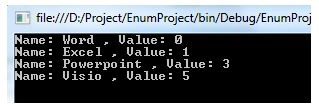
How to get enum variable name by its value in C#?
Retrieves an array of the values of the constants in a specified enumeration.
- ///This is used to get Enum values as array.
- private static void GetEnumValues()
- {
- Array enumValueArray = Enum.GetValues(typeof(MicrosoftOffice));
- foreach (int enumValue in enumValueArray)
- {
- Console.WriteLine("Name: " + Enum.GetName(typeof(MicrosoftOffice), enumValue) + " , Value: " + enumValue);
- }
- Console.ReadKey();
- }
How to convert an enum to a String in C#?
ToString() converts Enum to string.
- /// This is used to convert Enum to string.
- private static void EnumToString()
- {
- Console.WriteLine("Converting Enum to String");
- Console.WriteLine(MicrosoftOffice.Powerpoint.ToString());
- Console.WriteLine(MicrosoftOffice.Word.ToString())
- Console.ReadKey();
- }

How to convert a String to an enum or Parse in C#?
Converts the string representation of the name or numeric value of one or more enumerated constants to an equivalent enumerated object.
- /// <summary>
- /// This is used to convert string to Enum variable.
- /// </summary>
- private static void ParseEnum()
- {
- MicrosoftOffice ms = (MicrosoftOffice)Enum.Parse(typeof(MicrosoftOffice), "Word");
- Console.WriteLine(ms.ToString());
- MicrosoftOffice ms1 = (MicrosoftOffice)Enum.Parse(typeof(MicrosoftOffice), "Excel");
- Console.WriteLine(ms1.ToString());
- Console.ReadKey();
- }

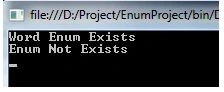
How to check and Parse a String from the enum variable using C#?
Converts the string representation of the name or numeric value of one or more enumerated constants to an equivalent enumerated object. The return value indicates whether the conversion succeeded.
It is optionally case sensitive; you can just specify true or false to specify the option.


Cipher CoderPosted Jun 11, 2020, 2:00 AM
Good one ...
Vihaan RPosted Dec 8, 2019, 7:17 AM
Hi thank you for sharing! Very informative tutorial. If you would like to see more I encourage you to view as it is helpful. Thanks! You can check it out here: https://systemoutofmemory.com/blogs/the-programmer-blog/c-sharp-cast-int-to-enum
Rajeesh MenothPosted Jul 31, 2015, 1:08 AM
Good one
Mohamed YunusPosted Jul 6, 2015, 2:01 AM
Well try Arun
nikhil sreeniPosted Jan 30, 2013, 2:18 AM
Thanks for the post,Its really helpful
Nagashyam KumarPosted Mar 18, 2012, 7:39 AM
Good One
Amit MaheshwariPosted Mar 18, 2012, 12:32 AM
It's a very well explanation about the enum keep it up. But I want to know that where we can use it please tell me? And why we used it?