

Table of Contents
Introduction
What Is Array Element Search?
Why Efficient Searching Matters in Real Applications
Different Methods to Search an Array in Python
Real-World Scenario: Protecting Patient Identifiers in Healthcare Systems
Time and Space Complexity Analysis
Complete Implementation with Test Cases
Best Practices and Performance Tips
Conclusion
Introduction
Searching for an element in an array (or list, in Python) is one of the most fundamental operations in programming. Whether you're looking up a user ID, validating a record, or filtering sensitive data, how you search directly impacts performance and correctness. In Python, multiple built-in and algorithmic approaches exist—each suited to different contexts. This article explores them through the lens of a critical real-world use case: detecting and redacting Personally Identifiable Information (PII) in healthcare data.
What Is Array Element Search?
Array element search is the process of determining whether a specific value exists in a collection and, optionally, retrieving its position. In Python, this typically involves lists, but the concepts extend to tuples, NumPy arrays, and other sequences.
Why Efficient Searching Matters in Real Applications
In healthcare systems, patient records often contain arrays of identifiers—such as Social Security Numbers (SSNs), medical record IDs, or phone numbers. Before sharing data for research or analytics, organizations must scan these arrays for PII to comply with regulations like HIPAA. An inefficient or incorrect search could either leak sensitive data or over-redact useful clinical information. Speed and accuracy are non-negotiable.
Different Methods to Search an Array in Python
1. Linear Search with in Operator
The simplest and most Pythonic approach for unsorted data.
def contains_element(arr, target):
    return target in arr
2. Linear Search with Index Tracking
Returns the position of the first match.
def find_index(arr, target):
    for i, val in enumerate(arr):
        if val == target:
            return i
    return -1  # Not found
3. Binary Search (for Sorted Arrays)
Dramatically faster for large, sorted datasets.
def binary_search(arr, target):
    left, right = 0, len(arr) - 1
    while left <= right:
        mid = (left + right) // 2
        if arr[mid] == target:
            return mid
        elif arr[mid] < target:
            left = mid + 1
        else:
            right = mid - 1
    return -1
4. Using Sets for Membership Testing
Convert the array to a set for O(1) average-case lookups.
def fast_contains(arr, targets):
    arr_set = set(arr)
    return [x for x in targets if x in arr_set]
Sets lose order and duplicates—use only when membership (not position) matters.
Real-World Scenario: Protecting Patient Identifiers in Healthcare Systems
Consider a healthcare data anonymization pipeline that processes batches of patient records. Each record contains an array of potential identifiers. The system must flag any record containing known PII patterns (e.g., SSNs like "123-45-6789").
import re

class PIIScanner:
    """
    A robust scanner for detecting and redacting Personally Identifiable Information (PII)
    in nested Python dictionaries and lists.
    """
    def __init__(self, exact_pii_strings: list = None):
        """
        Initializes the scanner with known PII strings and a set of common regex patterns.
        """
        # Set of exact strings that are considered PII (e.g., specific names or IDs)
        self.exact_pii_set = set(exact_pii_strings) if exact_pii_strings else set()

        # Compiled list of common PII regex patterns
        # Compiling them once improves performance
        self.pii_patterns = [
            # 1. US Social Security Number (SSN): XXX-XX-XXXX or XXXXXXXXX
            re.compile(r'\b\d{3}[-\s]?\d{2}[-\s]?\d{4}\b'),
            # 2. Email Address
            re.compile(r'\b[A-Za-z0-9._%+-]+@[A-Za-z0-9.-]+\.[A-Z|a-z]{2,}\b'),
            # 3. US Phone Number: (XXX) XXX-XXXX, XXX-XXX-XXXX, or XXX.XXX.XXXX
            re.compile(r'(\(\d{3}\)|\d{3})[-\.\s]?\d{3}[-\.\s]?\d{4}'),
            # 4. Credit Card Number (Simplified check for common formats 16 digits with optional spaces/dashes)
            re.compile(r'\b(?:\d{4}[-\s]?){3}\d{4}\b'),
            # 5. IP Address (IPv4)
            re.compile(r'\b(?:[0-9]{1,3}\.){3}[0-9]{1,3}\b')
        ]

    def _is_pii_match(self, value) -> bool:
        """Internal helper to check a single string/value against all PII rules."""
        if not isinstance(value, str):
            # Only strings can contain pattern-based PII
            return False

        value = value.strip()

        # 1. Check for exact string matches (case-sensitive)
        if value in self.exact_pii_set:
            return True

        # 2. Check for regex pattern matches
        for pattern in self.pii_patterns:
            if pattern.search(value):
                return True

        return False

    def redact_record(self, data) -> any:
        """
        Recursively redacts PII within nested dictionaries and lists.
        """
        if isinstance(data, dict):
            # Recurse into dictionary
            redacted_dict = {}
            for key, value in data.items():
                redacted_dict[key] = self.redact_record(value)
            return redacted_dict

        elif isinstance(data, list):
            # Recurse into list
            return [self.redact_record(item) for item in data]

        elif self._is_pii_match(data):
            # Redact the string/value if it is a PII match
            return '[REDACTED]'

        else:
            # Return non-PII primitives (numbers, booleans, safe strings)
            return data

# --- Example Usage ---
pii_detector = PIIScanner(exact_pii_strings=["John Doe", "sensitive_id_123"])

sample_record = {
    "user": "John Doe",
    "data": {
        "email": "[email protected]",
        "ssn_id": "123-45-6789",
        "notes": ["Check contact info (555) 123-4567.", "No PII here."],
        "purchase_history": [
            {"product": "A", "cc": "1111-2222-3333-4444"},
            {"product": "B", "cc": "5678 1234 9012 3456"}
        ],
        "safe_data": 42
    }
}

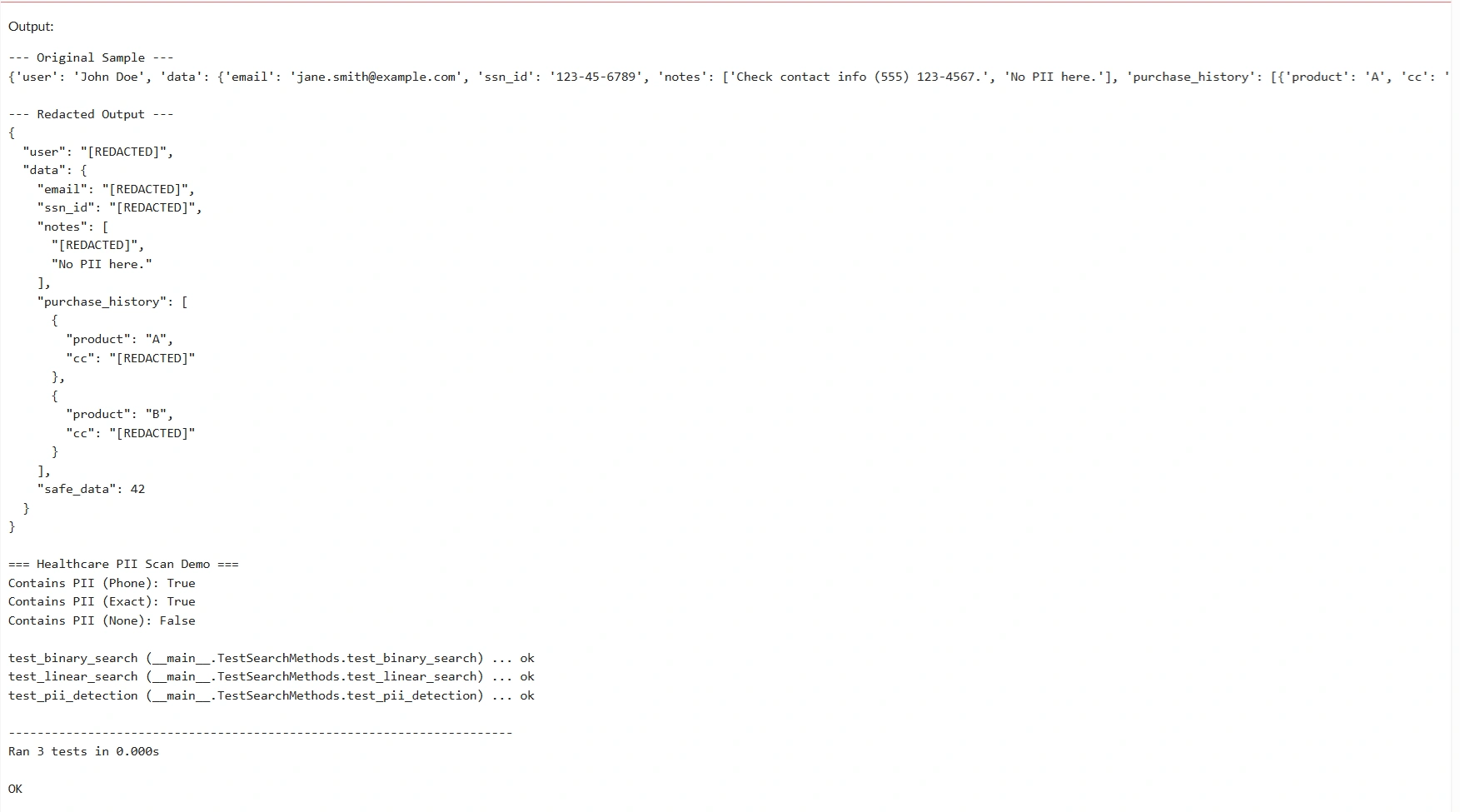
redacted_record = pii_detector.redact_record(sample_record)

print("--- Original Sample ---")
print(sample_record)
print("\n--- Redacted Output ---")
import json
print(json.dumps(redacted_record, indent=2))
Join the conversation! Your thoughts help the community grow.