

Introduction
This article explains how to send an email in Windows Store apps using the IMAP component. The IMAP component is the first email component for Windows Store apps that allows reception of emails and processes email messages in Windows Store Applications. Includes the SMTP component for sending emails from Windows Store Applications.
Step 1
First download the IMAP component ( MailForWindowsStore.dll ) from the following link:
Step 2
Now open Visual Studio 2012 and start a new Windows Store apps project.
Step 3
In this step add a reference to "MailForWindowsStore.dll" in your project.
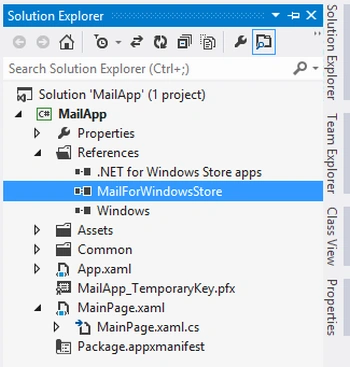
Step 4
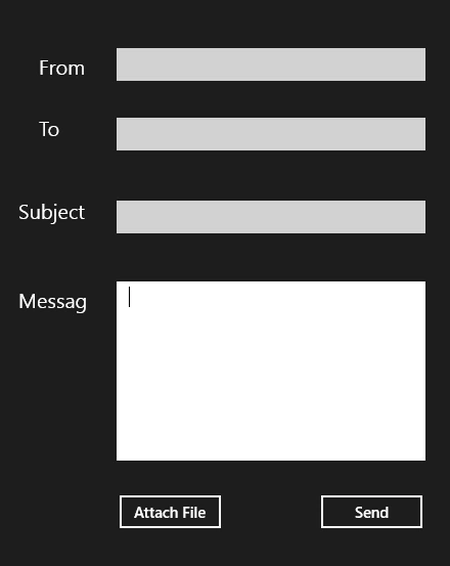
Now go to the "MainPage.xaml" page and add the following code.
<Page
x:Class="MailApp.MainPage"
xmlns="http://schemas.microsoft.com/winfx/2006/xaml/presentation"
xmlns:x="http://schemas.microsoft.com/winfx/2006/xaml"
xmlns:local="using:MailApp"
xmlns:d="http://schemas.microsoft.com/expression/blend/2008"
xmlns:mc="http://schemas.openxmlformats.org/markup-compatibility/2006"
mc:Ignorable="d">
<Grid Background="{StaticResource ApplicationPageBackgroundThemeBrush}">
<TextBox HorizontalAlignment="Left" TextWrapping="Wrap" x:Name="FromText" VerticalAlignment="Top" Margin="586,68,0,0" Width="302"/>
<TextBlock HorizontalAlignment="Left" TextWrapping="Wrap" Text="From" FontSize="20" VerticalAlignment="Top" Margin="510,76,0,0"/>
<TextBlock HorizontalAlignment="Left" TextWrapping="Wrap" Text="To" FontSize="20" VerticalAlignment="Top" Margin="510,136,0,0"/>
<TextBox HorizontalAlignment="Left" TextWrapping="Wrap" x:Name="ToText" VerticalAlignment="Top" Margin="586,136,0,0" Width="302"/>
<TextBox HorizontalAlignment="Left" TextWrapping="Wrap" x:Name="SubText" VerticalAlignment="Top" Margin="586,217,0,0" Width="302"/>
<TextBlock HorizontalAlignment="Left" TextWrapping="Wrap" Text="Subject" FontSize="20" VerticalAlignment="Top" Margin="490,217,0,0"/>
<TextBox HorizontalAlignment="Left" TextWrapping="Wrap" x:Name="MsgText" VerticalAlignment="Top" Margin="586,296,0,0" Width="302" Height="175"/>
<TextBlock HorizontalAlignment="Left" TextWrapping="Wrap" Text="Messag" FontSize="20" VerticalAlignment="Top" Margin="490,304,0,0"/>
<Button Content="Attach File" x:Name="AttachFileBtn" HorizontalAlignment="Left" VerticalAlignment="Top" Margin="586,502,0,0" Click="AttachFileBtn_Click"/>
<Button Content="Send" x:Name="SendBtn" HorizontalAlignment="Left" VerticalAlignment="Top" Margin="783,502,0,0" Width="105" Click="SendBtn_Click"/>
</Grid>
</Page>
Step 5
Go to the "MainPage.xaml.cs" page and add the following namespace.
using Limilabs.Mail;
Muhammad Rehan QadriPosted Jul 2, 2014, 9:45 AM
using Limilabs.Client.SMTP;using Limilabs.Mail.Headers; GIVE ERRRORS
Muhammad Rehan QadriPosted Jul 2, 2014, 9:44 AM
using Limilabs.Mail;
Muhammad Rehan QadriPosted Jul 2, 2014, 9:44 AM
Not working. Fake! Wasted my time.
reza moghbelPosted Aug 8, 2013, 6:10 PM
hey do you know why I get an error when I try to send an email?