

Procedure
- Start Eclipse IDE.
- Create a new project.
- Create two Java files, one is MainActivity.java file and the other is A.java.
- Create two XML files, one is activity_main.xml file and the other is home.xml for layout design.
- Declare a variable of the TimerTask.
- Then declare a TimerTask function like this:
- TimerTask ttt=new TimerTask() {
- public void run() {
- Intent i=new Intent(getApplicationContext(),A.class);
- startActivity(i);
- }
- };
- Timer t=new Timer();
- t.schedule(ttt, 4000);
- }
The following is the code.
A.java
activity_main.xml
home.xml
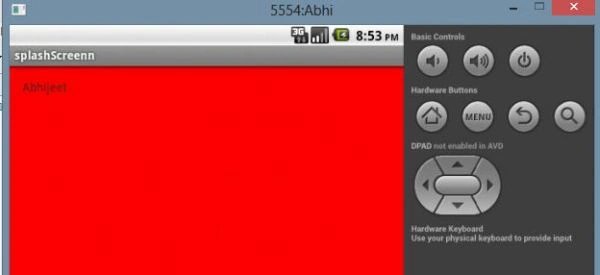
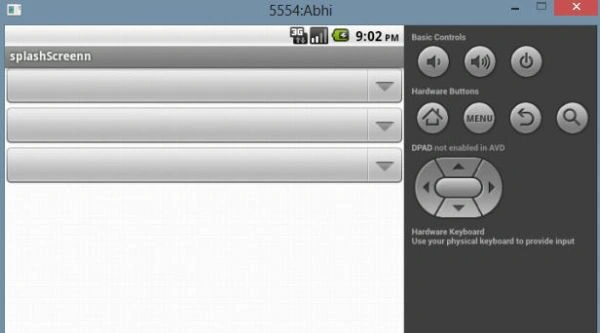
Output
- MainActivity.java
- package com.example.splashscreenn;
- import java.util.Timer;
- import java.util.TimerTask;
- import android.os.Bundle;
- import android.app.Activity;
- import android.content.Intent;
- import android.view.Menu;
- public class MainActivity extends Activity {
- TimerTask ttt;
- @Override
- protected void onCreate(Bundle savedInstanceState) {
- super.onCreate(savedInstanceState);
- setContentView(R.layout.activity_main);
- ttt = new TimerTask() {
- @Override
- public void run() {
- Intent i = new Intent(getApplicationContext(), A.class);
- startActivity(i);
- }
- };
- Timer t = new Timer();
- t.schedule(ttt, 4000);
- }
- }
- package com.example.splashscreenn;
- import android.app.Activity;
- import android.os.Bundle;
- public class A extends Activity {
- @Override
- protected void onCreate(Bundle savedInstanceState) {
- super.onCreate(savedInstanceState);
- setContentView(R.layout.home);
- }
- }
- <RelativeLayout
- xmlns:android="http://schemas.android.com/apk/res/android"
- xmlns:tools="http://schemas.android.com/tools"
- android:layout_width="match_parent"
- android:layout_height="match_parent"
- android:background="#ff0000"
- android:paddingBottom="@dimen/activity_vertical_margin"
- android:paddingLeft="@dimen/activity_horizontal_margin"
- android:paddingRight="@dimen/activity_horizontal_margin"
- android:paddingTop="@dimen/activity_vertical_margin"
- tools:context=".MainActivity" >
- <TextView
- android:layout_width="wrap_content"
- android:layout_height="wrap_content"
- android:text="Abhijeet" />
- </RelativeLayout>
- <?xml version="1.0" encoding="utf-8"?>
- <LinearLayout
- xmlns:android="http://schemas.android.com/apk/res/android"
- android:layout_width="match_parent"
- android:layout_height="match_parent"
- android:orientation="vertical" >
- <Spinner
- android:id="@+id/spinner1"
- android:layout_width="match_parent"
- android:layout_height="wrap_content" />
- <Spinner
- android:id="@+id/spinner2"
- android:layout_width="match_parent"
- android:layout_height="wrap_content" />
- <Spinner
- android:id="@+id/spinner3"
- android:layout_width="match_parent"
- android:layout_height="wrap_content" />
- </LinearLayout>
Join the conversation! Your thoughts help the community grow.