
SQL Server database transaction logs are the most important part of a database. Every DBA and database developer should understand Database Transaction logs, this is a huge topic of SQL Server.
About database Transaction logs
SQL Server databases have a transaction log that records all transactions and the database modifications made by each transaction. This contains enough information to undo all changes made to the data file as part of any separate transaction. If you want to see the data in a given database's transaction log, there is an undocumented SQL Server command called DBCC LOG. This command is used to view the transaction log for a specific database. The DBCC Log command only shows log information and this command will not provide you detailed information.
Syntax
- DBCC log ({dbid|dbname}, [, type= {-1|0|1|2|3|4}])
Parameters
Dbid or dbname: Enter either the dbid or the database name of the database in question.
Type is the type of output as in the following:
- minimum information (operation, context, transaction id)
- More information (plus flags, tags, row length, description)
- Very detailed information (plus object name, index name, page id, slot id)
- Full information about each operation
- Full information about each operation plus hexadecimal dump of the current transaction log's row.
1. The full information about each operation plus hexadecimal dump of the current transaction log's row, plus Checkpoint Begin, DB Version, Max XDESID by default type = 0.
Note: DBCC LOG can also be called as a system function for use in a SELECT statement or other queries via the fn_dblog function.
Syntax
- USE MASTER
- GO
- SELECT TOP 10 * FROM fn_dblog(<start>, <end>)
The first is the starting log sequence number, or LSN. You can also specify NULL, which means it will return everything from the start of the log.
The second is the ending LSN. You can also specify NULL, which means you want to return everything to the end of the log .
I will create a small Test Environment and how to work with SQL Server Transaction logs using DDL and DML oprations, like a create, insert, update and delete.
The test environment
Create the test environment with the following:
- --Create Test DB.
- USE [master];
- GO
- CREATE DATABASE TrackingDBLog;
- GO
- -- Create tables.
- USE TrackingDBLog;
- GO
- CREATE TABLE [Test] (
- [ID] INT IDENTITY (1, 1),
- [Date] DATETIME DEFAULT GETDATE (),
- [Name] CHAR (25) DEFAULT 'A');
- DBCC log (TrackingDBLog,1)
- GO
- select Top 10 * FROM fn_dblog(null,null)
- USE TrackingDBLog;
- GO
- select COUNT(*) from fn_dblog(null,null)

We have created a dummy database and a blank table. You can check the logs by using this function to get the details for all the processes used to create the database and table. Look at the following code to see the data in the transaction log file.
The DDL Scenario
Create the DDL Scenario with the following:


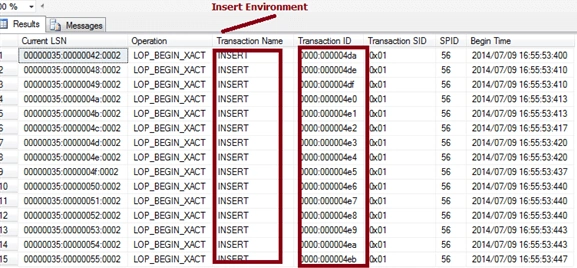
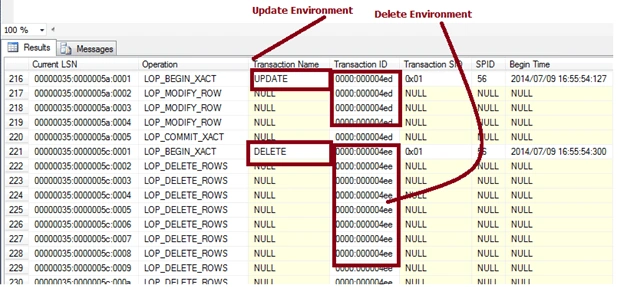


Saijyoti PillaiPosted Nov 26, 2017, 12:32 PM
I have a question, how come the count has changed before and after the backup statement?Can you please explain SELECT * FROM fn_dblog(null,null) GO BACKUP DATABASE TrackingDBLog TO DISK = 'D:\backup\TrackingDBLog.bak' GO SELECT COUNT(*) FROM fn_dblog(null,null)
Shivom AgarwalPosted Jul 11, 2014, 3:08 AM
thanx sanjay
Sanjay KumarPosted Jul 11, 2014, 12:56 AM
Nice artical