

Here I will explain how to use and connect to Sqlite in a Windows application.
Why we use Sqlite in C#
We use Sqlite because all ther other databases that we use generally require a server and Sqlite is a database that we can embed within our system. So we don't require any server for a Sqlite database. Most of mobile and small databases don't require a server and if we want to make a standalone application for one computer that doesn't depend on another server then Sqlite is perfect for us.
For more information about Sqlite you can go to this link: Sqlite.
How to connect Sqlite with C#. Basically C# doesn't support Sqlite itself so we need a third-party DLL to connect to a Sqlite database.
There is a link, from this link you can get a DLL file link and at this link you go to the download section and download the latest version. The download first link is a ZIP file so you extract this file to your application in the debug folder.
Step 1: Select a new project
Open your Visual Studio and select new project and in Visual C# select "Windows Forms Application" and provide the name as Sqlite and click on OK.
Step 2: Extract DLL file
Right-click on your application and select "Open folder in your window application" and then go to:
BIN -> Debug and extract your application here.
After this again right-click on your application and select "Add reference" and go to:
Browser -> BIN -> Debug and select DLL file (Sqlite Net.dll).
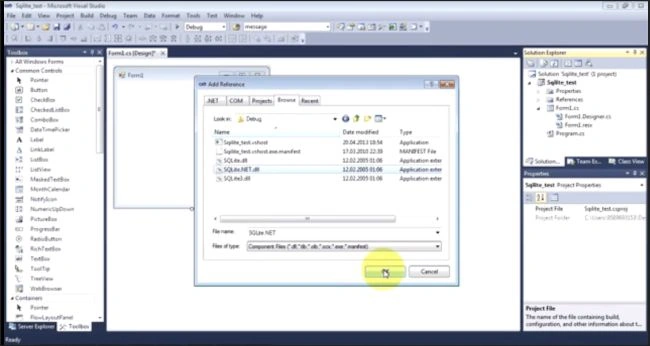
Step 3: Form
Drag and drop a button and provide the name as "connect Sqlite".
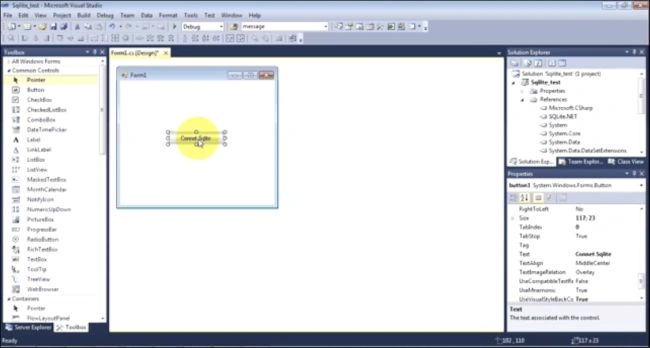
Step 4: Code
Double-click on the button and write the following code.
Add a namespace
using Finisar.SQLite;
You use sample code from this link:
using System;
using System.Collections.Generic;
using System.ComponentModel;
using System.Data;
using System.Drawing;
using System.Text;
using System.Windows.Forms;
using System.Data.SqlClient;
using System.Text;
using System.IO;
namespace First_Csharp_app
{
public partial class Form1 : Form
{
public Form1()
{
InitializeComponent();
}
private void Choose_Btn_click(object sender, EventArgs e)
{
// [snip] - As C# is purely object-oriented the following lines must be put into a class:
// We use these three SQLite objects:
SQLiteConnection sqlite_conn;
SQLiteCommand sqlite_cmd;
SQLiteDataReader sqlite_datareader;
// create a new database connection:
sqlite_conn = new SQLiteConnection("Data Source=database.db;Version=3;New=True;Compress=True;");
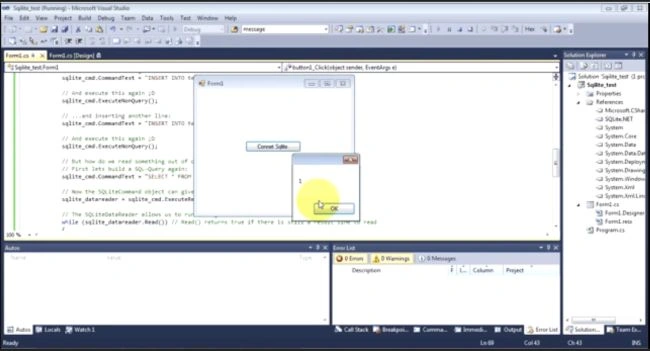
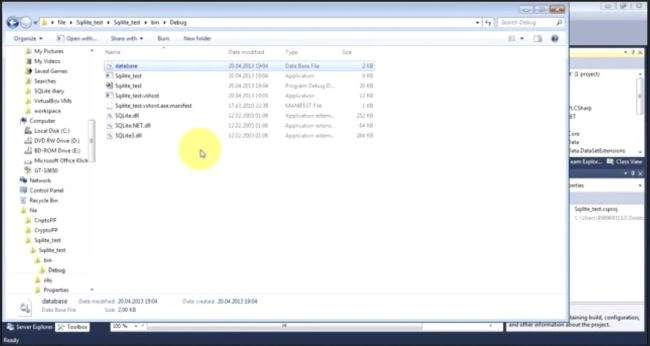
qa birPosted Apr 19, 2023, 6:51 AM
What is messageBox
yesubabu kPosted Dec 15, 2018, 12:57 AM
Unable to open database
yesubabu kPosted Dec 15, 2018, 12:56 AM
After completed application then when i run setup on client machine getting an error like :
Sripriya KPosted Dec 22, 2016, 5:06 AM
Where do we find the applications mentioned in the step2
Munesh SharmaPosted Jun 10, 2016, 2:09 AM
thank you
GokulPosted Jun 10, 2016, 2:08 AM
Nice
Sr KarthigaPosted May 3, 2016, 9:00 PM
Good one
Ajaykumar BankapurPosted Mar 5, 2016, 5:15 AM
thanks munesh...
Udaya kumarPosted Oct 31, 2014, 9:35 AM
Hai munish Thanks for sharing, I searched sqlite dll but i cant have correct package. can u give the url, which dll u referenced. . .