
Introduction
In this article, we will see how to use Sequelize CLI to create a table for our database and how can we set up a relationship between the two tables using foreign keys.
Prerequisites
- Node
- MySQL
Project structure
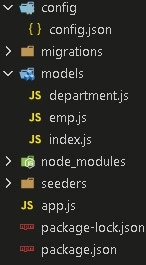
Setup the node project
- Open the console and type the below cmd to make a new directory.
mkdir seqlcli - Then change to that directory by typing the below cmd.
# cd seqlcli
Setup Node in the project
- Now type the below cmd on the console which will generate the package.json file.
# npm init - It will ask you to provide the basic details related to the package.json file like name, version, author, etc.
- After the file is initialized, we can build our node project.
- The file will have all the metadata related to our project.
Install packages
Now, we will install the package required for building our application.
- On console type
npm install --save sequelize mysql2 sequelize-cli express body-parser - Express: This is a framework on which the complete application will be built.
- Body-parser: This will fetch the form data from the coming request.
- Sequelize: This will contain all the files related to Sequelize ORM.
- Mysql2: This is a driver related to our database.
- Sequelize CLI: This allows us to make the use of sequelize files from the command line
Setup sequelize
Now we will set up a Sequelize structure required for building the application.
On console type
# sequelize
This will give you the following output.
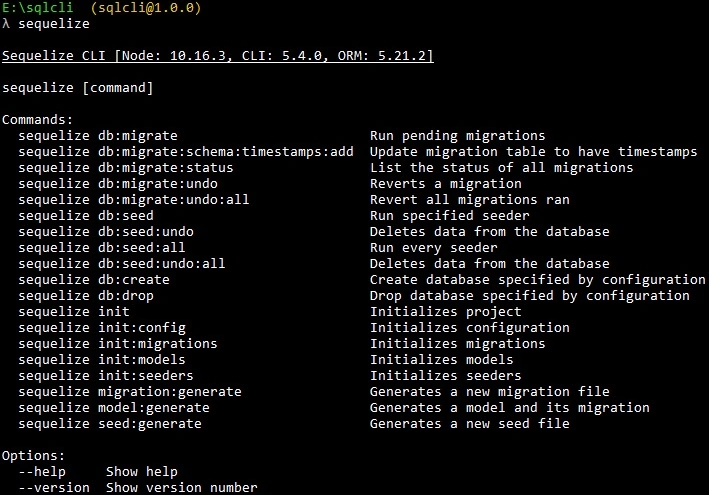
This shows that sequelize CLI is properly initialized.
Now initialize Sequelize by typing
#sequelize init
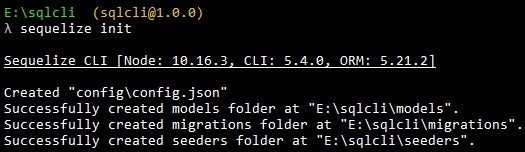
It will generate the following folder.
- Config: Will contain the config.json file which will contain the connection details.
- Models: This will contain an index.js file. This file will be generated with Sequelize CLI and collect all the models from the models directory and associate them if needed.
- Migrations: This will contain the migration files. The migration file is a change in that model or you can say the table used by CLI. It treats migrations like a commit or a log for changes in the database.
- Seeders: It will contain the seeder files. The seeder files are those which will contain data that we want to put in the table by default.
Create a Model
Now we will generate two models or tables for our database.
- Department
#sequelize model:generate --name department --attributes dbName:string - Emp
# sequelize model:generate --name emp --attributes name:string,salary:integer
The model generates a command requires two options
- Name: Name of the model.
- Attributes: The fields or attributes of the model/table.
Now we will get two models in our model folder with department, and emp name.
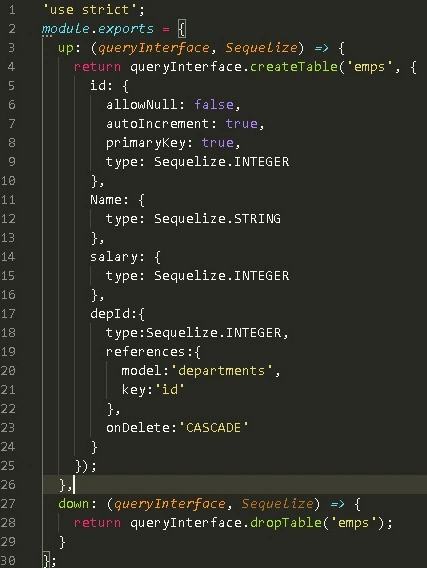
Two files will be added to the migration folder, which will contain the table schema of both these models.
Remember if we want to add or remove any field from the table then we will have to make changes in both the migration file and the model file of that particular model.
Make relationship
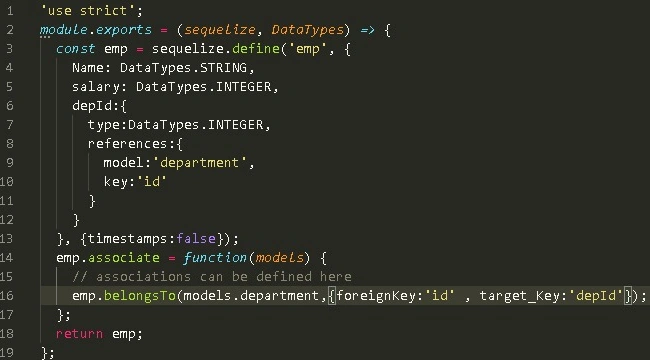
Now we will make a relationship between the department and the emp table through foreign Key.
To make a relationship between the two we use.
- HasMany.
- BelongsTo
- HasMany: It describes a 1:n or n:n relationship. The department table can have many relationships.
- BelongsTo: It describes a 1:1 or n:1 relationship.The emp table will have one relationship that is with the department.
- Open the department model and apply a relationship to it.
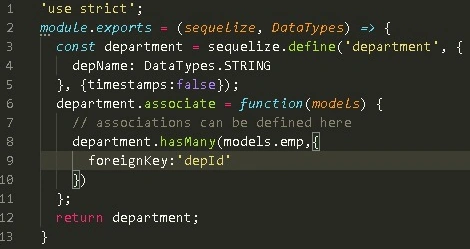
department.hasMany(models.emp, { foreignKey: 'depId' });
Here, the department model can have multiple relationships. One will be with the emp model.
Now we will specify the name of the column/attribute of the emp model which will contain the department references in the emp model.
So we have to tell the department model which column/attribute in emp will contain its references.
Here the depId will contain the reference of the department in the emp model.
We do it by providing it in foreign-key
zephyr primePosted Sep 18, 2020, 7:33 PM
I think the code to generate the tables is wrong It has mispellings and missing fields.Shouldn't this: sequelize model:generate --name department --attributes dbName:string be: sequelize model:generate --name department --attributes depName:string and sequelize model:generate --name emp --attributes name:string,salary:integer be sequelize model:generate --name emp --attributes name:string,salary:integer,depId:integer