

Introduction
A quality feature in the Windows family is to zip (compress) a file or folder by using the in-built tool. We can also use this feature in Windows 10 to zip (compress) a file or folder as well.
The first thing you need to know for this tutorial is what an archive file is. For easy portability and storage, archive files are used to gather multiple files into a single file, or they compress large files into smaller files, which take up less space. Zip, Rar, and APK are some formats of Archive files.
You should also know about Zip and Rar files. A ZIP file is used to compress one or more files or folders simultaneously and is an archive file format that supports lossless data compression. As per Wikipedia, "The. The ZIP file format was designed by Phil Katz of PKWARE and Gary Conway of Infinity Design Concepts. This format was created in 1989 and was first implemented in PKWARE, Inc.'s PKZIP utility, as a replacement for the previous ARC compression format by Thom Henderson". There are many different ways to compress files or folders inside a zip. In ZIP, each file is stored separately and various methods are used to compress it. Because files in a zip archive are compressed individually, it is possible to add them or add new ones, without applying compression or decomposition to the entire archive.
RAR is a proprietary archive file format that supports data compression and file spanning. RAR files require third-party software to create, open, and extract archive content, via WinRAR. As per Wikipedia, "It was developed by a Russian software engineer, Eugene Roshal (the name RAR stands for Roshal Archive), and the RAR software is licensed by win.rar GmbH".
Difference between the zip and rar format.
- Basics: ZIP is a free and open standard archive file format that supports lossless data compression, while RAR is a proprietary archive file format for lossless data compression that is not free and requires a third-party tool called WinRAR.
- Extensions: Zip files generally use the file extension .zip while filename extensions used by RAR are .rar
- Security: ZIP supports a password-based symmetric encryption system, while RAR provides no password-based security.
- Proprietary software: To create, open, and extract the contents of the RAR file, a third-party software tool called WinRAR is required whereas Zip is a widely used format, supported by various commercial and open-source tools.
- Advantages: The zip format is a much more popular format than the RAR format among users and is still the most commonly used archive type, still accounting for a significant number of archive (compressed) files on the Internet.
If you are facing problems when sending large-size files or large numbers of files via email or any other online platform (such as Microsoft Team, Skype, or WhatsApp), zip those files. Larger files occupy a lot of space and cannot be easily shared on any online platform. Zipping files can be a better option that compresses large files in the smallest space and saves space and also allows you to combine multiple files into one.
This tutorial will show you various ways on, how to zip or unzip files or folders in Windows 10.
How to compress (zip) files or folders
Method 1. Using file explorer
To zip a single file or folder that you want, follow the instructions below to proceed.
Step 1. Open the File Explorer. The user can also press the "Window + E" key to open the File Explorer).
Step 2. Navigate to the file or folder that you want to compress (zip).
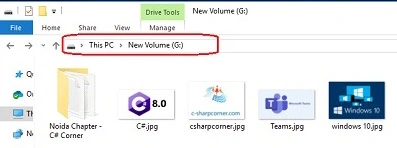
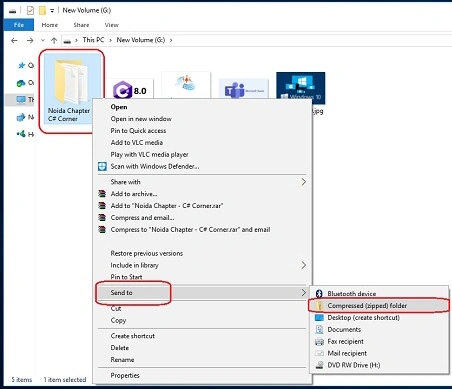
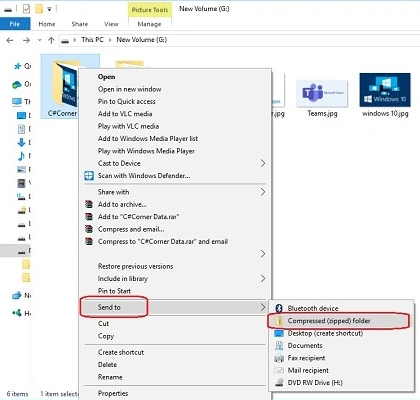
Step 3. If you want to zip (compress) a single file or folder, right-click on it and then, select Send to > Compressed (zipped) folder option.
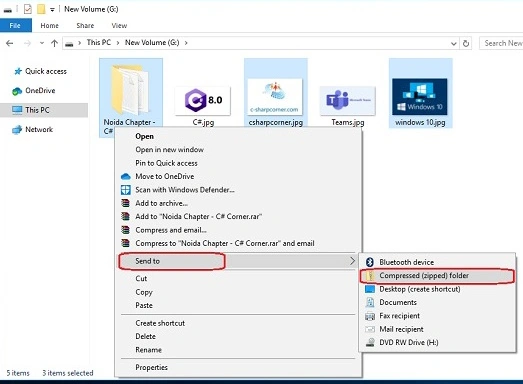
If the user wants to zip multiple files or folders, then select them all, right-click on them, and then select Send to > Compressed (zipped) folder option.
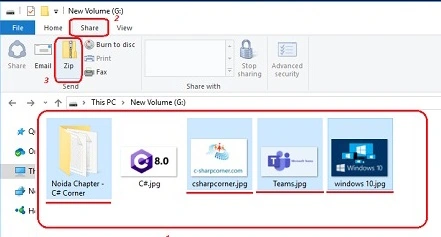
Note. Alternatively, you can select all files and folders that you want to zip and then, click on the "Zip" button under the "Share" tab to compress (zip) them.
Method 2. Zip multiple files or folders
If you want to zip multiple files and folders simultaneously, then follow the instructions below to proceed.
Step 1. Navigate to the files or folders that you want to zip (compress).
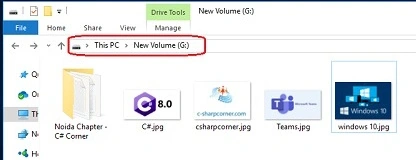
Step 2. Create a "New Folder" here and give a unique name to it.
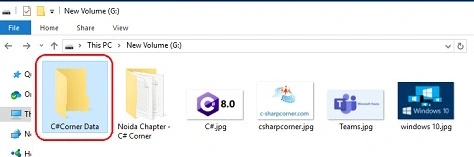
Step 3. Move all the files and folders that you want to zip into the newly created folder.

Step 4. Right-click on the newly created folder and select Send to > Compressed (zipped) folder option.
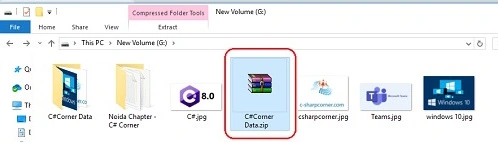
Step 5. Type a unique name for the newly created compressed (zipped) folder.
How to view a zip folder's content
If you are confused about what you have zipped with the files, or if you want to add more files to an already zipped folder, don't worry, you have a way to view and modify the zipped folder. The zip folder will open like a normal folder and you can see the files or folders inside it.
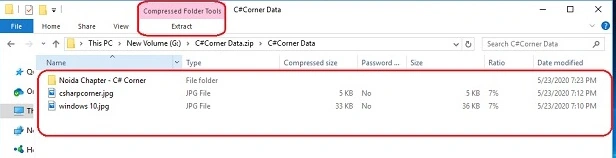
If you want to add some more files to it, you can add more files to it by drag and drop. If you want to delete a file, you can do so. If you want to extract it, you can simply click on the "Extract All" button under the extract tab, then the "Extract Compressed Folder" Wizard will appear on the screen, then choose the desired location to extract it and click on the "Extract" button.
How to extract (unzip) files or folders
To extract or unzip files or folders that you want, follow the instructions below to proceed.
Method 1. Extract all or single file or folder
To extract all the files or folders from a zipped folder, follow the instructions below to proceed.
Step 1. Navigate to the zipped folder from where you want to extract all or a single file, then double-click on it.
Step 2. Select the files or folders that you want to extract.
Step 3. Simply "Copy" it and "Paste" to your desired location.
Method 2. Extract all the files or folders
Step 1. Navigate to the zipped folder from where you want to extract all the files or folders.
Step 2. Right-click on it and click on the "Extract files" option.
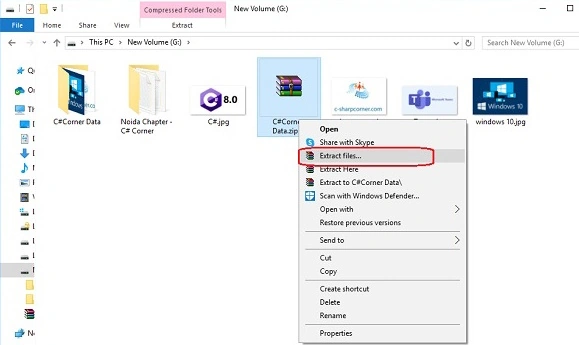
Step 3. The "Extraction path and options" window will appear on the screen. Now, choose the destination folder where you want to extract all the files and click on the "OK" button.
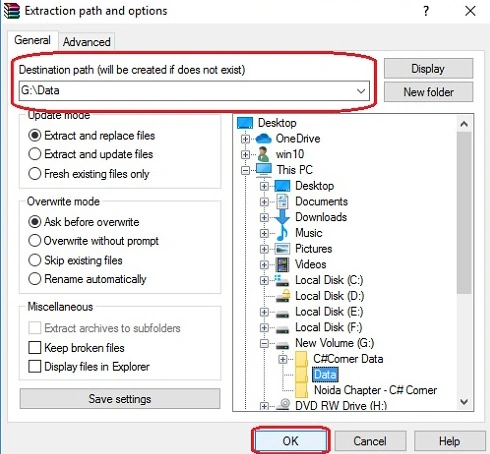
Congrats! You have successfully extracted or unzipped your folder. (Please note that this process will occur when you have WinRAR software in your system).
Conclusion
By following any of the above methods, you can zip or unzip files and folders in Windows 10.
I hope you enjoyed this article. Follow C# Corner to learn more new and amazing things about Windows 10.
Thanks for reading this article.
Chaman GautamPosted May 27, 2020, 11:18 AM
Informative article