Introduction
Image Source:
File:Postgresql elephant.svg
Last time I provided an overview of the open-source database named
PostgreSQL aka
Postgres. To learn more click here
Overview of Open Source Postgre SQL Database.
Note: Now I am assuming that you have the knowledge of Postgres on behalf of the preceding article and I have a table named "employee" in the database named "test".
Here is the schema of table and table content (0 rows).
Now I will explain how to do the CRUD operations in Postgres.
CRUD operations mean:
- C- Create means "Insert the data".
- R- Read means "Select the data".
- U- Update means "Update the data".
- D- Delete means "Delete the data".
Reference:
Create, read, update and delete.
To do the operations in Postgres using ASP.Net, you need to download the
Data Provider named "Npgsql" like "sqlclient", "oledb", "odbc" and so on.
You can download it from here
.Net Data Provider for Postgresql.
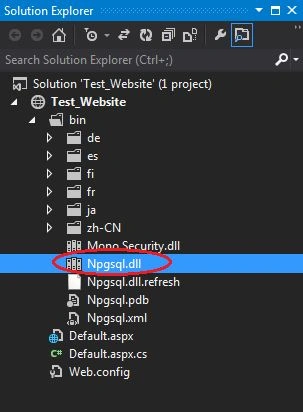
After downloading it, you will find the
Npgsql.dll file in the folder.
To learn more about
CRUD operations in postgre using ASP.Net, use the proceeding procedure:
Step 1Create a website named "Test_Website".
Add the reference of the downloaded Npgsql.dll by right-clicking on the website in the Solution Explorer.
And then browse to the path (of the proceeding sub-steps) where Npgsql.dll was saved and then:
- Click on the Browse tab.
- Click on the Browse button.
- Select the path of Npgsql.dll.
- Click on the Add button.
- Click on the OK button.
After adding the reference of Npgsql.dll to the website, it will look like this:
Now to do the CRUD operations using
Npgsql.dll.
Inserting: To insert the data into the "Postgres" database, add the following controls on the default page named "Default.aspx" for doing the insert:
- 1 TextBox for Employee ID.
- 1 TextBox for Employee First Name.
- 1 TextBox for Employee Last Name.
- 1 TextBox for Employee Email ID.
- 1 button for Submit.
- 1 label for messages.
- <table>
- <tr>
- <td colspan="2">
- <h1>Insertion</h1>
- </td>
- </tr>
- <tr>
- <td>Employee ID</td>
- <td>:</td>
- <td>
- <asp:TextBox ID="txtEmpID" runat="server"></asp:TextBox>
- </td>
- </tr>
- <tr>
- <td>Employee First Name</td>
- <td>:</td>
- <td>
- <asp:TextBox ID="txtEmpFname" runat="server"></asp:TextBox>
- </td>
- </tr>
- <tr>
- <td>Employee Last Name</td>
- <td>:</td>
- <td>
- <asp:TextBox ID="txtEmpLname" runat="server"></asp:TextBox>
- </td>
- </tr>
- <tr>
- <td>Employee Email-ID</td>
- <td>:</td>
- <td>
- <asp:TextBox ID="txtEmpEmail" runat="server"></asp:TextBox>
- </td>
- </tr>
- <tr>
- <td colspan="2">
- <asp:Button ID="btnInsertion" runat="server" Text="Insert" OnClick="btnInsertion_Click" Style="width: 48px" />
- <asp:Label ID="lblmsg" runat="server" ForeColor="Red"></asp:Label>
- </td>
- </tr>
- </table>
Design View: it will look like.
Add some namespaces to the .cs code file of the default page.
- using System.Data;
- using System.Configuration;
- using Npgsql;
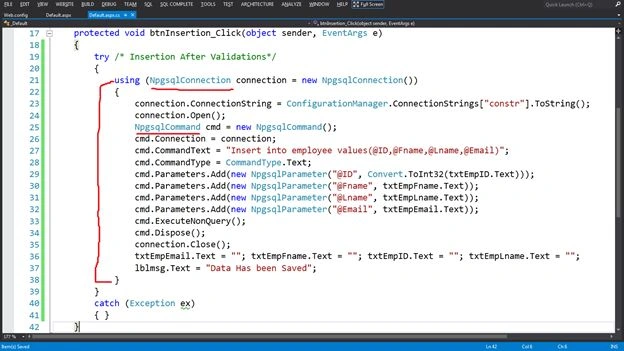
- Add the proceed code on the click event of the button
- protected void btnInsertion_Click(object sender, EventArgs e) {
- try {
-
- using(NpgsqlConnection connection = new NpgsqlConnection()) {
- connection.ConnectionString = ConfigurationManager.ConnectionStrings["constr"].ToString();
- connection.Open();
- NpgsqlCommand cmd = new NpgsqlCommand();
- cmd.Connection = connection;
- cmd.CommandText = "Insert into employee values(@ID,@Fname,@Lname,@Email)";
- cmd.CommandType = CommandType.Text;
- cmd.Parameters.Add(new NpgsqlParameter("@ID", Convert.ToInt32(txtEmpID.Text)));
- cmd.Parameters.Add(new NpgsqlParameter("@Fname", txtEmpFname.Text));
- cmd.Parameters.Add(new NpgsqlParameter("@Lname", txtEmpLname.Text));
- cmd.Parameters.Add(new NpgsqlParameter("@Email", txtEmpEmail.Text));
- cmd.ExecuteNonQuery();
- cmd.Dispose();
- connection.Close();
- txtEmpEmail.Text = "";
- txtEmpFname.Text = "";
- txtEmpID.Text = "";
- txtEmpLname.Text = "";
- lblmsg.Text = "Data Has been Saved";
- }
- } catch (Exception ex) {}
- }
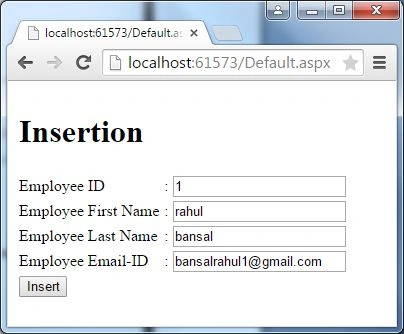
Run the default page that will look like the following after filling in the data.
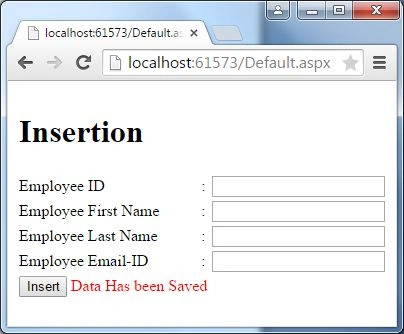
After submitting the data:
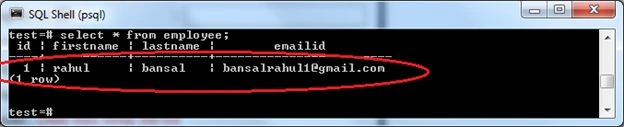
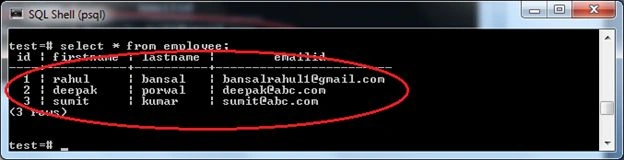
You can see the data in the database.
Selection
I have a table named "employee" to select the data from the "Postgres" database, after adding some rows of data into the table.
Add the following controls on the default page named "Default.aspx" for inserting:
- 1 button for Submit.
- 1 Grid view to display the data.
- <table>
- <tr>
- <td>
- <h1>Selection</h1>
- </td>
- </tr>
- <tr>
- <td>
- <asp:Button ID="btnSelect" runat="server" Text="Select All Data" OnClick="btnSelect_Click" />
- </td>
- </tr>
- <tr>
- <td>
- <asp:GridView ID="GridView1" runat="server"></asp:GridView>
- </td>
- </tr>
- </table>
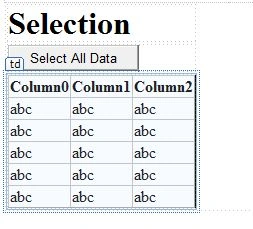
Design View: it will look like:
These 3 namespaces should be added to the .cs code file of the default page.
- using System.Data;
- using System.Configuration;
- using Npgsql;
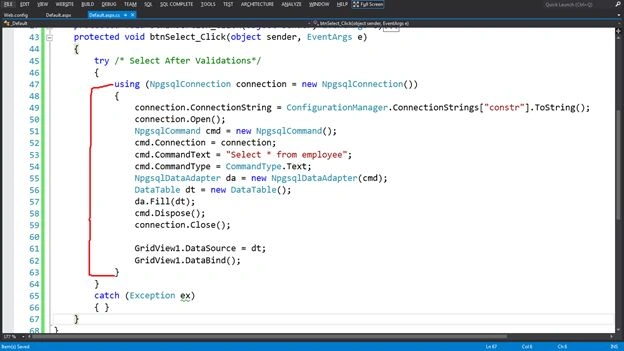
- Add the proceed code on the click event of the button
- protected void btnSelect_Click(object sender, EventArgs e) {
- try
- {
- using(NpgsqlConnection connection = new NpgsqlConnection()) {
- connection.ConnectionString = ConfigurationManager.ConnectionStrings["constr"].ToString();
- connection.Open();
- NpgsqlCommand cmd = new NpgsqlCommand();
- cmd.Connection = connection;
- cmd.CommandText = "Select * from employee";
- cmd.CommandType = CommandType.Text;
- NpgsqlDataAdapter da = new NpgsqlDataAdapter(cmd);
- DataTable dt = new DataTable();
- da.Fill(dt);
- cmd.Dispose();
- connection.Close();
-
- GridView1.DataSource = dt;
- GridView1.DataBind();
- }
- } catch (Exception ex) {}
- }
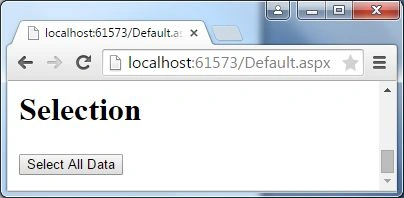
Run the default page that will look like this:
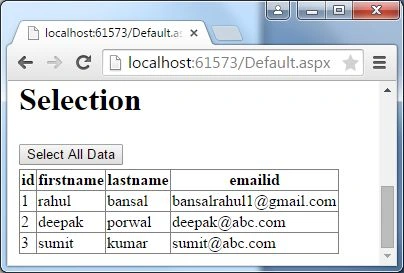
After selecting the data:
Updating
I have a table named "employee" to update the data from the "Postgres" database, after adding some rows of data into the table.
Add the following control to the default page named "Default.aspx" for inserting:
1 button to update the data in the insertion section
- <asp:Button ID="btnUpdation" runat="server" Text="Update" OnClick="btnUpdation_Click" />
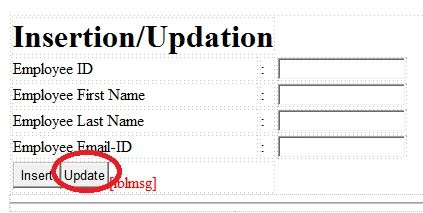
Design View: it will look alike
These 3 namespaces should be added in the .cs code file of the default page.
- using System.Data;
- using System.Configuration;
- using Npgsql;
-
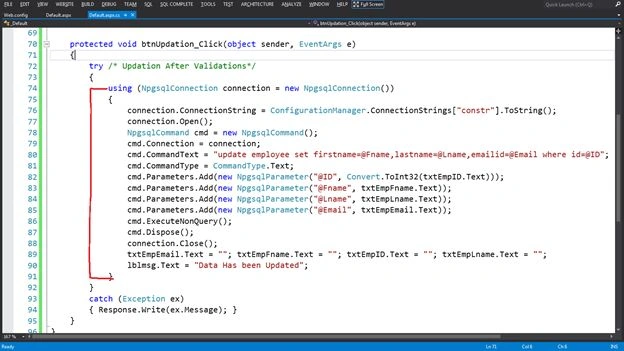
- protected void btnUpdation_Click(object sender, EventArgs e) {
- try
- {
- using(NpgsqlConnection connection = new NpgsqlConnection()) {
- connection.ConnectionString = ConfigurationManager.ConnectionStrings["constr"].ToString();
- connection.Open();
- NpgsqlCommand cmd = new NpgsqlCommand();
- cmd.Connection = connection;
- cmd.CommandText = "update employee set firstname=@Fname,lastname=@Lname,emailid=@Email where id=@ID";
- cmd.CommandType = CommandType.Text;
- cmd.Parameters.Add(new NpgsqlParameter("@ID", Convert.ToInt32(txtEmpID.Text)));
- cmd.Parameters.Add(new NpgsqlParameter("@Fname", txtEmpFname.Text));
- cmd.Parameters.Add(new NpgsqlParameter("@Lname", txtEmpLname.Text));
- cmd.Parameters.Add(new NpgsqlParameter("@Email", txtEmpEmail.Text));
- cmd.ExecuteNonQuery();
- cmd.Dispose();
- connection.Close();
- txtEmpEmail.Text = "";
- txtEmpFname.Text = "";
- txtEmpID.Text = "";
- txtEmpLname.Text = "";
- lblmsg.Text = "Data Has been Updated";
-
- }
- } catch (Exception ex) {}
- }
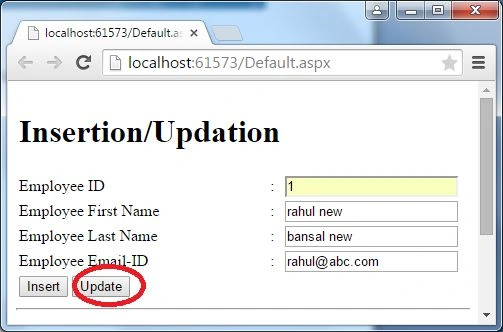
Run the default page that will look like the following after filling in the new data that you want to update.
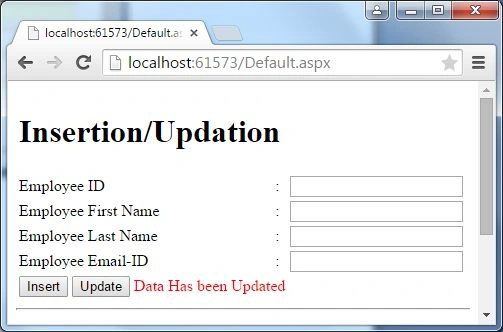
Then click on the update button.
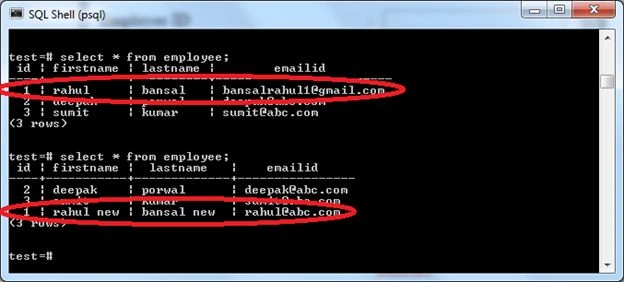
You can see the data changes in the database.
I have a table named "employee" to delete the data from the "Postgres" database, after adding some rows of data into the table.
Add the following controls to the default page named "Default.aspx" for inserting:
- 1 TextBox for employee ID.
- 1 button for Deletion.
- 1 label for message.
- <table>
- <tr>
- <td>
- <h1>Selection</h1>
- </td>
- </tr>
- <tr>
- <td>
- <asp:Button ID="btnSelect" runat="server" Text="Select All Data" OnClick="btnSelect_Click" />
- </td>
- </tr>
- <tr>
- <td>
- <asp:GridView ID="GridView1" runat="server"></asp:GridView>
- </td>
- </tr>
- </table>
- <table>
- <tr>
- <td colspan="3">
- <h1>Deletion</h1>
- </td>
- </tr>
- <tr>
- <td>Employee ID</td>
- <td>:</td>
- <td>
- <asp:TextBox ID="txtEmployeeID" runat="server"></asp:TextBox>
- </td>
- </tr>
- <tr >
- <td colspan="3">
- <asp:Button ID="btnDelete" runat="server" Text="Delete" OnClick="btnDelete_Click" />
- <asp:Label ID="lblmessage" runat="server" ForeColor="Red"></asp:Label>
- </td>
- </tr>
- </table>
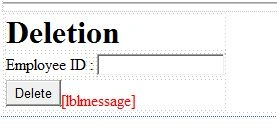
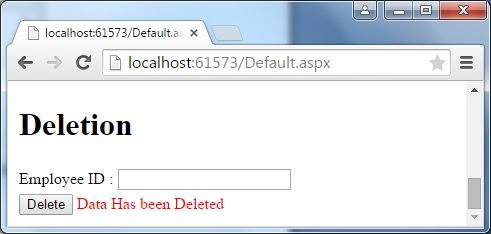
Design View: it will look like:
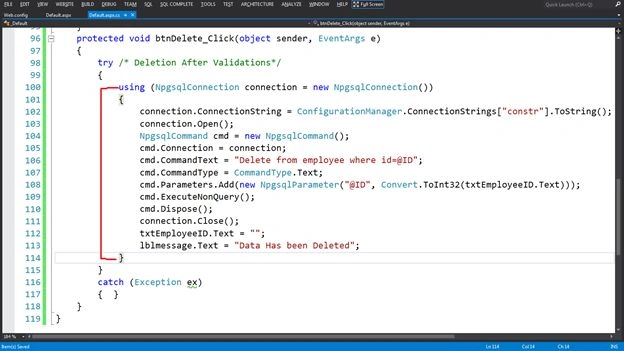
These 3 namespaces should be added to the .cs code file of the default page.
- using System.Data;
- using System.Configuration;
- using Npgsql;
-
- protected void btnDelete_Click(object sender, EventArgs e) {
- try
- {
- using(NpgsqlConnection connection = new NpgsqlConnection()) {
- connection.ConnectionString = ConfigurationManager.ConnectionStrings["constr"].ToString();
- connection.Open();
- NpgsqlCommand cmd = new NpgsqlCommand();
- cmd.Connection = connection;
- cmd.CommandText = "Delete from employee where id=@ID";
- cmd.CommandType = CommandType.Text;
- cmd.Parameters.Add(new NpgsqlParameter("@ID", Convert.ToInt32(txtEmployeeID.Text)));
- cmd.ExecuteNonQuery();
- cmd.Dispose();
- connection.Close();
- txtEmployeeID.Text = "";
- lblmessage.Text = "Data Has been Deleted";
- }
- } catch (Exception ex) {}
- }
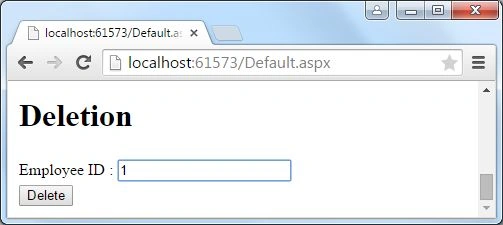
Run the default page and fill in the id that you want to delete.
Then click on the delete button.
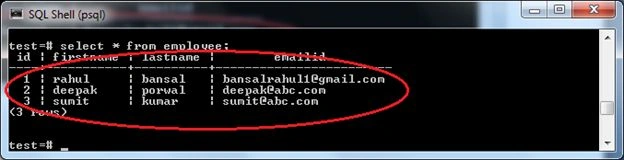
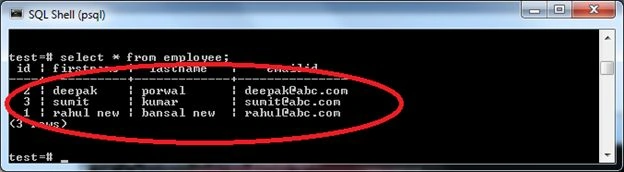
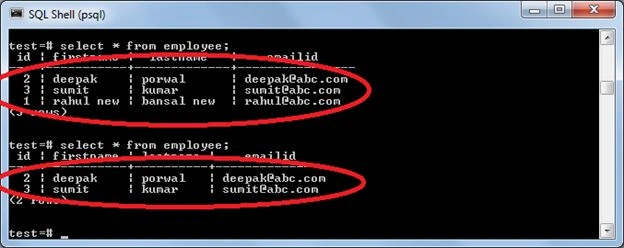
You can see the remaining 2 rows in the database and earlier there were 3 rows.







Adarsh SinghPosted Sep 12, 2019, 6:10 AM
Thanks For sharing It is Very Helpful For me.
Babu KasaniPosted Apr 23, 2019, 9:53 AM
PostgreSQL Function output as larger text, so how to read the larger text using c#
Deepak YadavPosted Dec 17, 2018, 6:31 AM
How to perform crud using procedure(postgresql)
Rajeev SonkarPosted Jul 6, 2018, 9:27 AM
I have import a shapefile in postgresql. And create a WMS service in geoserver.but unbale to intigrate in asp.net.plz help me.
Rajeev SonkarPosted Jul 6, 2018, 9:25 AM
Its not working . I am facing some problems.can u resolve
Anilananda ChakraborttyPosted Jun 13, 2018, 1:31 AM
How to perform crud operation using PostgreSQL function & asp.net with Different schema Name (Not Public) , Also the Schema name and Function Name should be Camel Case Naming Conversion like Shema Name = "Lookup", Function Name = "spInsertData" with Parameter and Without Parameter
Hitesh PrajapatiPosted Feb 1, 2018, 5:15 AM
How to make stored produre in postgresql.. crud operation
Chiheb ChebbiPosted Jun 29, 2015, 10:22 AM
this is really great
NitinPosted May 23, 2015, 8:51 AM
nice
Santhakumar MunuswamyPosted May 22, 2015, 2:52 PM
Thanks for nice one..
Faizal HussainPosted May 22, 2015, 1:17 PM
Thanks for sharing...
Abhishek JaiswalPosted May 22, 2015, 2:51 AM
Informative for me, keep up that good work! :)
Kiranteja JallepalliPosted May 22, 2015, 2:38 AM
i like your explanation
Shubham KumarPosted May 21, 2015, 8:48 AM
nice
Rahul Kumar SaxenaPosted May 20, 2015, 11:42 PM
Good Show..