

Synopsis
- Introduction
- Definition
- Advantages
- Different Controls
Introduction
Html helper is one of the main advantages of MVC. HTML Helper uses any view engine in MVC. It contains many methods, using these methods we create controls like Text box, Check box, Radio button and so on.
Definition
Html Helper is a class. It supports the rendering of Html controls in view.
- Namespace: System.Web.Mvc
- Assembly: System.Web.Mvc (in System.Web.Mvc.dll)
Syntax
- namespace System.Web.Mvc
- {
- public class HtmlHelper
- {
- }
- }
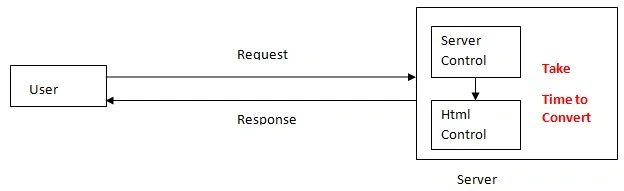
Html Helper is very fast. The browser only knows html if any application is developed and gives request to application from browser. This will take time to convert from server control to html control.
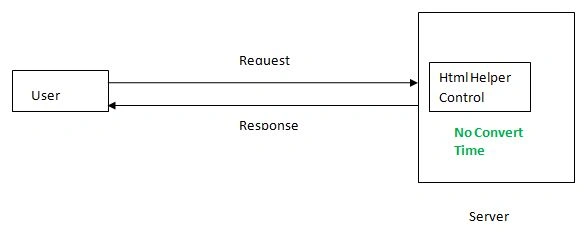
Using Html Helper control do not need to convert html control because it is default html control.
Without Html Helper
With Html Helper
HTML Class
Html Helper is a class. Create object for Html helper class then call html helper method and that method is an html helper control.
Example
- @Html.TextBox("txtName", "")
Here, @Html is an object for Html helper class. It is inside of WebViewPage of abstract class.
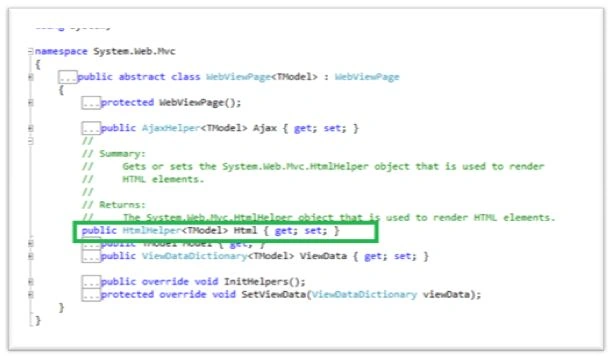
Above image can see the Html object marked in screen line. If you right click on the HtmlHelper and click go to definition, you can see html helper class.
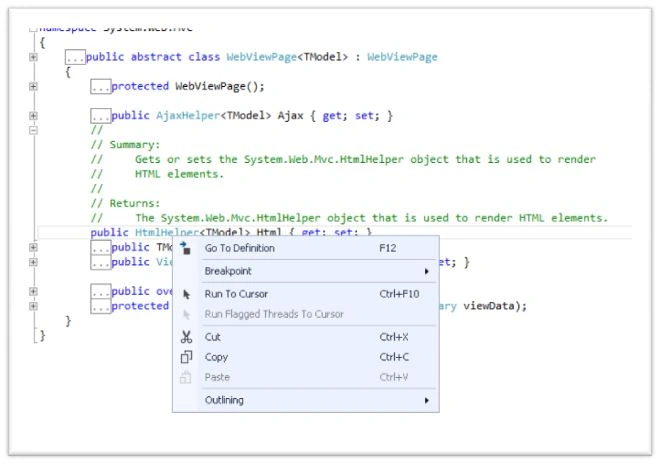
Clicking Go To Definition we can see the HtmlHelper<TModel>; HtmlHelper inherited in HtmlHelper<TModel> class.
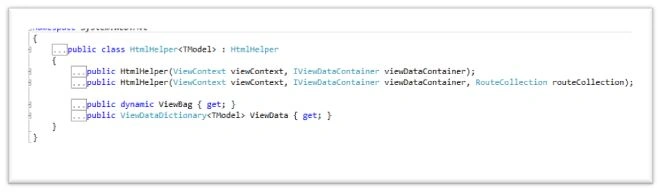
In the above image we can see Html helper inherited in HtmlHelper<TModel>. Now, right click on Html class and click go to definition.
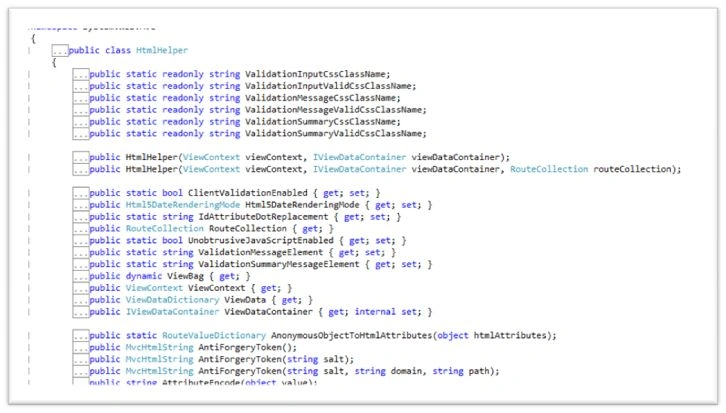
Inside the Html class contains many variables, methods and properties. ViewBag, ViewData are also in Html Helper class. ViewBag is a dynamic variable and ViewData is a ViewDataDictionary object.
All controller methods are in InputExtensions static class. It contains all controller methods.
- public static MvcHtmlString CheckBox(this HtmlHelper htmlHelper, string name);
- public static MvcHtmlString Password(this HtmlHelper htmlHelper, string name);
- public static MvcHtmlString RadioButton(this HtmlHelper htmlHelper, string name, object value, bool isChecked);
- public static MvcHtmlString TextBox(this HtmlHelper htmlHelper, string name);
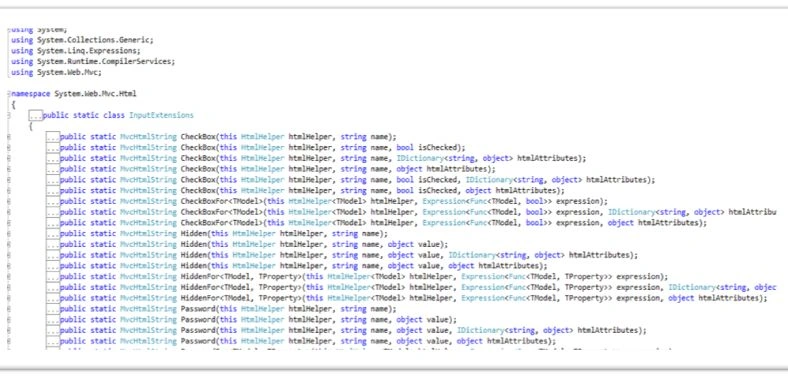
HTML Helper Controls
Text Box
Create text box using Html Helper like below.
- @Html.TextBox("txtName", "")
- @Html.TextBox("txtName", "", new { style="width:250px;",maxlength="5"})
We need to enter content when there is not enough text box so we use text area. In text area we have two attributes, one is row and another one is cols.
- @Html.TextArea("txtNotes", "", new { style = "width:250px;", rows="3",cols="10" })
If you need to select more than one option use check box. Check box can be created using html helper.
- @Html.CheckBox("chkTamil",true)Tamil
- @Html.CheckBox("chkEnglish")English
If you need to select any one option, use radio button. Radio button can be created in html helper like below.
- @Html.RadioButton("rdoSex",'m',true)Male
- @Html.RadioButton("rdoSex",'f')Female
Normally, drop down list reduce the space in design of application. If you need to select more than one from the list, use drop down list.
- @Html.DropDownList("ddlCountry", new SelectList(new List < Object >
- {
- new
- {
- value = 0, text = "--Select--"
- },
- new
- {
- value = 1, text = "India"
- },
- new
- {
- value = 2, text = "UK"
- },
- new
- {
- value = 3, text = "Kondankatture"
- }
- }, "value", "text", 0))
Note
Create a style or create CSS and apply for html helper controls. We can see example below.
- <style>
- .clss {
- color: red; font-family: 'Times New Roman'; font-size: 15px;
- background-color: yellow;
- }
- </style>
- @Html.TextBox("txtAddress", "", new { style = "width:250px;",@class="clss"})
Created CSS class as clss and apply like @class="clss"
@class attribute is used to call CSS class.
Conclusion
We can create many controls using html helper. We can create our own controls using html helper. This article helps those who are learning MVC for the first time. Html Helper is the main advantage of MVC.
Read more articles on MVC:
Gowtham RajamanickamPosted Apr 2, 2016, 12:31 PM
Good one
Debasis SahaPosted Mar 25, 2016, 8:50 AM
Good One..
Vignesh ManiPosted Mar 24, 2016, 5:47 PM
Thank You Mohammad
Mohammad KhalidPosted Mar 23, 2016, 7:29 AM
Good article to learn Html helper
Manivannan PPosted Mar 22, 2016, 10:09 AM
Hi Vignesh, This good one for MVC beginners.
Vignesh ManiPosted Mar 22, 2016, 9:07 AM
Thnak You to all
Shridhar SharmaPosted Mar 22, 2016, 6:23 AM
good one
Sibeesh VenuPosted Mar 22, 2016, 6:19 AM
Nice Share
Rajeev PunhaniPosted Mar 22, 2016, 1:21 AM
Nice.
Vignesh ManiPosted Mar 21, 2016, 12:14 PM
Hi Saillesh Correct one. If you use server control take conversion time. I am told in ASP.NET MVC
Saillesh PawarPosted Mar 21, 2016, 10:46 AM
Vignesh sir, i believe html helper are converted to html at server side just like our asp.net web forms server controls while if we us normal html tags they don't need to convert at server side. Correct me if i am wrong. Nice in depth article.. :)
Vignesh ManiPosted Mar 21, 2016, 9:23 AM
Thanks to all
Jaipal ReddyPosted Mar 21, 2016, 7:33 AM
Nice
Sthitaprajnya Debasis NayakPosted Mar 21, 2016, 5:34 AM
Nice One !!!
Mohammed IbrahimPosted Mar 21, 2016, 5:11 AM
nice
Humayun Kabir MamunPosted Mar 21, 2016, 5:09 AM
Nice...
Guest UserPosted Mar 21, 2016, 5:02 AM
Very Nice
Omid NasriPosted Mar 21, 2016, 4:08 AM
Thx.
Debasis SahaPosted Mar 21, 2016, 4:01 AM
Good One..