

Previous part: Authenticated Requests in .NET 9 Web API [GamesCatalog] 21
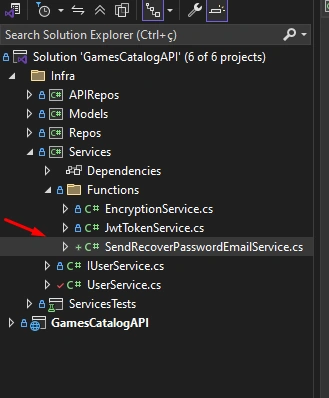
Step 1. Let's create the route that will send the user's password recovery email. In the Services project, under the Functions folder, we will create the SendRecoverPasswordEmailService.cs.
Code
using System.Net;
using System.Net.Mail;

namespace Services.Functions
{
    public interface ISendRecoverPasswordEmailService
    {
        Task SendEmail(string recipientEmail, string token);
    }

    public class SendRecoverPasswordEmailService(string senderEmail, string url, string senderPassword, string host) : ISendRecoverPasswordEmailService
    {
        public async Task SendEmail(string recipientEmail, string token)
        {
            MailMessage mail = new(senderEmail, recipientEmail)
            {
                Subject = "GamesCatalog - Password Recovery",
                Body = $"<h2><a href='{url}/User/RecoverPassword/{token}'>Follow this link to change your Password</a></h2>",
                IsBodyHtml = true
            };

            SmtpClient smtpClient = new(host)
            {
                Port = 587,
                EnableSsl = true,
                Credentials = new NetworkCredential(senderEmail, senderPassword)
            };

            try
            {
                // Send the email
                await smtpClient.SendMailAsync(mail);
                Console.WriteLine("Email sent successfully!");
            }
            catch
            {
                throw;
            }
        }
    }
}
In this code, we assemble and send an email with a link that the user can use to access a page where they will have the option to change their password.
Step 2. In appsettings.json, create the SendEmailKeys with valid credentials from an email account for this kind of sending.
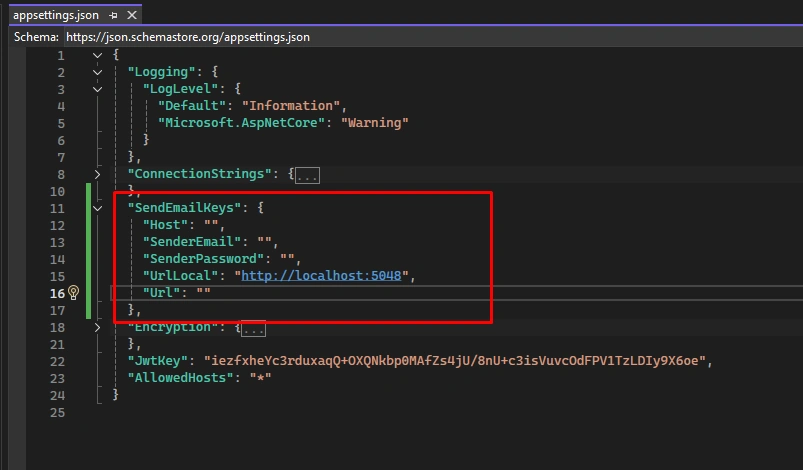
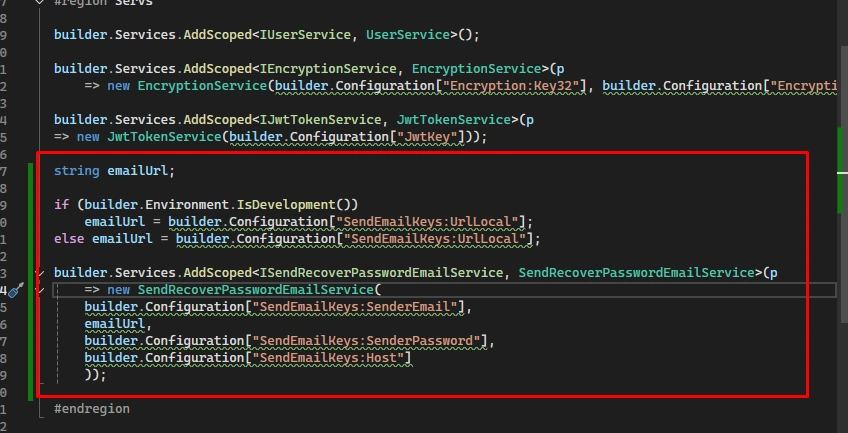
Step 2.1. And use the keys in the DI of SendRecoverPasswordEmailService.
Code
string emailUrl;

if (builder.Environment.IsDevelopment())
    emailUrl = builder.Configuration["SendEmailKeys:UrlLocal"];
else emailUrl = builder.Configuration["SendEmailKeys:UrlLocal"];

builder.Services.AddScoped<ISendRecoverPasswordEmailService, SendRecoverPasswordEmailService>(p
    => new SendRecoverPasswordEmailService(
    builder.Configuration["SendEmailKeys:SenderEmail"],
    emailUrl,
    builder.Configuration["SendEmailKeys:SenderPassword"],
    builder.Configuration["SendEmailKeys:Host"]
    ));
Step 3. In UserService, add the use of ISendRecoverPasswordEmailService in the function call.
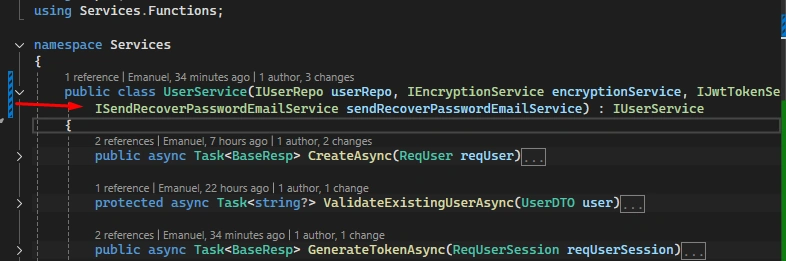
Step 3.1. And create the function SendRecoverPasswordEmailAsync.
public async Task<BaseResp> SendRecoverPasswordEmailAsync(ReqUserEmail reqUserEmail)
{
    string? validateError = reqUserEmail.Validate();

    if (!string.IsNullOrEmpty(validateError))
        return new BaseResp(null, validateError);

    UserDTO? userResp = await userRepo.GetByEmailAsync(reqUserEmail.Email);

    if (userResp != null)
    {
        string token = jwtTokenService.GenerateToken(
            userResp.Id,
            userResp.Email,
            DateTime.UtcNow.AddHours(1)
        );

        try
        {
            _ = sendRecoverPasswordEmailService.SendEmail(userResp.Email, token);
        }
        catch
        {
            return new BaseResp(null, "A error occurred!");
        }
    }

    return new BaseResp("Email Sent.");
}
Define the function in the interface.
Step 4. Create the route in UserController.
[Route("RecoverPassword")]
[HttpPost]
public async Task<IActionResult> SendRecoverPasswordEmail(ReqUserEmail reqUserEmail) =>
    BuildResponse(await userService.SendRecoverPasswordEmailAsync(reqUserEmail));
Step 5. Create the test in GamesCatalogAPI.http.
POST {{GamesCatalogAPI_HostAddress}}/User/RecoverPassword
Content-Type: application/json

{
  "email": "[email protected]"
}
###
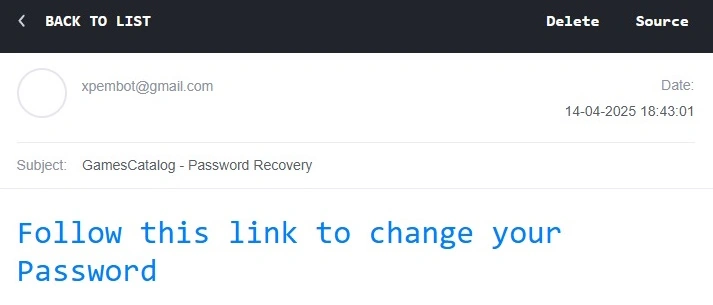
Step 6. Create a user and execute the POST request to the /User/RecoverPassword route, so that the user's email address receives an email with the link to the password reset URL.
Step 7. Now, let's create the routes related to password change. They will return static HTML pages. We will create two .html files: Index and PasswordUpdated.
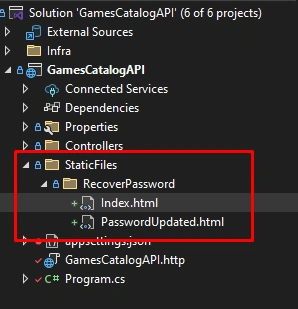
Step 8. Index.html will use Bootstrap. It will be a page for the user to enter the new password.
<!doctype html>
<html lang="en">
<head>
    <meta charset="utf-8">
    <meta name="viewport" content="width=device-width, initial-scale=1">
    <title>Games Catalog</title>
    <link href="https://cdn.jsdelivr.net/npm/[email protected]/dist/css/bootstrap.min.css" rel="stylesheet" integrity="sha384-4bw+/aepP/YC94hEpVNVgiZdgIC5+VKNBQNGCHeKRQN+PtmoHDEXuppvnDJzQIu9" crossorigin="anonymous">
    <style>
        .containerCenter {
            min-height: 100vh;
            display: flex;
            justify-content: center;
            align-items: center;
            flex-direction: column;
        }
    </style>
    <script>
        function ShowPassword(InputId) {
            var x = document.getElementById(InputId);
            if (x.type === "password") {
                x.type = "text";
            } else {
                x.type = "password";
            }
        }
    </script>
</head>
<body style="background: #1B2D3E">
    <div class="container containerCenter">
        <div class="row">
            <div class="col align-self-center">
                <div class="card">
                    <div class="card-body">
                        <h5 class="card-title">Games Catalog</h5>
                        <h6 class="card-subtitle mb-2 text-body-secondary">Password Recovery</h6>
                        <form method="POST" action="/User/RecoverPassword/{{token}}">
                            <p class="card-text">
                                <div class="mb-12">
                                    <label for="Password" class="form-label">Password</label>
                                    <input type="password" name="Password" id="Password" class="form-control" maxlength="20" aria-describedby="passwordHelpBlock" required>
                                    <div id="passwordHelpBlock" class="form-text">
                                        Your password must be 4-20 characters long.
                                    </div>
                                    <input type="checkbox" onclick="ShowPassword('Password')"> Show Password
                                </div>
                                <br />
                                <div class="mb-12">
                                    <label for="PasswordConfirmation" class="form-label">Password Confirmation</label>
                                    <input type="password" name="PasswordConfirmation" id="PasswordConfirmation" class="form-control">
                                    <input type="checkbox" onclick="ShowPassword('PasswordConfirmation')"> Show Password
                                </div>
                            </p>
                            <input type="submit" class="btn btn-success" value="Update Password" />
                        </form>
                    </div>
                </div>
            </div>
        </div>
    </div>
    <script src="https://cdn.jsdelivr.net/npm/[email protected]/dist/js/bootstrap.bundle.min.js" integrity="sha384-HwwvtgBNo3bZJJLYd8oVXjrBZt8cqVSpeBNS5n7C8IVInixGAoxmnlMuBnhbgrkm" crossorigin="anonymous"></script>
</body>
</html>
Code for PasswordUpdated.html, which will return the confirmation of the password update.
<!doctype html>
<html lang="en">
<head>
    <meta charset="utf-8">
    <meta name="viewport" content="width=device-width, initial-scale=1">
    <title>Games Catalog</title>
    <link href="https://cdn.jsdelivr.net/npm/[email protected]/dist/css/bootstrap.min.css" rel="stylesheet" integrity="sha384-4bw+/aepP/YC94hEpVNVgiZdgIC5+VKNBQNGCHeKRQN+PtmoHDEXuppvnDJzQIu9" crossorigin="anonymous">
    <style>
        .containerCenter {
            min-height: 100vh;
            display: flex;
            justify-content: center;
            align-items: center;
            flex-direction: column;
            background-color: var(--background-color);
        }
    </style>
</head>
<body style="background: #1B2D3E ">
    <div class="container containerCenter">
        <div class="row">
            <div class="col align-self-center">
                <div class="card">
                    <div class="card-body">
                        <h5 class="card-title">Games Catalog</h5>
                        <h6 class="card-subtitle mb-2 text-body-secondary">Recover Password</h6>
                        <div class="h4 pb-2 mb-4 text-success border-top border-success">
                            <p class="fs-2">{{ReturnMessage}}</p>
                        </div>

                    </div>
                </div>
            </div>
        </div>
    </div>
    <script src="https://cdn.jsdelivr.net/npm/[email protected]/dist/js/bootstrap.bundle.min.js" integrity="sha384-HwwvtgBNo3bZJJLYd8oVXjrBZt8cqVSpeBNS5n7C8IVInixGAoxmnlMuBnhbgrkm" crossorigin="anonymous"></script>
</body>
</html>
Step 9. Let's create the routes in UserController. Add the dependencies for IHostEnvironment and IJwtTokenService.
Code
public class UserController(IUserService userService, IHostEnvironment hostingEnvironment, IJwtTokenService jwtTokenService) : BaseController
Step 9.1. Let's create the route that returns the HTML page for entering the new password.
[ApiExplorerSettings(IgnoreApi = true)]
[Route("RecoverPassword/{token}")]
[HttpGet]
public IActionResult RecoverPasswordBody(string token)
{
    string html = System.IO.File.ReadAllText(
        Path.Combine(
            hostingEnvironment.ContentRootPath,
            "StaticFiles",
            "RecoverPassword",
            "Index.html"
        )
    );

    html = html.Replace("{{token}}", token);

    return base.Content(html, "text/html");
}
We receive the GET request and return the page with the token.
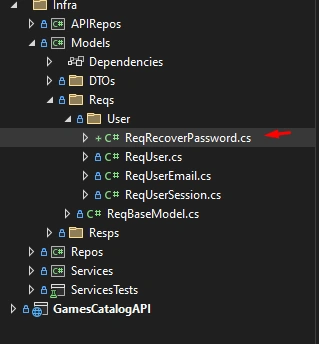
Step 9.2. For the route that performs the password update, we will create a model to receive the new password.
Code
using System.ComponentModel.DataAnnotations;

namespace Models.Reqs.User;

public record ReqRecoverPassword : ReqBaseModel
{
    [Display(Name = "Password")]
    [DataType(DataType.Password)]
    [Required(ErrorMessage = "Password is required")]
    [StringLength(30, MinimumLength = 4)]
    public required string Password { get; init; }

    [Display(Name = "PasswordConfirmation")]
    [DataType(DataType.Password)]
    [Required(ErrorMessage = "Password Confirmation is required")]
    [StringLength(30, MinimumLength = 4)]
    public required string PasswordConfirmation { get; init; }
}
Step 9.3. In UserRepo, let's create a function to update the password.
public async Task UpdatePasswordAsync(int uid, string password)
{
    using var context = DbCtx.CreateDbContext();

    context.User
        .Where(x => x.Id == uid)
        .ExecuteUpdate(y => y.SetProperty(z => z.Password, password));

    await context.SaveChangesAsync();
}
Define the function in the interface.
Step 9.4. In UserService, let's create UpdatePasswordAsync and define it in the interface.
public async Task<BaseResp> UpdatePasswordAsync(ReqRecoverPassword reqRecoverPassword, int uid)
{
    string? validateError = reqRecoverPassword.Validate();

    if (string.IsNullOrEmpty(validateError) &&
        reqRecoverPassword.Password != reqRecoverPassword.PasswordConfirmation)
    {
        validateError = "Invalid password Confirmation";
    }

    if (!string.IsNullOrEmpty(validateError))
        return new BaseResp(null, validateError);

    UserDTO? user = await userRepo.GetByIdAsync(uid);

    if (user != null)
    {
        await userRepo.UpdatePasswordAsync(user.Id, encryptionService.Encrypt(reqRecoverPassword.Password));
        return new BaseResp("Password Updated.");
    }
    else
    {
        return new BaseResp(null, "Invalid User");
    }
}
Step 9.5. In UserController, let's create the RecoverPassword route, which will be used by Index.html.
[ApiExplorerSettings(IgnoreApi = true)]
[Route("RecoverPassword/{token}")]
[HttpPost]
public async Task<IActionResult> RecoverPassword(string token, [FromForm] ReqRecoverPassword reqRecoverPassword)
{
    string html = System.IO.File.ReadAllText(
        Path.Combine(
            hostingEnvironment.ContentRootPath,
            "StaticFiles",
            "RecoverPassword",
            "PasswordUpdated.html"
        )
    );

    try
    {
        int? uid = jwtTokenService.GetUidFromToken(token);

        html = html.Replace("{{token}}", token);

        if (uid == null)
        {
            html = html.Replace("{{ReturnMessage}}", "User Not Found");
        }
        else
        {
            BaseResp bLLResponse = await userService.UpdatePasswordAsync(reqRecoverPassword, Convert.ToInt32(uid));

            if (bLLResponse.Success)
                html = html.Replace("{{ReturnMessage}}", bLLResponse.Content?.ToString());
            else
                html = html.Replace("{{ReturnMessage}}", bLLResponse.Error?.Message?.ToString());
        }
    }
    catch (SecurityTokenExpiredException)
    {
        html = html.Replace("{{ReturnMessage}}", "Email link expired.");
    }

    return base.Content(html, "text/html");
}
Step 10. Thus, when we click the link sent by email, we are directed to the password update screen.
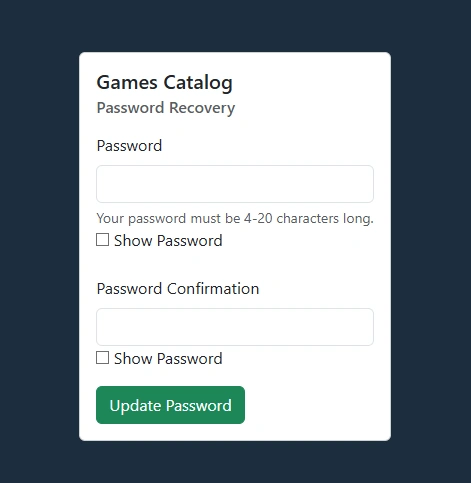
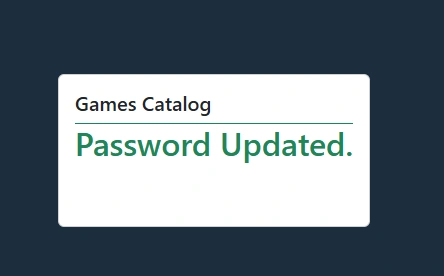
When we enter the new password and confirm, the user's password is updated, and we are directed to the confirmation screen.
In the next part, we will create the function that retrieves or reuses the user's token from the IGDB API to query the games on the server side.
Code on git: GamesCatalogBackEnd
Join the conversation! Your thoughts help the community grow.