

Introduction
HTML5 WebSockets offer a reduction of unnecessary network traffic. It is basically used to create a single bi-directional connection between a client and a server. It means that the client can send a request to the server and leave it on the server then whenever the data is ready at the server will send it to the client.
Somewhere I learned about a similar concept to display real-time data, HTML5 Server-Sent Events. When you need to display real-time data (the latest updates from a server) on a web page, but without refreshing the page, you need to use Server-Sent Events. To get the latest update from a server we need to refresh the browser, but for websites like Facebook/Twitter updates, stock price updates, etcetera you also might need to display the latest real-time data on the web page. Server-Sent Events are supported in all major browsers, except Internet Explorer.
Since here I am writing an article about HTML5 WebSockets, let's concentrate on that. I will be writing another article about HTML5 Server-Sent Events. Before explaining HTML5 WebSockets I first want to explain the client-server architecture because you should know about the complete architecture of HTTP network traffic.
Client-server architecture is simply a network architecture in which a process on the network is either a client or a server. It allows multi-user updating through a GUI front end to a shared database.
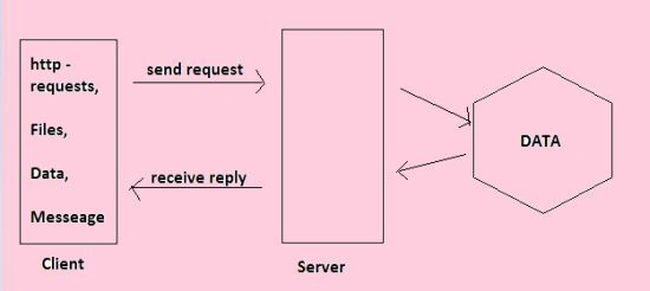
- Two-tier architectures
- Three-tier architectures:


Two-tier architectures
In this architecture, the user interface is placed at the user's Desktop environment and the database management system services are usually in a server that is a more powerful machine that provides services to the many clients.
Three-tier architectures: In this architecture, middleware is used between the user's system interface client environment and the database management server environment.
HTML5 WebSockets
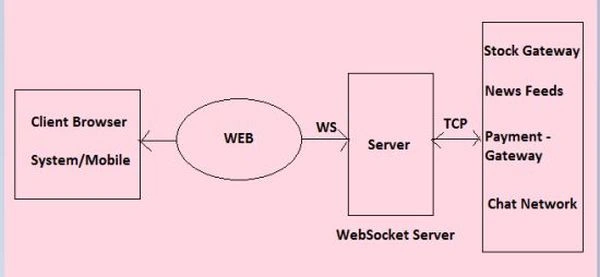
- Overhead of HTTP (Network Throughput)
- Low Latency
Thanks, in the next part of this article we will test the HTML5 WebSockets.
Join the conversation! Your thoughts help the community grow.