Introduction
In this article, I will explain about Http Get, Put, Post and Delete verbs in ASP.Net Web API in detail. These are very significant verbs in ASP.NET Web API. This article explains how to perform these 4 verbs in ASP.NET Web API.
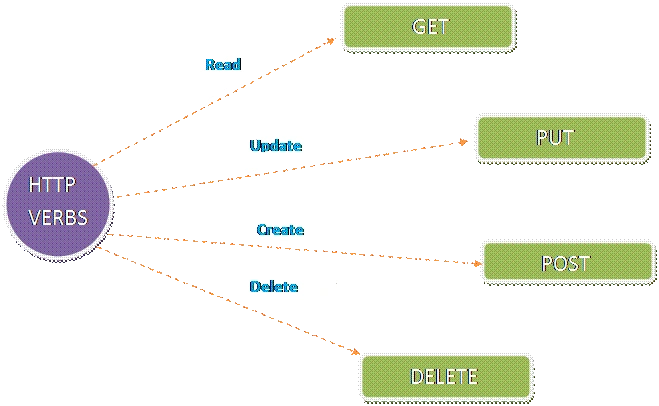
Steps for performing HTTP verbs using ASP.NET web API
The steps given below explain about how HTTP verbs perform with ASP.NET Web API.
Step 1
Open new project in Visual Studio, select the Web under visual C# and select ASP.NET Web Application. Finally, give the project name and click OK. Now, select Web API from template Window and click OK.
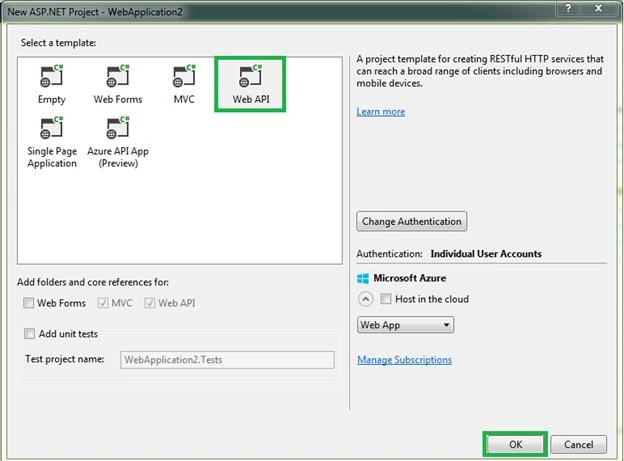
After opening the project solutions, we can see the all folders in Solution Explorer. Everything is same as ASP.NET MVC but we can find one extra controller and this controller is Value controller. Value controller is inherited from APIController. APIController is an abstract class. Before reading this article, please refer to the article, as it helps to know about APIControllers and API routing.\
Step 2
We can find the five methods in ValuesController. ValuesController looks, as shown below.
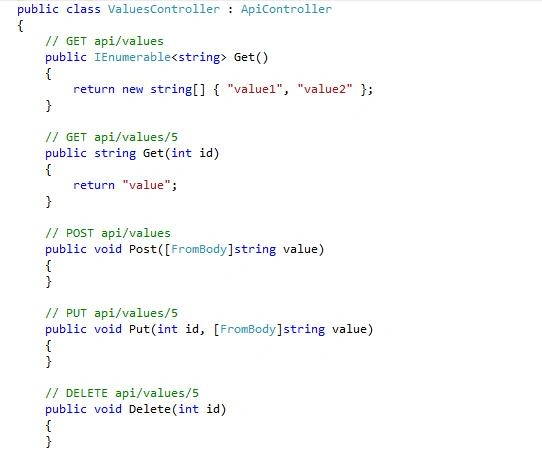
In this Controller, we create one static variable with the type of list. In this variable, we assign three strings.
Example
- static List<string> languages = new List<string>() {
- "C#","ASP.NET","MVC"
- };
Get method returns what are the strings assigned in the languages variable. Get method contains the code, which looks, as shown below.
-
- public IEnumerable<string> Get()
- {
- return languages;
- }
If need arises, you can get the specified string from the list. We can get it, using Get method with the parameter. Here, Get method contains overload.
-
- public string Get(int id)
- {
- return languages[id];
- }
If need to Add or Save data in the list arises, we can use Post method. For Post method, we use code given below.
-
- public void Post([FromBody]string value)
- {
- languages.Add(value);
- }
We can update and delete the data in the list, using the code given below.
-
- public void Put(int id, [FromBody]string value)
- {
- languages[id] = value;
- }
-
-
- public void Delete(int id)
- {
- languages.RemoveAt(id);
- }
Step 3
We are using Fiddler for monitoring Get, Put, Post, Update actions in Web API. We can download it for free from the URL “https://www.telerik.com/download/fiddler” and install it.
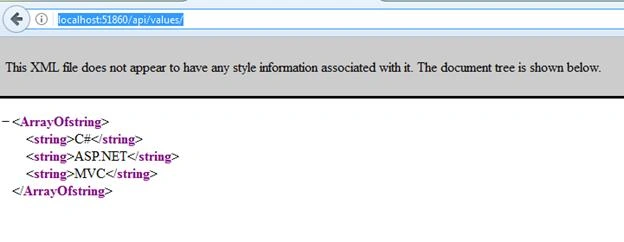
Now, build the project solution and run it. I am running URL http://localhost:51860/api/values/. Now, it will call Get action method in ValueController. Put a breakpoint and you can see which method calls in ValueControllers.

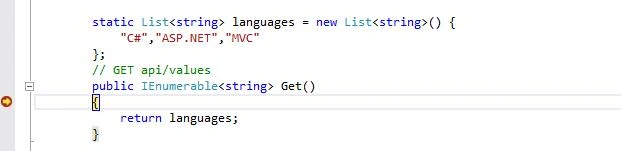
When we put above-mentioned output without the parameter, it automatically calls Get method in Web API. After returning an output, we can see the output as an XML, which is shown below.
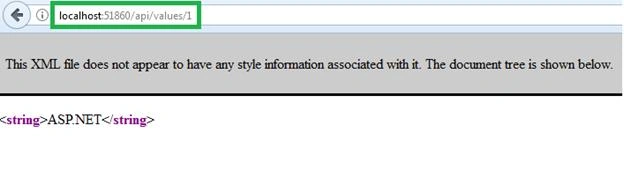
If we pass index value of the list, we can get a particular string from the list. I am givin
g http://localhost:51860/api/values/1 so, it will return “ASP.NET” because it has an index value 1.
 Step 4
Now, open Fiddler and using it, we can monitor POST, PUT and delete. First, run the Application and then copy http://localhost:51860/api/values URL past in Fiddler in composer tab, followed by clicking enter.
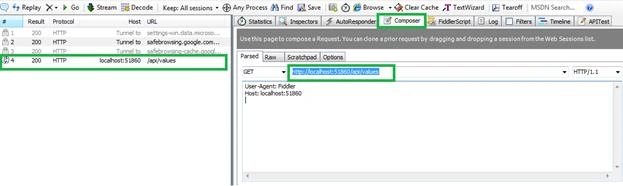
Now, double click the latest URL on the left side in Fiddler and you can view the result. This will show the type of result and request header details.
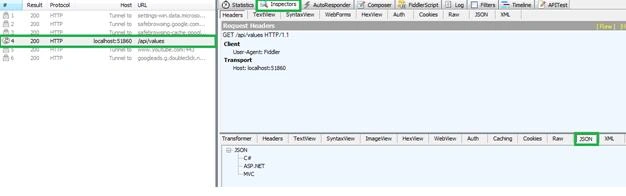
First, refresh the Application in the Browser. Now, go to composer tab, select GET in the drop-down list and click. Track the latest URL from the left side to composer tab. We can see all details like Host, Connection, Catch-Control, User-Agent and Accept details.

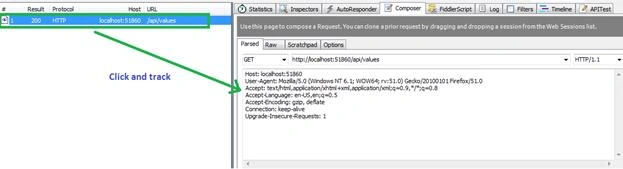
Now, add new string, using post HTTP verb, how to add and again get back from the list, using Fiddler.
Go to composer tab, select POST in the drop-down list and add new string or value in Request body and add Content-Type: application/JSON, followed by clicking Execute button in right side top.
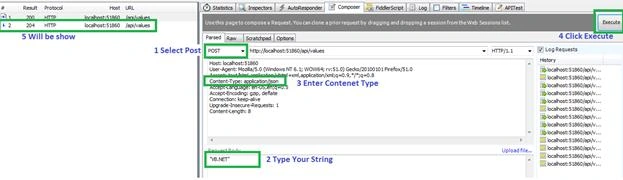
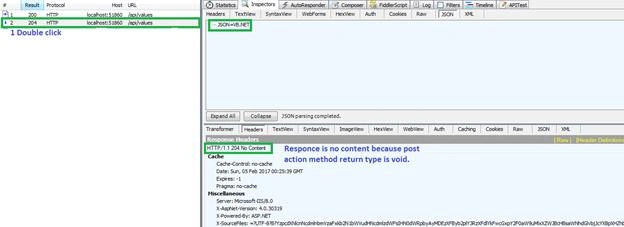
Now, double click the latest URL on the left side of Fiddler and you can see the response of giving Post request in Fiddler. We can see the response is 204 No Content because post action method is void return type.
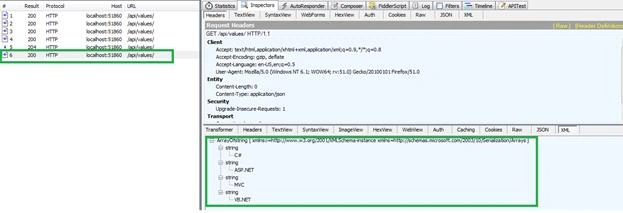
Now, we can check whether a string is added in a static variable. Now, select get request and delete added string in request body and click execute. Now, double click the latest one on the left side in Fiddler and you can see added string, which looks as shown below.
Now, we can update the last string in a static variable, using PUT HTTP verb in Fiddler. Now, select PUT from the dropdown in composer tab and the type where we want a new string to update the old string, followed by passing the index value to update the string in the URL and click execute button.
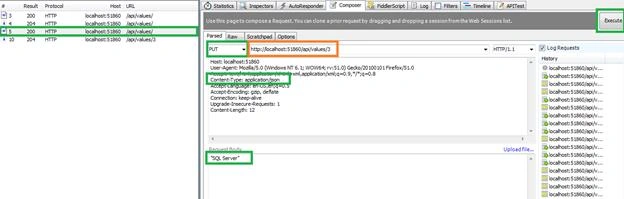
Now, refresh the page and get a new one on the left side of Fiddler. Double-click it and we can see the updated string in Fiddler.
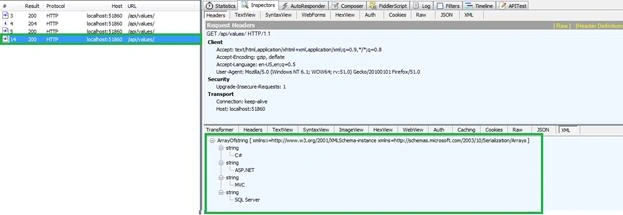
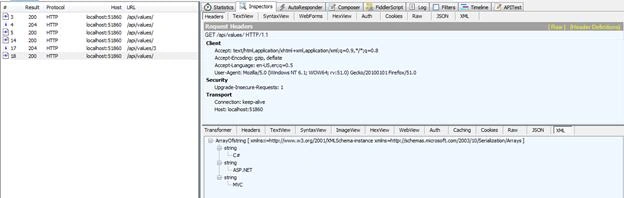
Similarly, we can delete the string from a static variable. Similar to selecting Delete HTTP verb, pass an index value of the one, which needs to be deleted from a static variable. After clicking executes, it refreshes our application. For reference, view the screenshot given below.
Conclusion
This step by step article explained about Http verbs in Web API in ASP.NET. I hope it helps freshers and those who are learning ASP.NET Web API.


Brian CampassiPosted May 26, 2021, 8:18 PM
What does PUT stand for? I know what it does, but is it an acronym?
Sree SundaramPosted Jan 19, 2021, 6:54 PM
Can i have Apicontroller and TableController in the same project? That is, I have some TableControllers that go against a database but I need to create a few ApiControllers that perform actions and do not need a database table
VijayKumar KVRPosted Sep 4, 2019, 11:24 PM
What happens if don't use HttpVerbs? Does the request is still valid. I mean do we get the response?
aril floresPosted Sep 2, 2019, 10:53 PM
How to get http web Ai
Bijendra RathodPosted Jun 13, 2019, 7:32 AM
How to write post,put,delete method using request url in c#? plz help me..(note: the request url is "http://ide1.vivasa.in:59725/bag" .
RAVI VADIVELPosted Feb 28, 2019, 4:44 AM
Very simple example and easily can understand
Shivakumar GowdaPosted Nov 21, 2017, 2:10 AM
How to call post method from url without using Fiddler.. I am struggling to invoke post method to insert data into a table. Please help me I'm new to Web Api
Former memberPosted Feb 20, 2017, 3:38 AM
What is difference between post,put and delete verb in web api ? We can have web api action with many http verb like post,put and delete. We know that post is used for insert operations and put used for update operations but we can do update operation in post and insert operation with put verb. Then tell me what is the difference between post and put? Please help me to understand the difference post and put with example.
Sankar BcPosted Feb 8, 2017, 10:03 AM
Super vi good Explanation
Maruthi PalllamalliPosted Feb 8, 2017, 3:06 AM
Why did you maintain void for post and put. we can do update operations with help of post also. so why should we required put to update in this case ?
RakeshPosted Feb 7, 2017, 9:45 AM
Good explain........!! Mr. Mani sir
Vignesh ManiPosted Feb 7, 2017, 8:27 AM
Thanks you so much your feedback ear friends!!
Former memberPosted Feb 7, 2017, 3:36 AM
NIce one. please show how could i give custom name for web api action. thanks
Hariharan KrishnamoorthiPosted Feb 7, 2017, 2:22 AM
Thanks for sharing this article with samples.
Anand MorePosted Feb 7, 2017, 12:57 AM
Thanks Vignesh... informative article !!
Anu VPosted Feb 6, 2017, 11:28 PM
Nice article.. Thanks for sharing..
Humayun Kabir MamunPosted Feb 6, 2017, 10:36 PM
Thanks for this article...