

The purpose of this article is to understand and configure a HttpClient of our own. If you are very much interested in seeing the HTTP Protocol a little more closely, then I hope this article will be gratifying. So, let's start our talking.
Fine, we will first clarify the basic idea of the HTTP protocol (not much, just the basics) and then we will directly go to the HttpClient implementation part in the console application and we will consume a Web API RESTful service on it.
HTTP is the protocol by which you are reading this article, you buy your book in Anazon.com, chat with your friend in Facebook (which I like the most) and do many more things in the web. Let's think about the scenario when you have clicked on this article link to read it. A couple of operations has fired without your knowledge. What are the operations?
You have clicked on a link, your browser has formed a HTTP GET message with relevant information and made a request to the c-sharocorner.com's server. Now, the question is what does the request look? Ok, here we will get one overview (that is a little over-simplified but very similar to the real one) of the GET request. The simplest example is here.
GET: http://c-sharpcorner.com/Articles/myarticle.aspx HTTP/1.1
Host: c-sharpcorner.com
Now, I have already said that this might not be the exact request, because in the exact request there might be many header information to help the server for a better response.
Let's understand the first line, the structure is like this:
[Method] [URL] [HTTP Version]
Method: It defines the request type. Here the request type is GET. There are many others, like POST, PUT and DELETE.
URL: The URL defines the specific URL that we want to get from the server. Obviously this URL is an arbitrary one and provided for our understanding.
HTTP Version: The HTTP version defines the current HTTP version of this request. We are seeing that the HTTP version is 1.1 which is the latest one after 1.0 and dominating the WWW since 1999.
Ok, we have learned the meaning of the first line. Now let's go to the second line. The second line is nothing but one header information. The header name is Host. In the HTTP request and response there might be n number of headers. Other than the “Host” header, all are optional. The host header contains the server name.
Ok, we will not go much deepper into the HTTP protocol to concentrate on our actual topic. Let's start to configure our own HTTP client application that will consume services from the Web API. For that we need to create two different applications. One will be the server (Web API) and the console application will be the HttpClient.
Create Web API to host RESTful service
In this application we will implement a very simple Web API that will host the HTTP service on the RESTful API. Have a look at the following code.
using System;
using System.Collections.Generic;
using System.Linq;
using System.Net;
using System.Net.Http;
using System.Web;
using TestWEB_API.Models;
using System.Web.SessionState;using System.Web.Http;
using System.Web.Mvc

namespace TestWEB_API.Controllers
{
    public class ValuesController : ApiController
    {
        public List<string> Get()
        {
            List<string> Li = new List<string>();
            Li.Add("Sourav");
            Li.Add("Ajay");
            Li.Add("Manish");
            return Li;
        }
    }
}
The Get() action is implemented very simply, we are just sending a collection of strings to the client. That's all. Now we need to concentrate on the client implementation part.
Implement HTTP client in Console application
Before proceeding, let's clarify some basic concepts. What is the classic example of HTTP client? Yes, our browser. The browser knows very well how to form a HTTP request. It does not matter which kind of request it is. It set header information (not one header, many are there, like time-date, preferred data type) set host address and proper HTTP protocol type and send it to a destination, that happens behind the cenes. But in this example we will implement it from scratch (not from scratch exactly, because we will be using the Httpclient class of the .NET class library). Have a look at the following example.
using System;
using System.Collections.Generic;
using System.Linq;
using System.Text;
using System.Threading.Tasks;
using System.Net.Http;
using System.Net.Http.Headers;

namespace HttpClientAPP
{
    class Program
    {
        static void Main(string[] args)
        {
            HttpClient client = new HttpClient();
            client.BaseAddress = new Uri("http://localhost:11129/");
            // Add an Accept header for JSON format.
            client.DefaultRequestHeaders.Accept.Add(new MediaTypeWithQualityHeaderValue("application/json"));
            // List all Names.
            HttpResponseMessage response = client.GetAsync("api/Values").Result;  // Blocking call!
            if (response.IsSuccessStatusCode)
            {
                var products = response.Content.ReadAsStringAsync().Result;
            }
            else
            {
                Console.WriteLine("{0} ({1})", (int)response.StatusCode, response.ReasonPhrase);
            }
        }
    }
}
Here we have set a base address that is nothing but the RESTful URL of our service application. Then we are requesting the server to return data in JSON format by setting the expected content type header. Then we are reading the response information asynchronously.
In the output we are getting data in JSON format, which is what is expected.
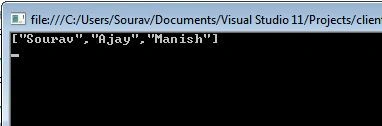
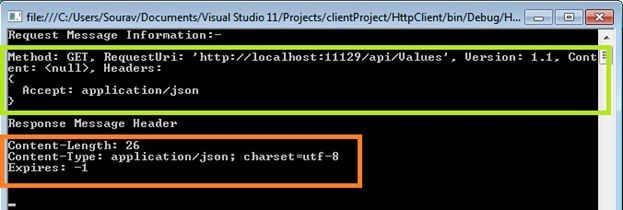
Cheers, we have created our first HTTP client that has made a GET request to the Web API. That's fine and cool, now we are interested in seeing the request and response message that we made at the time of the API call and that we got in response. Here is the sample implementation for that.
using System;
using System.Collections.Generic;
using System.Linq;
using System.Text;
using System.Threading.Tasks;
using System.Net.Http;
using System.Net.Http.Headers;

namespace HttpClientAPP
{
    class Program
    {
        static void Main(string[] args)
        {
            HttpClient client = new HttpClient();
            client.BaseAddress = new Uri("http://localhost:11129/");
            // Add an Accept header for JSON format.
            client.DefaultRequestHeaders.Accept.Add(new MediaTypeWithQualityHeaderValue("application/json"));
            // List all Names.
            HttpResponseMessage response = client.GetAsync("api/Values").Result;  // Blocking call!
            if (response.IsSuccessStatusCode)
            {
                Console.WriteLine("Request Message Information:- \n\n" + response.RequestMessage + "\n");
                Console.WriteLine("Response Message Header \n\n" +  response.Content.Headers + "\n");
            }
            else
            {
                Console.WriteLine("{0} ({1})", (int)response.StatusCode, response.ReasonPhrase);
            }
            Console.ReadLine();
        }
    }
}
prince princePosted Jun 12, 2024, 3:13 AM
Thanks really very helpful
denemee epostahesabiPosted Jul 25, 2022, 7:56 AM
Thanks man...
Dharmendra SinghPosted Apr 12, 2019, 6:53 AM
Abe bhai kuch palle nhi pda baila
Ashish JainPosted Dec 17, 2018, 10:56 PM
In the Put call, i think we need to pass the ID as well.
Sachith WickramaarachchiPosted Mar 13, 2018, 2:25 PM
Can I pass multiple parameter for deletion? var response = client.DeleteAsync("api/person/" + 10 + "sachith").Result;
Saranga JayawardhanaPosted Jul 24, 2017, 2:29 AM
Nice Article, I want to know whether we can consume json post other than a .net application from this .net client and send a response using the .Net client?if so could you please give me the c# coding block for it,Thanks
Patrick MuofheePosted May 30, 2017, 10:13 AM
I am working on something similar to what you demonstrate but i am lost can you please help I do have a console application that need to communicate with Api json
Anu VPosted Dec 21, 2016, 5:28 AM
Nice Article... Informative.. like it
Pawan TiwariPosted Apr 16, 2016, 11:11 AM
Nice Article... Informative.. like it
Fawad RazaPosted Mar 10, 2016, 9:30 AM
How on earth would you create services, this is merely some code segments, where is the full solution, am I missing something?
Vishnu SinghPosted Jul 23, 2015, 5:28 AM
nice article... really helped me.
Dinesh BeniwalPosted May 23, 2014, 8:58 AM
Great Sourav
Former memberPosted May 23, 2014, 8:17 AM
very nice and detailed article !