

INotifyPropertyChanged was introduced in .NET 2.0. This interface has only one member, the PropertyChanged event that will notify listeners when a property of the implementing class is changed.
Demo
- Open Visual Studio and select WPF application.
- Open/add one user control or window.
- Create one normal property, here I have added FirstName as in the following:
- private string firstname = string.Empty;
- public string FristName
- {
- get { return firstname; }
- set
- {
- firstname = value;
- }
- }
- Add the same property into two controls as in the following:
- <TextBlock Margin="2">First Name</TextBlock>
- <TextBox Margin="2" Grid.Row="0" Grid.Column="1" MinWidth="120" Text="{Binding Path=FristName,ElementName=ThisControl,UpdateSourceTrigger=PropertyChanged}"></TextBox>
- <TextBlock Margin="2" Grid.Column="2" Text="{Binding Path=FristName,ElementName=ThisControl,UpdateSourceTrigger=PropertyChanged}"></TextBlock>
- Run the application, I entered the first name field but not displaying in my TextBlock in the right side.

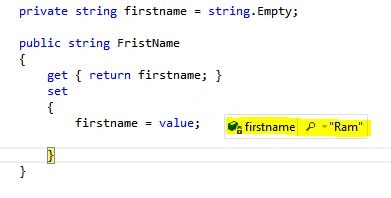
- But we can see the property change in the preceding picture. But it's not reflecting it in the UI.
- Implement the INotifyPropertyChanged interface, no change in the XAML.
- public partial class INotify : UserControl, INotifyPropertyChanged
- public INotify()
- {
- InitializeComponent();
- }
- private string firstname = string.Empty;
- public string FristName
- {
- get { return firstname; }
- set
- {
- firstname = value;
- OnPropertyChanged("FristName");
- }
- }
- #region INotifyPropertyChanged Members
- public event PropertyChangedEventHandler PropertyChanged;
- public void OnPropertyChanged(string txt)
- {
- PropertyChangedEventHandler handle = PropertyChanged;
- if (handle != null)
- {
- handle(this, new PropertyChangedEventArgs(txt));
- }
- }
- #endregion
- Run the application and see the change.

- We got the change in the UI.
Conclusion
The INotifyPropertyChanged interface will notify the source of changes to the target.
Gowtham RajamanickamPosted Mar 14, 2015, 4:46 AM
informative..
Tom MohanPosted Mar 9, 2015, 10:56 PM
Thanks Jose Gregorio Ramirez for your valuable support and feedback.
Jose Gregorio RamirezPosted Mar 9, 2015, 10:22 PM
Good show, Mr. Tom. I knew the interface IPropertyChange recently, and the utility has been very flexible in the case of lists is possible to use ObservableCollection with BindingList by namespaces: ObjectModel. I appreciate your time in sharing WPF. A hug, dear.
Jose Gregorio RamirezPosted Mar 9, 2015, 10:22 PM
Good show, Mr. Tom. I knew the interface IPropertyChange recently, and the utility has been very flexible in the case of lists is possible to use ObservableCollection with BindingList by namespaces: ObjectModel. I appreciate your time in sharing WPF. A hug, dear.
Tom MohanPosted Mar 7, 2015, 10:43 AM
Thanks Rahul Saxena
Rahul Kumar SaxenaPosted Mar 7, 2015, 9:31 AM
Good Show..