

This is the “HttpHandler and HttpModule in real scenarios” article series. As the name suggests, in this series we will understand a few real scenarios where we can use HttpHandler and HttpModule. In our previous two articles we have learned how to implement a simple HttpHandler in our ASP.NET application. You can read them here.
- HttpHandler and HttpModule in Real Scenario: Getting Started with HttpHandler
- HttpHandler and HttpModule in Real Scenario: Few examples of HttpHandler-1
In this article we will understand a few more scenarios where we can implement HttpHandler in an ASP.NET application.
Count number of request to certain page
Yes, there might be some other solution for this problem but we can use HttpHandler to count the number of hits to a certain page. Here is the implementation of trying to count the hits of a Home.aspx page. At first we are checking the request URL. If the URL contains “Home.aspx” then we will increment the count value by one.
- using System;
- using System.Collections.Generic;
- using System.Linq;
- using System.Web;
- namespace WebApp
- {
- public class countHandler : IHttpHandler
- {
- static int CountRequest = 0;
- public void ProcessRequest(HttpContext context)
- {
- if (context.Request.RawUrl.Contains("Home.aspx"))
- {
- CountRequest++;
- }
- }
- public bool IsReusable
- {
- get
- {
- return false;
- }
- }
- }
- }
The handler is realy simple and now we need to register the handler. Add the following code to your web.config file.
- <system.webServer>
- <handlers>
- <add name="myImageHandler" verb="*" path="*.aspx" type="WebApp. countHandler"/>
- </handlers>
- </system.webServer>
Ok, we have finished our implementation part. Now let’s try to call the Home.aspx page in a browser. After calling the Home.aspx page, our handler will execute and it will increase the “CountRequest” value by one.
We are seeing that now the CountRequest value is 2, because the output screen has taken in the second trial.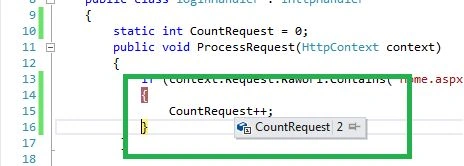
Redirect one page from other page
This is another possible scenario where we can implement HttpHandler as a solution. Let’s think about a situation where one web page exists but then it no longer exists but your client thinks that the page is still in the application.
Now to solve this problem we need to redirect the HTTP request of that page to some other page. For the redirect operation we can use HttpHandler. Have a look at the following code.
In this implementation, if someone tries to reach the Home.aspx page then she will redirect to the abc.html page. In this way we can implement redirection.

Vipul MalhotraPosted Sep 14, 2015, 4:22 PM
nice article