

Introduction
JQuery offers the fastest way to populate the data in GridView.
The jQuery Data Table plugin is very cool and easy to use. It provides a lot of options like:
Filtration
It helps to filter your data in any order. If you do that by using C# code, you will have to write a lot of code but in jQuery, it automatically does this in just a single click.
Searching
This provides us a very quick way of searching in real time. If you do that using code, you have to send the request again and again to the server which would decrease the response time.
Pagination
jQuery plugins provide a pagination option and here, we can adjust on loading how much data should be displayed in the table.
Exporting
Here, we have one more option to export our Grid View in any type of format -
- Excel
- CSV
But I have only exported in the Excel format for this demonstration.
Visibility
Visibility of columns is also a significant option which helps us make particular columns visible or hidden.
A bunch more options are there in this plugin. So, let’s start with making a new project in Visual Studio.
Step 1
Just open Visual Studio and select a new project. Give a name to your application as you want and click OK.
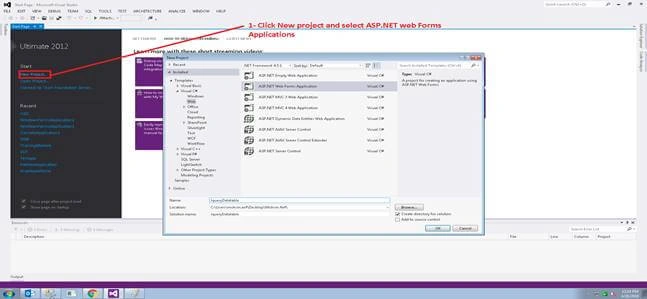
Step 2
When we start with a new project, it gives us a built-in template which I have removed because I wanted to start from scratch. Now, at this stage, we have just a simple HTML code which we need for making an application from scratch.

Step 3
Here, we have two options -
1. We make this in the master page environment that is used for making our default theme on every page. The advantage of it is that we need to place all JS, CSS files, and functions at one location and these will be accessible in all forms. If you want to do it in a master page environment, then add a new content page.
2. You can also do it without making any master page. I worked in a master page environment; that’s why I added a content page and dragged the GridView.


Amit KaushalPosted Mar 19, 2024, 12:37 PM
How can I implement same if my gridview is in Update Panel?
Jun CarlosPosted Nov 21, 2022, 8:31 PM
Where is the database?
ibram youssefPosted Mar 10, 2020, 8:32 AM
I need Source Code Because Photo not clear
Ashish SharmaPosted Feb 25, 2020, 1:15 AM
Will this work on .net framework 3.5 ?? as Guid is not supported below .netframework 4
Mohsin ArifPosted Jun 7, 2019, 10:20 AM
There is my project file attached download and check it
Farid GuseynliPosted Jun 7, 2019, 8:41 AM
Very small photos, I can't see what is there