

Introduction
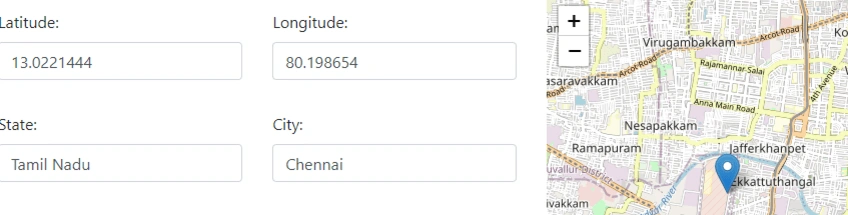
Today's web applications would be incomplete without interactive maps, which give users simple ways to explore and engage with geographic data. Using Leaflet, a lightweight JavaScript library, and geolocation to determine the user's current location on the map, we will build dynamic and interactive maps in this Article.
HTML Structure
by adding together the program's HTML framework. For users to enter their latitude, longitude, state, city, and pincode, we'll include form elements. We'll also make an element to show the map.
<link rel="stylesheet" href="https://maxcdn.bootstrapcdn.com/bootstrap/4.5.2/css/bootstrap.min.css">
<link rel="stylesheet" href="https://unpkg.com/leaflet/dist/leaflet.css" />
<script src="https://unpkg.com/leaflet/dist/leaflet.js"></script>

<div class="row">
    <div class="col-lg-7 col-md-7 col-12">
        <form method="post" role="form" id="RegisterPOS" class="php-email-form">
            <div class="row">
                <div class="col-md-6 col-12 form-group mt-3">
                    <input type="text" name="Latitude" class="form-control" id="Latitude" placeholder="Latitude" required>
                    <div class="invalid-feedback">Please enter latitude.</div>
                </div>
                <div class="col-md-6 col-12 form-group mt-3">
                    <input type="text" name="Longitude" class="form-control" id="Longitude" placeholder="Longitude" required>
                    <div class="invalid-feedback">Please enter longitude.</div>
                </div>
                <div class="col-md-6 col-12 form-group mt-3">
                    <input type="text" name="State" class="form-control" id="State" placeholder="State" required>
                    <div class="invalid-feedback">Please enter state.</div>
                </div>
                <div class="col-md-6 col-12 form-group mt-3">
                    <input type="text" name="City" class="form-control" id="City" placeholder="City" required>
                    <div class="invalid-feedback">Please enter city.</div>
                </div>
                <div class="col-md-6 col-12 form-group mt-3">
                    <input type="text" name="Pincode" class="form-control" id="Pincode" placeholder="Pincode" required>
                    <div class="invalid-feedback">Please enter pincode.</div>
                </div>
            </div>
        </form>
    </div>
    <div class="col-lg-5 col-md-5 col-12">
        <div class="row">
            <div class="col-md-12">
                <div id="map" style="height: 400px;"></div>
            </div>
        </div>
    </div>
</div>
velladuraiPosted Apr 23, 2024, 6:07 AM
It is really helpful for me thanks ishika