

MVVM is a pattern that is most famous known as Model View View Model Pattern. In this article we will see how we can implement MVVM pattern in a sample Silverlight Application.
Creating Silverlight Project
Fire up Visual Studio 2008 and create a Silverlight Application. Name it as SilverlightMVVMSample.
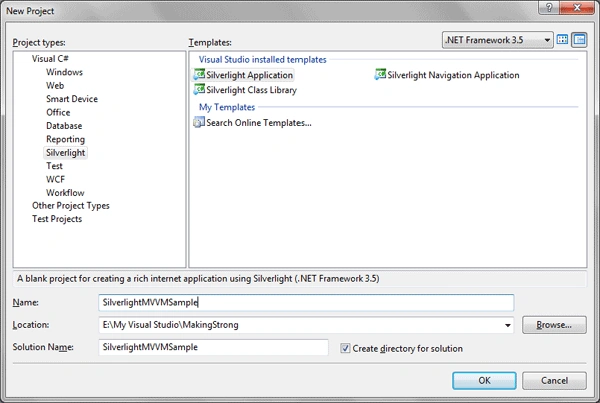
We will start with Model.
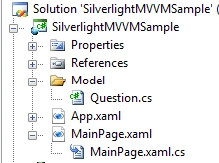
1) Add a folder to the Silverlight Project and name it as Model.
2) Add a class to it, name it as Question.cs.
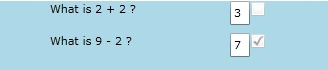
Now here is the basic idea about our Sample application; we will have some questions and user has to type the answers in textbox. If it is true/false it will be notified.
So basically the Question class will implement INotifyPropertyChanged interface and we will have similar properties as shown in below code.
public class Question : INotifyPropertyChanged
{
public string Text { get; set; }
public string ActualAnswer { get; set; }
private string _provided;
public string ProvidedAnswer
{
get
{
return _provided;
}
set
{
_provided = value;
RaisePropertyChanged("ProvidedAnswer");
RaisePropertyChanged("Grade");
}
}
public bool Grade
{
get { return (ActualAnswer == _provided); }
set
{
RaisePropertyChanged("Grade");
}
}
#region INotifyPropertyChanged Members
public event PropertyChangedEventHandler PropertyChanged;
#endregion
private void RaisePropertyChanged(string propertyName)
{
if (this.PropertyChanged!=null)
{
this.PropertyChanged(this,new PropertyChangedEventArgs(propertyName));
}
}
}
Now we have 4 properties such as Text, ActualAnswer, ProvidedAnswer and Grade. Here one thing you have noticed that whenever there is a change in property of ProvidedAnswer it implements the method RaisePropertyChanged. It's actually a customized method where we are checking with the PropertyChanged property. If it is not null, fire the event.
Now we will add ViewModel to the project.
3) Add a folder named ViewModel and add a class to it. Name it QuestionViewModel.cs.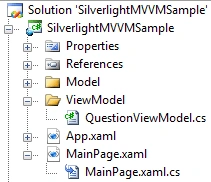
Now ViewModel is the part where data comes, it can be any method from the WebService or any data. Here we will create our own data for our sample application.
Add a property of ObservableCollection of Question type. We will write a method which will create some data for us. The code looks like the following.
public class QuestionViewModel
{
public ObservableCollection<Question> Questions { get; set; }
public void FetchQuestions()
{
ObservableCollection<Question> q = new ObservableCollection<Question>();
q.Add(new Question() {Text="What is 2 + 2 ?", ActualAnswer="4" });
q.Add(new Question() { Text = "What is 9 - 2 ?", ActualAnswer = "7" });
Questions = q;
}
}
Finally at the end of the method FetchQuestions we have assigned the added values to the collection.
Now the View part, we will add a UserControl to the project and design our application.
4) Create a folder called View and add a UserControl to it. Name it as QuestionView.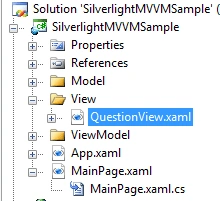
Now go ahead and look into the Xaml view. You can see the Grid; now it's time to show your Blend 3 skills and design as per required. Add the following:
- TextBlock (Displaying the Question)
- TextBox (User Input as Answer)
- CheckBox (Correct/Incorrect)
<Grid x:Name="LayoutRoot" Background="LightBlue">
<StackPanel Orientation="Vertical">
thabo gilbertPosted Aug 14, 2012, 8:42 AM
Ya man You r a Guru , Your Article is very nice , But I need to see you in the future using MVVM template which ships with Vs2010
nisha raytePosted Jun 4, 2012, 3:07 AM
I want to bind table from database to Radgridview using linq to sql claases and i want all code in mvvm pattern so please provide me solution
raghava svPosted Jan 20, 2012, 6:43 AM
event is not working in vs2010 means when correct answer is giving by user in textbox its corresponding checkbox event is not firing(checkbox is not checking ) please give me a suggestion why that event is not firing thanx in advance
Johny MotorheadPosted Oct 28, 2011, 6:57 PM
Thanks a lot, man! Greetings from Russia! ;)
Anindita BasakPosted Jan 7, 2011, 4:11 AM
I have used WPF MVVM toolkit CTP released June 2010, it's good but complexity increases when going with PRISM 4.0 Patterns. Any Solutions?
Ravi Ranjan SharmaPosted May 14, 2010, 5:54 AM
But Nice article for new people who is learning silverlight.
Ravi Ranjan SharmaPosted May 14, 2010, 5:52 AM
This is not a actual MVVM implementation
Giridhar SirigiriPosted Jan 24, 2010, 9:11 AM
Hi , It is a nice article, Please help me in planning the folowing, I am very new to silverlight and MVVM. I have two different classes in Model which will carry the Master Data which need to bind to a user control. Ex: Location (ID, Name) & ParentLocation (List of Locations). I have two different classes which need to hold the selected locations and additional data: Ex: Report (List of ReportLocations, StartDate,EndDate,Date Created), ReportLocation(LocationID,Note); All these list need to bind to different Accordion pane and list boxes under each in the view. Can you please let me know how to plan for Model, ViewModel and View? I am using WCF for Storing and retrieving data from database.
muscle baiPosted Sep 24, 2009, 11:34 AM
Find the video for this code snippet from infragistics: http://community.infragistics.com/pixel8/media/p/91949.aspx
Former memberPosted Jul 26, 2009, 7:34 PM
Nice Article :)