

Introduction
If you are new to JQwdget JQX Grid, I recommend you read my previous articles on the topic here.
Today we will learn how to implement a nested grid using JQWidget JQX grid files.
Background
In my previous article, I said all of the properties of the JQwidget JQX grid and now we can implement them. Now I have a requirement to implement the Nested grid. So I thought of sharing that with you all.
Loading required files
To start, we need to load the necessary files first. Just select the files from the Solution Explorer and drag those to the last of body section of the page.
- <script type="text/javascript" src="jqwidgets/jqxcore.js"></script>
- <script type="text/javascript" src="jqwidgets/jqxdata.js"></script>
- <script type="text/javascript" src="jqwidgets/jqxbuttons.js"></script>
- <script type="text/javascript" src="jqwidgets/jqxscrollbar.js"></script>
- <script type="text/javascript" src="jqwidgets/jqxmenu.js"></script>
- <script type="text/javascript" src="jqwidgets/jqxgrid.js"></script>
- <script type="text/javascript" src="jqwidgets/jqxgrid.selection.js"></script>
- <script type="text/javascript" src="jqwidgets/jqxgrid.filter.js"></script>
- <script type="text/javascript" src="jqwidgets/jqxgrid.sort.js"></script>
Now it is time to load the CSS style sheet for the grid.
- <link href="jqwidgets/styles/jqx.base.css" rel="stylesheet" />
Once you have loaded the required files, we can start our implementation.
Before loading the JQWidget JQX grid, we need to understand the preceding terms.
- A Data Array: The main and the first necessary thing to load a grid is the data, we will provide a JSON array as data.
- A Source: Once the data is ready we will give this array to the source, where the source is a JSON property on which we are giving some initial settings. We will look to it when implementing the grid.
- A Data Adapter: And once we have created the source element we will give this to another JSON property that is the same as the source with some different settings.Now we will start the grid implementation.
Implementing Grid
First, we will load a simple grid, then we will implement the nested gird. Sounds good?
The simplest implementation to load a JQWidget JQX grid is as follows.
- $("#jqxgrid").jqxGrid(
- {
- width: 850,
- height: 365,
- sortable: true,
- source: source,
- //rowdetails: true,
- rowsheight: 35,
- //initrowdetails: initrowdetails,
- rowdetailstemplate: {
- rowdetails: "<div id='grid' style='margin: 10px;'></div>",
- rowdetailsheight: 220,
- rowdetailshidden: true
- },
- ready: function() {
- $("#jqxgrid").jqxGrid('showrowdetails', 1);
- },
- columns: [{
- text: 'User Id',
- datafield: 'UserId',
- hidden: true
- }, {
- text: 'My Transactions',
- datafield: 'TransactionName'
- }]
- });
In the preceding code I knowingly commented two properties. Have you noticed it?
- //rowdetails: true,
- //initrowdetails: initrowdetails,
The preceding specified properties are the properties we need to assign for the nested grid.
We can set the data and assign it to the source as follows for the simple grid.
- var tdData = $.parseJSON('[{"UserId": "5","TransactionName": "TRAN-Chennai"},{"UserId": "6","TransactionName": "TRAN-Kerala"}]');
- var source =
- {
- datafields: [{
- name: 'UserId',
- type: 'int'
- }, {
- name: 'TransactionName',
- type: 'string'
- }],
- id: 'UserId',
- datatype: "array",
- async: false,
- localdata: tdData
- };
- var ordersDataAdapter = new $.jqx.dataAdapter(ordersSource, {
- autoBind: true
- });
- orders = ordersDataAdapter.records;
Now if you run the page you will get output as follows.

If your grid is not populated, please go to your browser console and check whether the required files are loaded correctly.
Now it is time to implement the nested grid.
Implementing the Nested Grid
So our new settings for the parent grid must be as follows.
- $("#jqxgrid").jqxGrid(
- {
- width: 850,
- height: 365,
- sortable: true,
- source: source,
- rowdetails: true,
- rowsheight: 35,
- initrowdetails: initrowdetails,
- rowdetailstemplate: {
- rowdetails: "<div id='grid' style='margin: 10px;'></div>",
- rowdetailsheight: 220,
- rowdetailshidden: true
- },
- ready: function() {
- $("#jqxgrid").jqxGrid('showrowdetails', 1);
- },
- columns: [{
- text: 'User Id',
- datafield: 'UserId',
- hidden: true
- }, {
- text: 'My Transactions',
- datafield: 'TransactionName'
- }]
- });
And now we will create the function initrowdetails, you can see the code here.
- var nestedGrids = new Array();
- // create nested grid.
- var initrowdetails = function(index, parentElement, gridElement, record)
- {
- var id = record.uid.toString();
- var grid = $($(parentElement).children()[0]);
- nestedGrids[index] = grid;
- var filtergroup = new $.jqx.filter();
- var filter_or_operator = 1;
- var filtervalue = id;
- var filtercondition = 'equal';
- var filter = filtergroup.createfilter('stringfilter', filtervalue, filtercondition);
- // fill the orders depending on the id.
- var ordersbyid = [];
- for (var m = 0; m < orders.length; m++) {
- var result = filter.evaluate(orders[m]["UserId"]);
- if (result)
- ordersbyid.push(orders[m]);
- }
- var secondaryDataFields = $.parseJSON('[{ "name": "UserId", "type": "int" },{ "name": "TransactionName", "type": "string" },{ "name": "tranDate", "type": "string" },{ "name": "tranUser", "type": "string" }]');
- var orderssource = {
- datafields: secondaryDataFields,
- id: 'UserId',
- localdata: ordersbyid
- }
- var nestedGridAdapter = new $.jqx.dataAdapter(orderssource);
- var secondaryGridColumn = $.parseJSON('[{ "text": "User Id", "datafield":"UserId" , "hidden":"true"},{ "text": "Transaction Name", "datafield":"TransactionName" },{ "text": "Transaction Date", "datafield":"tranDate" },{ "text": "User", "datafield":"tranUser" }]');
- if (grid != null) {
- grid.jqxGrid({
- source: nestedGridAdapter,
- width: 780,
- height: 200,
- columns: secondaryGridColumn
- });
- }
- }
You can see that the settings provided are the same as we provided for the parent grid and please note that the "id" in both of the sources are the same. We provide "UserId" as the key.
Complete Code
The following is the complete code.
- <!DOCTYPE html>
- <html>
- <head>
- <meta name="viewport" content="width=device-width" />
- <link href="jqwidgets/styles/jqx.base.css" rel="stylesheet" />
- <script type="text/javascript" src="jqwidgets/jquery-1.9.1.js"></script>
- <script type="text/javascript">
- $(document).ready(function() {
- var tdData = $.parseJSON('[{"UserId": "5","TransactionName": "TRAN-Chennai"},{"UserId": "6","TransactionName": "TRAN-Kerala"}]');
- var source =
- {
- datafields: [{
- name: 'UserId',
- type: 'int'
- }, {
- name: 'TransactionName',
- type: 'string'
- }],
- id: 'UserId',
- datatype: "array",
- async: false,
- localdata: tdData
- };
- var orderdetailsurl = $.parseJSON('[{"UserId": "5","TransactionName": "Adyar","tranDate": "04/22/2015 1:35:52","tranUser": "skannan"},{"UserId": "5","TransactionName": "Guindy","tranDate": "04/22/2015 1:35:52","tranUser": "skannan"},{"UserId": "6","TransactionName": "Trichur","tranDate": "04/21/2015 1:46:50","tranUser": "bmahadevan"}]');
- var secondGridData = $.parseJSON('[{ "name": "UserId", "type": "int" },{ "name": "TransactionName", "type": "string" },{ "name": "tranDate", "type": "string" },{ "name": "tranUser", "type": "string" }]');
- var ordersSource =
- {
- datafields: secondGridData,
- datatype: "array",
- localdata: orderdetailsurl,
- async: false
- };
- var ordersDataAdapter = new $.jqx.dataAdapter(ordersSource, {
- autoBind: true
- });
- orders = ordersDataAdapter.records;
- var nestedGrids = new Array();
- // create nested grid.
- var initrowdetails = function(index, parentElement, gridElement, record) {
- var id = record.uid.toString();
- var grid = $($(parentElement).children()[0]);
- nestedGrids[index] = grid;
- var filtergroup = new $.jqx.filter();
- var filter_or_operator = 1;
- var filtervalue = id;
- var filtercondition = 'equal';
- var filter = filtergroup.createfilter('stringfilter', filtervalue, filtercondition);
- // fill the orders depending on the id.
- var ordersbyid = [];
- for (var m = 0; m < orders.length; m++) {
- var result = filter.evaluate(orders[m]["UserId"]);
- if (result)
- ordersbyid.push(orders[m]);
- }
- var secondaryDataFields = $.parseJSON('[{ "name": "UserId", "type": "int" },{ "name": "TransactionName", "type": "string" },{ "name": "tranDate", "type": "string" },{ "name": "tranUser", "type": "string" }]');
- var orderssource = {
- datafields: secondaryDataFields,
- id: 'UserId',
- localdata: ordersbyid
- }
- var nestedGridAdapter = new $.jqx.dataAdapter(orderssource);
- var secondaryGridColumn = $.parseJSON('[{ "text": "User Id", "datafield":"UserId" , "hidden":"true"},{ "text": "Transaction Name", "datafield":"TransactionName" },{ "text": "Transaction Date", "datafield":"tranDate" },{ "text": "User", "datafield":"tranUser" }]');
- if (grid != null) {
- grid.jqxGrid({
- source: nestedGridAdapter,
- width: 780,
- height: 200,
- columns: secondaryGridColumn
- });
- }
- }
- // creage jqxgrid
- $("#jqxgrid").jqxGrid(
- {
- width: 850,
- height: 365,
- sortable: true,
- source: source,
- rowdetails: true,
- rowsheight: 35,
- initrowdetails: initrowdetails,
- rowdetailstemplate: {
- rowdetails: "
- <div id='grid' style='margin: 10px;'></div>",
- rowdetailsheight: 220,
- rowdetailshidden: true
- },
- ready: function() {
- $("#jqxgrid").jqxGrid('showrowdetails', 1);
- },
- columns: [{
- text: 'User Id',
- datafield: 'UserId',
- hidden: true
- }, {
- text: 'My Transactions',
- datafield: 'TransactionName'
- }]
- });
- });
- < /script>
- <title>JQWidget JQX Nested Grip Implementation @ SibeeshPassion </title>
- </head>
- <body class='default'>
- JQWidget JQX Nested Grip Implementation @ SibeeshPassion
- <br />
- <div id="jqxgrid"></div>
- <script type="text/javascript" src="jqwidgets/jqxcore.js"></script>
- <script type="text/javascript" src="jqwidgets/jqxdata.js"></script>
- <script type="text/javascript" src="jqwidgets/jqxbuttons.js"></script>
- <script type="text/javascript" src="jqwidgets/jqxscrollbar.js"></script>
- <script type="text/javascript" src="jqwidgets/jqxmenu.js"></script>
- <script type="text/javascript" src="jqwidgets/jqxgrid.js"></script>
- <script type="text/javascript" src="jqwidgets/jqxgrid.selection.js"></script>
- <script type="text/javascript" src="jqwidgets/jqxgrid.filter.js"></script>
- <script type="text/javascript" src="jqwidgets/jqxgrid.sort.js"></script>
- </body>
- </html>
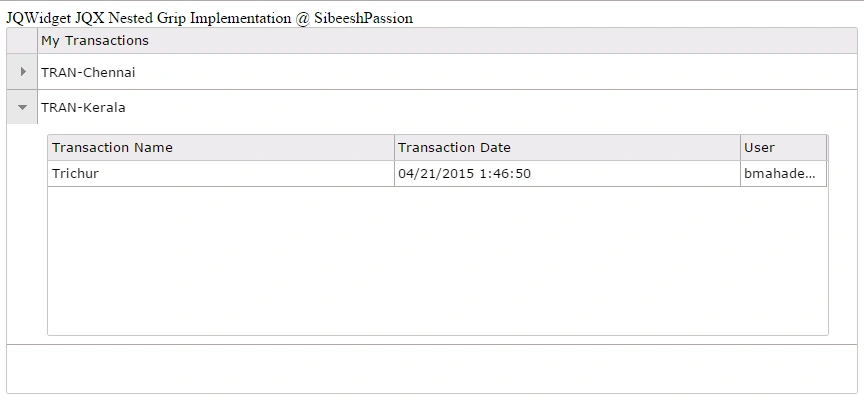
Output
Now if things goes well, you will get output as follows.

Conclusion
I hope you liked this article. Please provide your valuable suggestions. It matters a lot. Please download the source code to learn more.
Point of interest
JQX Grid, JQWidget, JQX Nested Grid.
shivani sharmaPosted May 12, 2021, 9:48 AM
Hi Sibeesh, I got my nested grid working, but the nested grid isn't expanding in one of the scenarios. So I have a dropdown list, on selection of which I filter the parent grid. When I do that, the grid reloads, there's data in nested grid as well (I rebind the grid with updated source). But now the nested grid won't expand - basically $("#jqxgrid").on("rowexpand", is called twice and immediately, $("#jqxgrid").on("rowcollapse", is called. I can't fix it, can you help with this please?
Sibeesh VenuPosted May 13, 2015, 3:23 AM
Rahul Saxena thank you
Sibeesh VenuPosted May 13, 2015, 3:22 AM
Gowtham Rajamanickam thank you
Sibeesh VenuPosted May 13, 2015, 3:22 AM
Nitin Tyagi thank you
Sibeesh VenuPosted May 13, 2015, 3:21 AM
Vivek Tripathi thank you
Rahul Kumar SaxenaPosted May 12, 2015, 11:42 PM
Good Show..
Gowtham RajamanickamPosted May 12, 2015, 1:22 PM
good
NitinPosted May 12, 2015, 12:56 PM
good one
Vivek TripathiPosted May 12, 2015, 9:11 AM
nice article Sibeesh
Sibeesh VenuPosted May 12, 2015, 3:04 AM
VD tripathi Thank you.
Vishwakant TripathiPosted May 12, 2015, 2:22 AM
explained well..
Sibeesh VenuPosted May 12, 2015, 1:11 AM
Santhakumar Munuswamy Thank you
Santhakumar MunuswamyPosted May 12, 2015, 12:29 AM
Thanks for good work