

A webhook is an HTTP-based, event-driven mechanism that allows applications to automatically send real-time data to other applications. Unlike APIs, which require periodic polling, webhooks send information instantly via POST requests when a specific event occurs. Common use cases include updating databases, triggering CI/CD pipelines, or sending notifications.
A webhook (also called a web callback or HTTP push API) is a way for an app to push real-time information to other applications. A webhook delivers data to other applications as it happens, meaning you get data immediately—unlike typical APIs, where you would need to poll for data very frequently to get it in real-time.
Think of a webhook as a digital carrier pigeon for the modern age. It's a way for one app to automatically send real-time updates to another app whenever something interesting happens. No more constant checking or refreshing needed —i.e., Polling—webhooks deliver the results straight to your digital doorstep. Webhooks are sometimes referred to as reverse APIs because of the ability to give you what amounts to an API spec, and you must design an API for the webhook to use. The webhook will make an HTTP request to your app (typically a POST), and you'll have to interpret the response.
Webhooks vs APIs:
Webhooks and APIs are both tools in web development that enable communication between software applications, but they serve different purposes and operate in distinct ways.
Here's a quick breakdown of the differences between webhooks and APIs:
Direction: Webhooks "push" data automatically in response to events. APIs exchange data in response to explicit requests, either "push" or "pull".
Trigger: Webhooks are event-driven, while APIs are request-driven.
Use cases: Webhooks are typically used for real-time notifications, while APIs handle a wide range of operations, such as data retrieval and updates.
Configuration: Webhooks need configuration for specific events and endpoints. APIs provide callable endpoints without event-based configuration.
Frequency: Webhooks operate in real time. APIs operate based on the frequency of requests.
Security: Webhooks push data to exposed endpoints, requiring security measures. APIs often demand authentication for data access.
While webhooks and APIs facilitate communication between applications, webhooks are event-driven and automatically send data when specific events occur—whereas APIs are request-driven and provide data or services in response to explicit requests.
In here we have implemented a short POC where we have an Employee Management application in which newly employee get adds and once the new employee’s record creates then an event get trigger to inform Bank applications to create a new record for that newly added employee.
Instead of bank applications keeping on requesting/polling for any new employee added, webhooks are registered at Employee management application which triggers respective webhook URLs for their events.
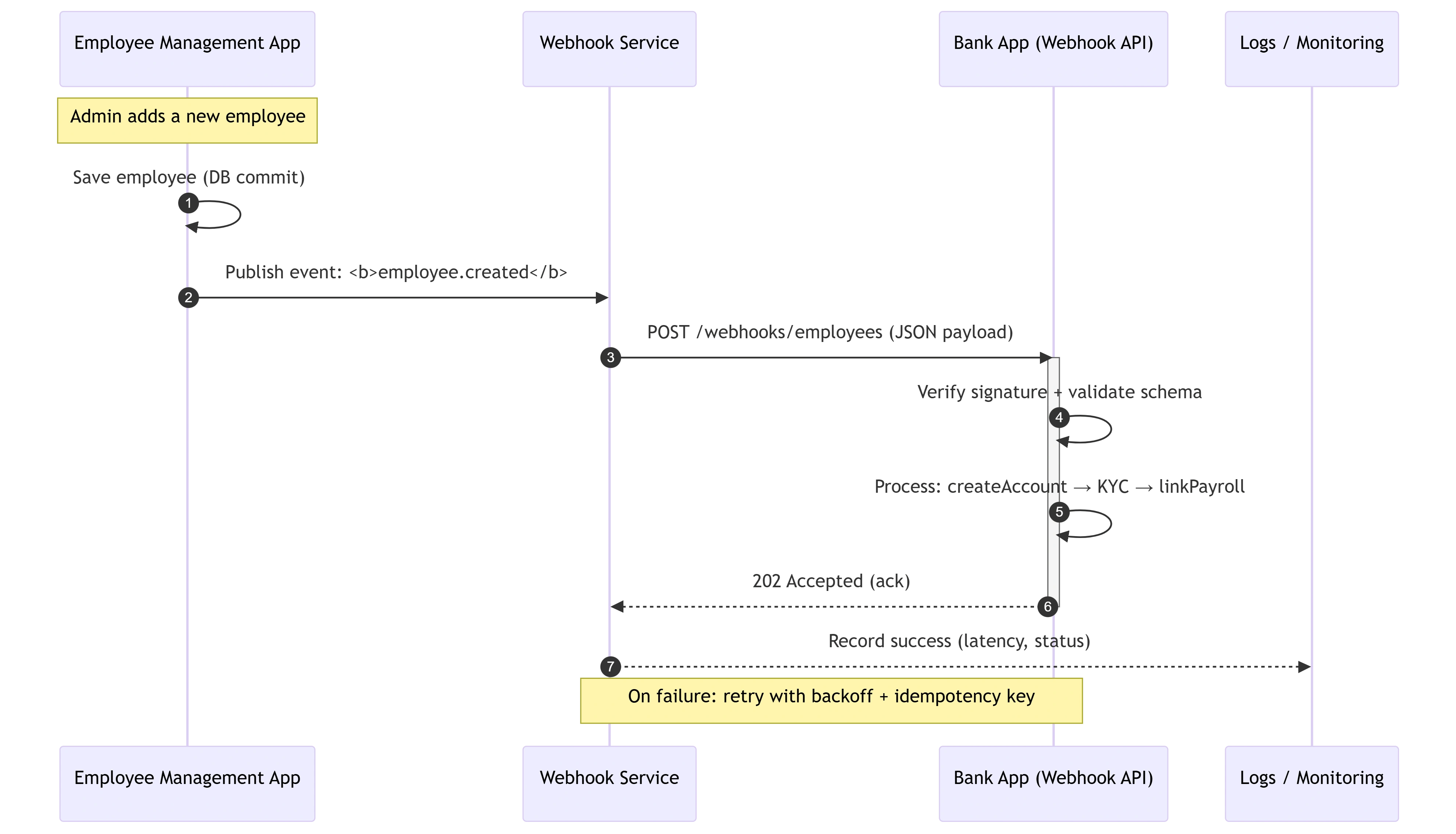
How do webhooks work:
For a system to send webhooks, the system must be able to support making outbound HTTP requests in response to an event within a system, and you can build your system to send webhooks by triggering HTTP requests for different types of events.
They are most common in SaaS and PaaS platforms like GitHub, Shopify, Stripe, Twilio because they support different types of events based on the activities that happen within them. To receive webhook requests, you must register for all or specific events (also known as topics) that the platform offers. Those events represent triggers for the events such as charge.created or user.created to name a few examples. Some platforms require a handshake or challenge to complete before the registration is successful. It's a mandatory process to verify that the URL is valid and wishes to receive requests from the source system.
Once you register for an event, you will receive requests at the destination URL you provided for each time the event occurs.
Consuming a webhook
Webhooks are regular HTTP requests and should be handled as such. The HTTP endpoint must support the HTTP method used by the provider and the request's content type. Payloads most commonly use a JSON, form-encoded, or XML content type, which most HTTP server’s support.
They are mostly sent using the HTTP POST method. However, this is dependent on the provider. GET requests have their payload appended to the URL as a query string. POST and PUT requests have their payload in the request body and might contain properties like authentication tokens.
There are several things to consider consuming webhooks successfully and avoid integrity issues
Delivery guarantees & idempotency
Webhooks typically have "at-least-once" delivery guarantees, which means receiving the same request more than once is possible. You should make your processing idempotent.
Timeouts
Webhook requests have a timeout for how long they wait for a response from your server. The timeout is typically short, at most 5 seconds and sometimes as low as 1 second. It is best practice to return an HTTP status code of 200 to confirm that you have received it.
Throughput control
Webhooks sent by providers are not throughput controlled, and chances are you will eventually receive more requests than you can handle. To not lose any data, you should persist with the data immediately, generally using a message queue and process the event asynchronously.
Asynchronous processing
Because of the short timeout and lack of throughput control, webhooks should be processed asynchronously. By processing asynchronously, you can ensure that your system can respond quickly to the request and defer any long-running processing to a background job.
Ordering
Webhooks are not guaranteed to be delivered in order and typically include a timestamp in the payload or headers. That timestamp can be used to determine if an event is out of order or "stale" to avoid processing it.
Security & Signature verification
Since webhooks are ultimately HTTP requests made to a "Public" URL, they are susceptible to being spoofed by malicious actors. The authenticity can be verified by validating the request's signature. Typically, the signature uses HMAC algorithms with a shared secret key to hash the body of the request. The signature must be computed and compared to the signature in the request for every request. If the signature does not match, the request should be rejected.
What are the benefits of webhooks?
Webhooks are the magical conduits that connect applications and systems, creating a seamless and synchronized orchestra of data exchange.
Here are a few of the most prevalent benefits of webhooks:
Real-time updates: Gone are the days of manual checks and tiresome refreshes. With webhooks, you can sit back and let the information come to you. Whether it's a new order on your e-commerce website or a notification from your favorite social media platform, webhooks ensure that you're always in the loop.
Automation: Webhooks trigger actions and unleash a cascade of events with the flick of a digital switch. Want to send a personalized email to a new subscriber? Webhooks, make it happen. Need to update your CRM system when a customer makes a purchase? Webhooks have your back.
Integration: With webhooks, disparate systems become dance partners, seamlessly exchanging information and performing synchronized routines. Whether it's syncing data between different applications or bridging the gap between services, webhooks bring together the digital ensemble that powers our modern world.
Flexibility: Webhooks don't impose any constraints on the format or type of data they transmit. From humble JSON payloads to majestic XML documents, webhooks embrace them all. This flexibility empowers developers to craft custom-tailored solutions, opening the doors to endless possibilities and boundless creativity.
Security: Unlike their rowdy alternatives, webhooks are peaceful, patient listeners. They await their turn to receive the information they need, ensuring that your systems stay protected from unnecessary strain. By allowing you to define the endpoint where data is delivered, webhooks put you firmly in the driver's seat, giving you full control over the flow of information.
Join the conversation! Your thoughts help the community grow.