
Introduction
In this article, we will explain how to import data from an Excel sheet to SQL Server database by using library named js-xlsx. In this demo, we are going to create a basic Application whose role is to show you the steps, which are used to achieve our goal. Prior to it, you need to have some basic knowledge on AngularJS, Web API2 and Entity Framework ORM. I hope, you will like my article.
In this article, we are going to
- Create database.
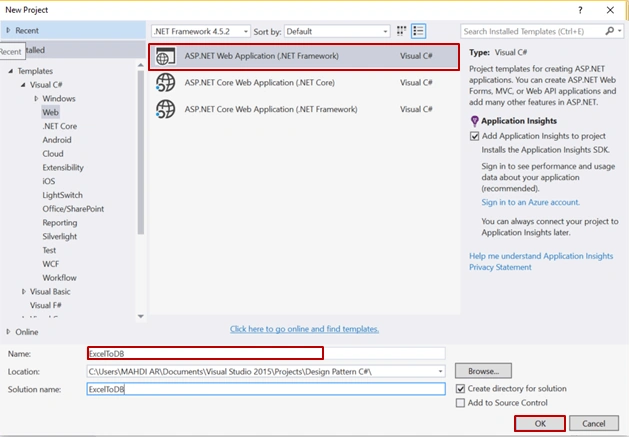
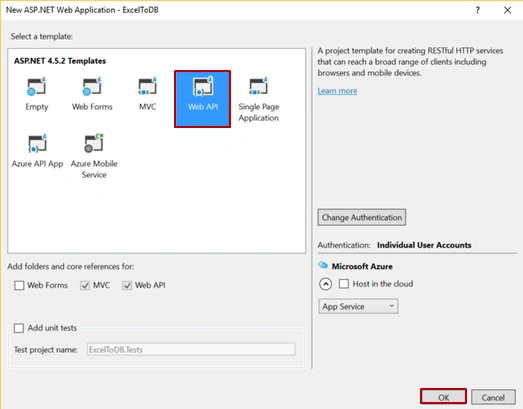
- Create Web API Application.
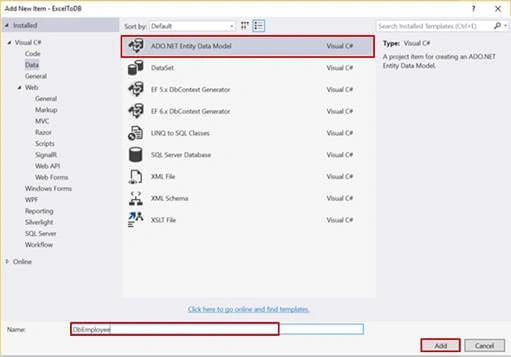
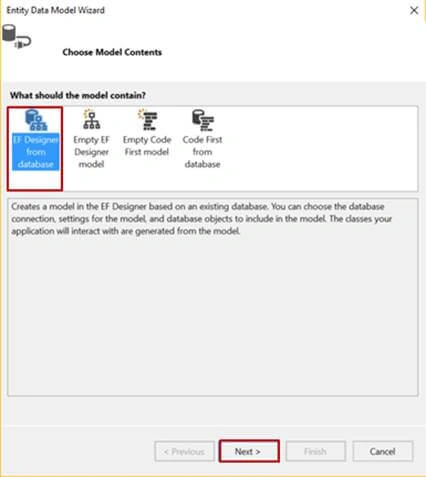
- Configuring Entity Framework ORM.
- Create controller.
- AngularJS part.
- Create HTML page.
Let’s start.
SQL database part
Here, you will find the scripts to create a database and table.
Create a database
- USE [master]
- GO
- /****** Object: Database [DbEmployee] Script Date: 3/25/2017 8:23:01 AM ******/
- CREATE DATABASE [DbEmployee]
- CONTAINMENT = NONE
- ON PRIMARY
- ( NAME = N'DbEmployee', FILENAME = N'c:\Program Files (x86)\Microsoft SQL Server\MSSQL11.MSSQLSERVER\MSSQL\DATA\DbEmployee.mdf' , SIZE = 3072KB , MAXSIZE = UNLIMITED, FILEGROWTH = 1024KB )
- LOG ON
- ( NAME = N'DbEmployee_log', FILENAME = N'c:\Program Files (x86)\Microsoft SQL Server\MSSQL11.MSSQLSERVER\MSSQL\DATA\DbEmployee_log.ldf' , SIZE = 1024KB , MAXSIZE = 2048GB , FILEGROWTH = 10%)
- GO
- ALTER DATABASE [DbEmployee] SET COMPATIBILITY_LEVEL = 110
- GO
- IF (1 = FULLTEXTSERVICEPROPERTY('IsFullTextInstalled'))
- begin
- EXEC [DbEmployee].[dbo].[sp_fulltext_database] @action = 'enable'
- end
- GO
- ALTER DATABASE [DbEmployee] SET ANSI_NULL_DEFAULT OFF
- GO
- ALTER DATABASE [DbEmployee] SET ANSI_NULLS OFF
- GO
- ALTER DATABASE [DbEmployee] SET ANSI_PADDING OFF
- GO
- ALTER DATABASE [DbEmployee] SET ANSI_WARNINGS OFF
- GO
- ALTER DATABASE [DbEmployee] SET ARITHABORT OFF
- GO
- ALTER DATABASE [DbEmployee] SET AUTO_CLOSE OFF
- GO
- ALTER DATABASE [DbEmployee] SET AUTO_CREATE_STATISTICS ON
- GO
- ALTER DATABASE [DbEmployee] SET AUTO_SHRINK OFF
- GO
- ALTER DATABASE [DbEmployee] SET AUTO_UPDATE_STATISTICS ON
- GO
- ALTER DATABASE [DbEmployee] SET CURSOR_CLOSE_ON_COMMIT OFF
- GO
- ALTER DATABASE [DbEmployee] SET CURSOR_DEFAULT GLOBAL
- GO
- ALTER DATABASE [DbEmployee] SET CONCAT_NULL_YIELDS_NULL OFF
- GO
- ALTER DATABASE [DbEmployee] SET NUMERIC_ROUNDABORT OFF
- GO
- ALTER DATABASE [DbEmployee] SET QUOTED_IDENTIFIER OFF
- GO
- ALTER DATABASE [DbEmployee] SET RECURSIVE_TRIGGERS OFF
- GO
- ALTER DATABASE [DbEmployee] SET DISABLE_BROKER
- GO
- ALTER DATABASE [DbEmployee] SET AUTO_UPDATE_STATISTICS_ASYNC OFF
- GO
- ALTER DATABASE [DbEmployee] SET DATE_CORRELATION_OPTIMIZATION OFF
- GO
- ALTER DATABASE [DbEmployee] SET TRUSTWORTHY OFF
- GO
- ALTER DATABASE [DbEmployee] SET ALLOW_SNAPSHOT_ISOLATION OFF
- GO
- ALTER DATABASE [DbEmployee] SET PARAMETERIZATION SIMPLE
- GO
- ALTER DATABASE [DbEmployee] SET READ_COMMITTED_SNAPSHOT OFF
- GO
- ALTER DATABASE [DbEmployee] SET HONOR_BROKER_PRIORITY OFF
- GO
- ALTER DATABASE [DbEmployee] SET RECOVERY SIMPLE
- GO
- ALTER DATABASE [DbEmployee] SET MULTI_USER
- GO
- ALTER DATABASE [DbEmployee] SET PAGE_VERIFY CHECKSUM
- GO
- ALTER DATABASE [DbEmployee] SET DB_CHAINING OFF
- GO
- ALTER DATABASE [DbEmployee] SET FILESTREAM( NON_TRANSACTED_ACCESS = OFF )
- GO
- ALTER DATABASE [DbEmployee] SET TARGET_RECOVERY_TIME = 0 SECONDS
- GO
- ALTER DATABASE [DbEmployee] SET READ_WRITE
- GO
Create a table
- USE [DbEmployee]
- GO
- /****** Object: Table [dbo].[EmployeeTable] Script Date: 3/25/2017 8:23:51 AM ******/
- SET ANSI_NULLS ON
- GO
- SET QUOTED_IDENTIFIER ON
- GO
- SET ANSI_PADDING ON
- GO
- CREATE TABLE [dbo].[EmployeeTable](
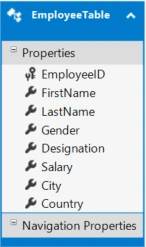
- [EmployeeID] [int] IDENTITY(1,1) NOT NULL,
- [FirstName] [varchar](50) NULL,
- [LastName] [varchar](50) NULL,
- [Gender] [varchar](50) NULL,
- [Designation] [nchar](10) NULL,
- [Salary] [int] NULL,
- [City] [varchar](50) NULL,
- [Country] [varchar](50) NULL,
- CONSTRAINT [PK_EmployeeTable] PRIMARY KEY CLUSTERED
- (
- [EmployeeID] ASC
- )WITH (PAD_INDEX = OFF, STATISTICS_NORECOMPUTE = OFF, IGNORE_DUP_KEY = OFF, ALLOW_ROW_LOCKS = ON, ALLOW_PAGE_LOCKS = ON) ON [PRIMARY]
- ) ON [PRIMARY]
- GO
- SET ANSI_PADDING OFF
- GO


karthik gPosted Dec 19, 2019, 7:58 AM
It Doesn't work with large excel file.
Dhandapani TRPosted Dec 5, 2018, 9:14 PM
This code not allow to upload large excel file, can anyone give solution for upload large excel file
Hamid KhanPosted Oct 9, 2017, 12:11 AM
Very good explanation.......................
Santosh PatilPosted May 17, 2017, 4:08 AM
Even i am facing the issue in IE11. readAsBinaryString Is not supported. Can someone please help me out for this ?
lakshmana poojaryPosted May 17, 2017, 3:54 AM
reader.readAsBinaryString(file); is not supported in I.E 11 browser. Hence It is not working in I.E 11 browser. Can some please help me out for this ?
Kazi Chele)Posted Apr 12, 2017, 5:01 AM
Awesome article..... Thanks for sharing..... You just save me :)
Abhishek ChaurasiaPosted Mar 27, 2017, 12:43 PM
Is this use libraries free or licensesd like <script src="Scripts/xlsx.full.min.js"></script> <script src="Scripts/jszip.js"></script>
wikum wijeysooriyaPosted Mar 27, 2017, 7:30 AM
Source code please
Thiruppathi RPosted Mar 27, 2017, 2:29 AM
Nice article thank you for sharing..