

Initial Chamber
Step 1. Open Visual Studio 2010 and create an Empty Website, Give a suitable name [insert_demo].
Step 2. In Solution Explorer you get your empty website, add a web form, SQL Database. By going like this.
For Web Form
insert_demo (Your Empty Website) - Right-click, Add New Item, then Web Form. Name it insert_demo.aspx.
For SQL Server Database
insert_demo (Your Empty Website) - Right-click, Add New Item, SQL Server Database. [Add Database inside the App_Data_folder].
Database Chamber
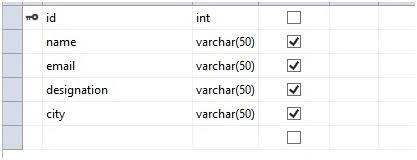
Step 3. Get to your Database [Database.mdf], we will create a table tbl_Data. Go to database.mdf, Table, then Add New table; design your table like the following.
Table - tbl_data [Don’t forget to make ID, then Identity Specification - Yes]
Design Chamber
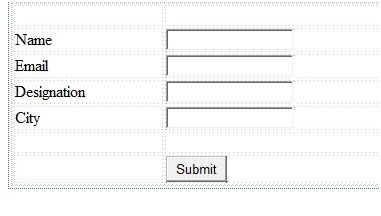
Step 4. Now open your insert_demo.aspx file, where we create our design for inserting data into database.
insert_demo.aspx
<%@ Page Language="C#" AutoEventWireup="true" CodeFile="Default.aspx.cs" Inherits="_Default" %>

<!DOCTYPE html>
<html xmlns="http://www.w3.org/1999/xhtml">
<head runat="server">
    <script type="text/javascript" src="http://code.jquery.com/jquery-1.8.2.js"></script>
    <script type="text/javascript" src="http://ajax.googleapis.com/ajax/libs/jquery/1.4.2/jquery.min.js"></script>
    <script type="text/javascript" src="http://ajax.googleapis.com/ajax/libs/jqueryui/1.8.1/jquery-ui.min.js"></script>
    <title></title>

    <style type="text/css">
        .auto-style1 {
            width: 147px;
        }
    </style>
</head>

<body>
    <form id="form1" runat="server">
        <div>
            <table style="width:100%;">
                <tr>
                    <td class="auto-style1"></td>
                    <td></td>
                    <td></td>
                </tr>
                <tr>
                    <td class="auto-style1">Name</td>
                    <td>
                        <asp:TextBox ID="TextBox1" runat="server"></asp:TextBox>
                    </td>
                    <td></td>
                </tr>
                <tr>
                    <td class="auto-style1">Email</td>
                    <td>
                        <asp:TextBox ID="TextBox2" runat="server"></asp:TextBox>
                    </td>
                    <td></td>
                </tr>
                <tr>
                    <td class="auto-style1">Designation</td>
                    <td>
                        <asp:TextBox ID="TextBox3" runat="server"></asp:TextBox>
                    </td>
                    <td></td>
                </tr>
                <tr>
                    <td class="auto-style1">City</td>
                    <td>
                        <asp:TextBox ID="TextBox4" runat="server"></asp:TextBox>
                    </td>
                    <td></td>
                </tr>
                <tr>
                    <td class="auto-style1"></td>
                    <td></td>
                    <td></td>
                </tr>
                <tr>
                    <td class="auto-style1"></td>
                    <td>
                        <asp:Button ID="Button1" runat="server" Text="Submit" />
                    </td>
                    <td></td>
                </tr>
            </table>
        </div>
    </form>

    <script type="text/javascript">
        $(function () {
            $('#Button1').click(function () {
                var name = $('#TextBox1').val();
                var email = $('#TextBox2').val();
                var designation = $('#TextBox3').val();
                var city = $('#TextBox4').val();
                if (name !== '' && email !== '' && designation !== '' && city !== '') {
                    $.ajax({
                        type: 'POST',
                        url: 'Default.aspx/insertdata',
                        async: false,
                        data: "{'name':'" + name + "','email':'" + email + "','designation':'" + designation + "','city':'" + city + "'}",
                        contentType: 'application/json; charset=utf-8',
                        success: function (data) {
                            var obj = data.d;
                            if (obj === 'true') {
                                $('#TextBox1').val('');
                                $('#TextBox2').val('');
                                $('#TextBox3').val('');
                                $('#TextBox4').val('');
                                alert("Data Saved Successfully");
                            }
                        },
                        error: function (result) {
                            alert("Error Occurred, Try Again");
                        }
                    });
                } else {
                    alert("Please Fill all the Fields");
                    return false;
                }
            });
        });
    </script>
</body>
</html>
samudraiah 19231Posted Mar 1, 2018, 5:16 AM
Thanq so much sir its better use
Abdul Amin KhanPosted Jul 24, 2017, 7:29 AM
There is any way to hide or encrypt page name/path in script. url: 'Default.aspx/insertdata',
Abdul Amin KhanPosted Jul 24, 2017, 7:07 AM
Thanks a Lot. I was seeking this from very long time. You make it very easy for me
Deepak RaiPosted Jun 15, 2017, 12:54 AM
Its very helpful and worked for me Nilesh Jadav .....Good job. But in my form there is to buttons one is for Feedback and other is for subscribtion in where i can insert values in Feedback table using javascript but i can't save it for Subscribtion. Since i made a changes in static method and javascript. plz help me out.
Muhammad Aqib ShehzadPosted Jul 29, 2016, 10:42 AM
Nice share
SubashPosted Jul 29, 2016, 4:53 AM
Very useful
Sonu ChaudharyPosted Mar 17, 2016, 7:35 AM
nice artical
Ujjval ShuklaPosted Jan 17, 2016, 5:00 AM
Good One.
Arul RPosted Jan 14, 2016, 2:35 AM
Nice
Santhakumar MunuswamyPosted Jan 5, 2016, 11:28 PM
Thanks for nice share
Muhammad Aqib ShehzadPosted Jan 5, 2016, 7:40 AM
Good Share
Raja TPosted Jan 3, 2016, 11:51 PM
Nice, Thanks for sharing
Vinodh NarayananPosted Jan 3, 2016, 1:06 PM
good one