
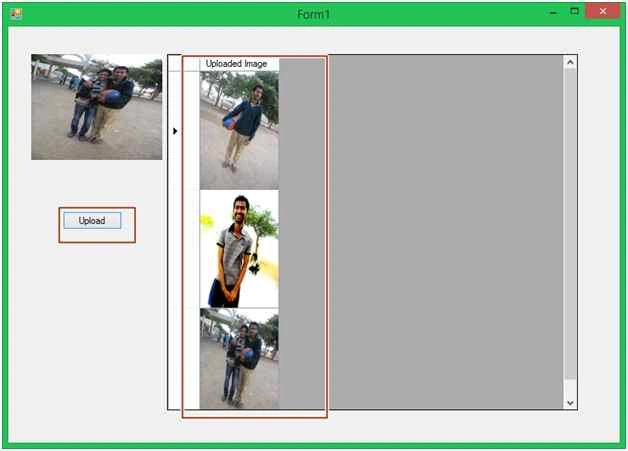
We use PictureBox control to add pictures and then that picture will get inserted into the DataGridView.
Initial chamber
Step 1: Open Visual Studio 2010, Go to File, New, Projects and under Visual C# select Windows.
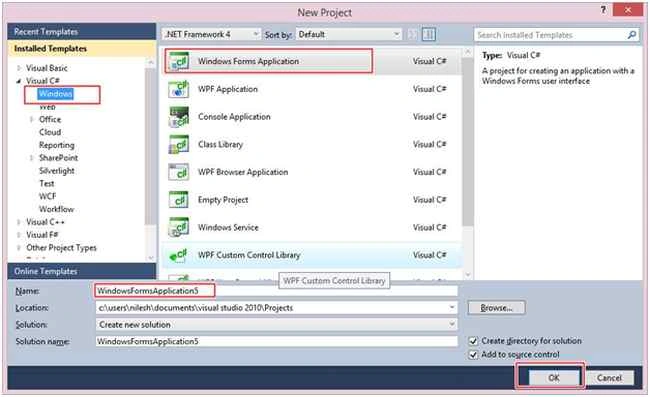
You can change the name of the project and browse your project to different location too. And then press – OK.
Design chamber
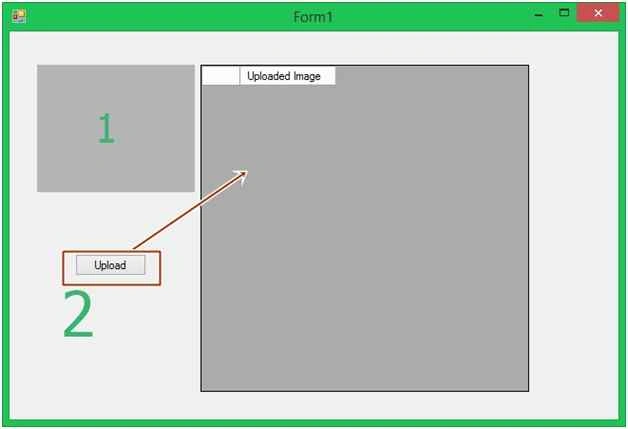
Step 2: Now open your Form1.cs file, where we create our design for DataGridView and Picture Image Control. We will drag a PictureBox, a button, and a DataGridView from toolbox to Form1.cs. You will see your Form look like this.
Form1.cs [Design]

Code chamber
Right Click on the blank part of Form1.cs and View Code. You will see you are entered in the code part of the form. Write the following code for Form1.cs.
Form1.cs

Insert Images In DataGridView In Windows Application Using C#
Join the conversation! Your thoughts help the community grow.
Sign in to leave a comment
It is the same account you read, post and publish with — and you will come straight back to this page.
Samuel MasukuPosted Feb 2, 2022, 11:29 AM
Needed this so much, thank you.
Ali AhmedPosted Nov 2, 2015, 2:07 AM
Simple but very constructive.
Arul RPosted Oct 28, 2015, 5:25 AM
Good one !!!
Upendra Pratap ShahiPosted Oct 26, 2015, 6:30 AM
nice one..
Isham KhanPosted Oct 26, 2015, 2:24 AM
nyc
Sibeesh VenuPosted Oct 26, 2015, 1:18 AM
Nice Share
Harshad PansuriyaPosted Oct 26, 2015, 12:35 AM
Nice one
Mohammed IbrahimPosted Oct 25, 2015, 10:52 PM
nice
Mukesh KumarPosted Oct 25, 2015, 2:58 PM
Great One Sir
Vinodh NarayananPosted Oct 25, 2015, 2:50 PM
Gud one
Gowtham KPosted Oct 25, 2015, 12:47 PM
Good One, Thanks for Sharing