

Introduction
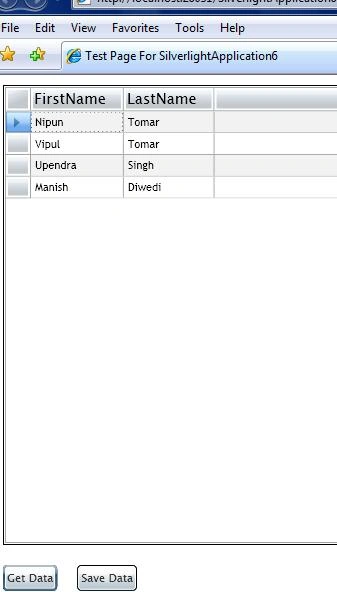
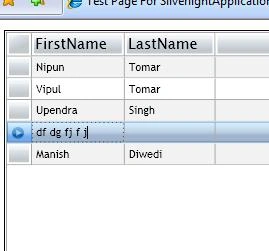
This article is in continuation of the previous one in which I discussed how to create ADO.NET Data Service and access Database using Silverlight 2. Here I am going to show how to perform Insert, Update, and Delete in Silverlight Datagrid using ADO.NET Data Service.
1. Create a class of the Entities type
- TestEntities proxy;
2. Create a variable to track if DataGrid is in Edit mode
- private bool inEdit;
3. Create Page_Loaded event to initailize the ADO.NET Data Service
- void Page_Loaded(object sender, RoutedEventArgs e) {
- proxy = new TestEntities(new Uri("WebDataService.svc", UriKind.Relative));
- }
4. Create Events for the DataGrid
- < my: DataGrid x: Name = "dataGrid"
- Margin = "10"
- AutoGenerateColumns = "True"
- AutoGeneratingColumn = "OnGeneratedColumn"
- BeginningEdit = "dataGrid_BeginningEdit"
- CommittingEdit = "dataGrid_CommittingEdit"
- CancelingEdit = "dataGrid_CancelingEdit"
- KeyDown = "dataGrid_KeyDown" / >
5. AttachTo method is used when an entity exists in the store already and you would want the DataServiceContext to track that entity. Use AddObject or AddTo method when a new entity is created and want the Context to track the entity. Write the Event Handelers for DataGrid Events
- private void dataGrid_BeginningEdit(object sender, DataGridBeginningEditEventArgs e) {
- inEdit = true;
- }
- private void dataGrid_CancelingEdit(object sender, DataGridEndingEditEventArgs e) {
- inEdit = false;
- }
- private void dataGrid_CommittingEdit(object sender, DataGridEndingEditEventArgs e) {
- //Attach the object to the context.
- try {
- proxy.AttachTo("Users", dataGrid.SelectedItem);
- }
- catch {}
- proxy.UpdateObject(e.Row.DataContext);
- }
6. Create a ObservableCollection
- /// <summary>
- /// Represents a dynamic data collection that provides notifications when items get added, removed, or when the whole list is refreshed.
- /// </summary>
- ObservableCollection < Users > BoundData {
- get {
- return (dataGrid.ItemsSource as ObservableCollection < Users > );
- }
- }
brahmam keditedPosted Feb 1, 2011, 11:45 PMEdited Feb 1, 2011, 11:57 PM
please Help me i am New for Entity Model in silverlight. i am getting below error at proxy.AttachTo method try { proxy.AttachTo("Users", dataGrid.SelectedItem); } catch { } Error:The context is already tracking the entity.
Dharmesh ranaPosted May 28, 2010, 9:08 PM
it didn't work
sk pPosted Mar 7, 2010, 4:11 PM
I found another article that might help you. get-update-delete-in-silverlight-datagrid-using-wcf-service
sandeep reddyPosted Oct 9, 2009, 10:17 AM
Hi I am sandeep and I am new to silverlight and I have Implemented the same application while clicking the Get Data button I am facing an error System.Data.Services.Client.DataServiceQueryException was unhandled by user code Message="An error occurred while processing this request." StackTrace: at System.Data.Services.Client.QueryAsyncResult.EndExecute[TElement](Object source, IAsyncResult asyncResult) at System.Data.Services.Client.DataServiceQuery`1.EndExecute(IAsyncResult asyncResult) at silverlightado.MainPage.OnLoadComplete(IAsyncResult result) at System.Data.Services.Client.BaseAsyncResult.HandleCompleted() at System.Data.Services.Client.QueryAsyncResult.AsyncEndRead(IAsyncResult asyncResult) at System.IO.Stream.BeginRead(Byte[] buffer, Int32 offset, Int32 count, AsyncCallback callback, Object state) at System.Data.Services.Client.QueryAsyncResult.AsyncEndGetResponse(IAsyncResult asyncResult) InnerException: System.InvalidOperationException Message="An error occurred while saving changes. See the inner exception for details." StackTrace: at System.Data.Services.Client.BaseAsyncResult.EndExecute[T](Object source, String method, IAsyncResult asyncResult) at System.Data.Services.Client.QueryAsyncResult.EndExecute[TElement](Object source, IAsyncResult asyncResult) InnerException: System.Data.Services.Client.DataServiceClientException Message="<?xml version=\"1.0\" encoding=\"iso-8859-1\" standalone=\"yes\"?>\r\n<error xmlns=\"http://schemas.microsoft.com/ado/2007/08/dataservices/metadata\">\r\n <code></code>\r\n <message xml:lang=\"en-AU\">An error occurred while processing this request.</message>\r\n</error>" StatusCode=500 InnerException: and after looking back to application i found one more thing is missing In your application 4.Run the Service and results will be as below after this point there is a picture of xml and in 5.And if use the database object name then the respective records are displayed on clicking users you have shown the data well while i am implementing i am not able to see 5th point but ie didnot shown any error and browsed in firefox and displays <message xml:lang="en-AU">An error occurred while processing this request.</message> error like this please help me on this how to fix this issue it helps me lot and I was thinking it could be the problem please help me. Regards sandeep
Steven MayhuePosted Aug 28, 2009, 11:34 AM
There is no RowEditEnding event available either.
Steven MayhuePosted Aug 28, 2009, 11:28 AM
ObservableCollection<ApplauseModel.tblSettings> BoundData { get { return (dgSettings.ItemsSource as ObservableCollection<ApplauseModel.tblSettings>); } } BoundData returns null even though grid has 8 items loaded?? Steve
JaiPosted Jul 1, 2009, 11:10 AM
Hi, Its a good sample :) However, I am getting two errors when I build. Error 1 'System.Windows.Controls.DataGridAutoGeneratingColumnEventArgs' does not contain a definition for 'Property' and no extension method 'Property' accepting a first argument of type 'System.Windows.Controls.DataGridAutoGeneratingColumnEventArgs' could be found (are you missing a using directive or an assembly reference?) D:\Tutorials\Silver Light Samples\silverLightSimpleGrid\SilverlightApplication6\SilverlightApplication6\Page.xaml.cs 152 19 SilverlightApplication6 Error 2 Could not load file or assembly 'Microsoft.Data.Web, Version=3.5.0.0, Culture=neutral, PublicKeyToken=b77a5c561934e089' or one of its dependencies. The system cannot find the file specified. D:\Tutorials\Silver Light Samples\silverLightSimpleGrid\SilverlightApplication6\SilverlightApplication6Web\web.config 44
Joseph Britto BrittoeditedPosted Jun 4, 2009, 10:34 AMEdited Jun 4, 2009, 10:36 AM
I can't get CommittingEdit="dataGrid_CommittingEdit" in .xaml page.
AndrusPosted Jan 20, 2009, 9:21 AM
Trying to compile this sample in SL2 RTM causes warnings Warning 1 The property 'CommittingEdit' does not exist on the type 'DataGrid' in the XML namespace 'clr-namespace:System.Windows.Controls;assembly=System.Windows.Controls.Data'. C:\ssleditingingrid\SilverlightApplication6\SilverlightApplication6\Page.xaml 13 22 SilverlightApplication6 Warning 2 The property 'CancelingEdit' does not exist on the type 'DataGrid' in the XML namespace 'clr-namespace:System.Windows.Controls;assembly=System.Windows.Controls.Data'. C:\ssleditingingrid\SilverlightApplication6\SilverlightApplication6\Page.xaml 13 63 SilverlightApplication6 Sample saves changes in CommittingEdit event. Since this event does not exist in RTM, this code cannot used to save changes: moving to other row is not dedected by code. How to fix ? Andrus.
DipsaPosted Jan 19, 2009, 6:27 AM
This article is very useful to me. I have used above code to prepare a CRUD operation using VB.Net. Project build successfully. but when i click 'Insert' nothing happens, when i update row and click 'Save' button DB row not updating. Please help me. can you please provide same example in vb.net? Thanks a lot.
Jiang EdwardPosted Nov 3, 2008, 4:23 AM
your code is helped me to much. Now, I have some question, I can't find CommittingEdit and CancelingEdit events in my DataGrid. Can you help me , thanks a lot
umar kashmiriPosted Oct 13, 2008, 1:17 AM
when i implemented previous and this article i got this exception "No parameterless Constructor defined for this object" on data binding with datagrid.itemsource. Can u tell me plz y is that so.kindly email me the solution.