

Background
In many MVC projects and other applications you might have noticed while inserting data into the database whole post back occurs which consumes the server resources unnecessarily and some time inserts the duplicate records when page is post back again. So to avoid it we will learn how to post the data using jQuery Ajax post method in MVC which will insert the data asynchronously into the database without whole page postback.
You might be interested in one of my ASP.NET article Inserting Form Data Into Database Using Stored Procedure In ASP.NET C# posted in December 2012 with 149 k+ views and based on the same I decided same functionality article using ASP.NET MVC.
In many MVC projects and other applications you might have noticed while inserting data into the database whole post back occurs which consumes the server resources unnecessarily and some time inserts the duplicate records when page is post back again. So to avoid it we will learn how to post the data using jQuery Ajax post method in MVC which will insert the data asynchronously into the database without whole page postback.
You might be interested in one of my ASP.NET article Inserting Form Data Into Database Using Stored Procedure In ASP.NET C# posted in December 2012 with 149 k+ views and based on the same I decided same functionality article using ASP.NET MVC.
- "Start", then "All Programs" and select "Microsoft Visual Studio 2015".
- "File", then "New" and click "Project" then select "ASP.NET Web Application Template", then provide the Project a name as you wish and click on OK.
- Choose MVC empty application option and click on OK
Right click on Model folder in the created MVC application, give the class name employee or as you wish and click OK.
EmpModel.cs
- public class EmpModel
- {
- public string Name { get; set; }
- public string City { get; set; }
- public string Address { get; set; }
- }
Step 3: Create Table and Stored procedures.
Now before creating the views let us create the table named Employee in the database according to our model fields to store the details:

Create stored procedure to insert records
Now before creating the views let us create the table named Employee in the database according to our model fields to store the details:
Create stored procedure to insert records
- Create procedure [dbo].[AddEmp]
- (
- @Name varchar (50),
- @City varchar (50),
- @Address varchar (50)
- )
- as
- begin
- Insert into Employee values(@Name,@City,@Address)
- End
Step 4: Add controller class.
Right click on Controller folder in the created MVC application; give the class name. I have given class name Home and clicked OK.
HomeControlle.cs
- public class HomeController : Controller
- {
- private SqlConnection con;
- // GET: AddEmployee
- public ActionResult AddEmployee()
- {
- return View();
- }
- //Post method to add details
- [HttpPost]
- public ActionResult AddEmployee(EmpModel obj)
- {
- AddDetails(obj);
- return View();
- }
- //To Handle connection related activities
- private void connection()
- {
- string constr = ConfigurationManager.ConnectionStrings["SqlConn"].ToString();
- con = new SqlConnection(constr);
- }
- //To add Records into database
- private void AddDetails(EmpModel obj)
- {
- connection();
- SqlCommand com = new SqlCommand("AddEmp", con);
- com.CommandType = CommandType.StoredProcedure;
- com.Parameters.AddWithValue("@Name", obj.Name);
- com.Parameters.AddWithValue("@City", obj.City);
- com.Parameters.AddWithValue("@Address", obj.Address);
- con.Open();
- com.ExecuteNonQuery();
- con.Close();
- }
- }
Step 5: Add View
Right click on View folder of created MVC application project and add empty view named AddEmployee.cshtml.
Step 6: Create jQuery Post method
Now open the AddEmployee.cshtml view and create the following jQuery Post method to call controller.
Right click on View folder of created MVC application project and add empty view named AddEmployee.cshtml.
Step 6: Create jQuery Post method
Now open the AddEmployee.cshtml view and create the following jQuery Post method to call controller.
- <script>
- $(document).ready(function () {
- //function will be called on button click having id btnsave
- $("#btnSave").click(function () {
- $.ajax(
- {
- type: "POST", //HTTP POST Method
- url: "Home/AddEmployee", // Controller/View
- data: { //Passing data
- Name: $("#txtName").val(), //Reading text box values using Jquery
- City: $("#txtAddress").val(),
- Address: $("#txtcity").val()
- }
- });
- });
- });
- </script>
- To work with jQuery we need to reference jQuery library. You can use the following CDN jQuery library from any provider such as Microsoft, Google or jQuery.
- https://ajax.googleapis.com/ajax/libs/jquery/1.11.3/jquery.min.js
To use above jQuery library you need an active internet connection, if you don't have then you can use the following offline jQuery library as well:
- <script src="~/Scripts/jquery-1.10.2.min.js"></script>
Now after adding the library and form controls, the AddEmployee.cshtml code will look like as:
- @{
- ViewBag.Title = "www.compilemode.com";
- }
- <script src="https://ajax.googleapis.com/ajax/libs/jquery/1.11.3/jquery.min.js"></script>
- <script>
- $(document).ready(function () {
- $("#btnSave").click(function () {
- $.ajax(
- {
- type: "POST", //HTTP POST Method
- url: "Home/AddEmployee", // Controller/View
- data: { //Passing data
- Name: $("#txtName").val(), //Reading text box values using Jquery
- City: $("#txtAddress").val(),
- Address: $("#txtcity").val()
- }
- });
- });
- });
- </script>
- <br /><br />
- <fieldset>
- <div class="form-horizontal">
- <div class="editor-label">
- Name
- </div>
- <div class="editor-label">
- <input type="text" id="txtName" />
- </div>
- <div class="editor-label">
- Address
- </div>
- <div class="editor-label">
- <input type="text" id="txtAddress" />
- </div>
- <div class="editor-label">
- City
- </div>
- <div class="editor-label">
- <input type="text" id="txtcity" />
- </div>
- <div class="editor-label">
- <br />
- <input class="btn-default" type="button" id="btnSave" value="Save" />
- </div>
- </div>
- </fieldset>
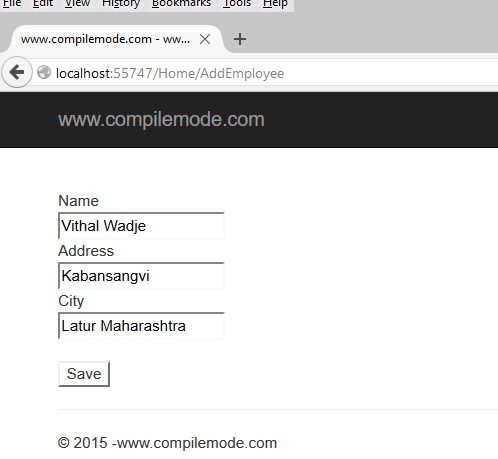
After entering the details click on save button. The details will get added into the database as in the following:

From all the above examples we learned how to insert data using jQuery post method without whole page postback.
Note
- Do a proper validation such as date input values when implementing.
- Download the Zip file of the sample application for a better understanding.
- Make the changes in the web.config file depending on your server details for the connection string.
Summary
From all the preceding examples you have learned how to insert data using jQuery post method. I hope this article is useful for all readers, if you have a suggestion then please contact me.
From all the preceding examples you have learned how to insert data using jQuery post method. I hope this article is useful for all readers, if you have a suggestion then please contact me.
Vikas RaoPosted Jan 8, 2020, 7:16 AM
Please add [ / ] in front of your controller name like :-- url: "/Home/AddEmployee",
narendrta yadavPosted Jul 9, 2019, 2:08 AM
Thanks Nice
Amit MakhijaPosted Aug 8, 2018, 10:15 PM
How to Insert Date Using jQuery Ajax POST Method In ASP.NET MVC 5??
Nithish ReddyPosted Mar 20, 2018, 8:46 AM
How to insert a csv record in asp.net mvc5 using class library for model and data access layer ?
Nicholus MaropengPosted Jan 17, 2018, 5:15 AM
Nice.. Well explained
TaraPosted Nov 17, 2017, 11:49 AM
Nice.. Well explained
Kishan sahooPosted Jul 29, 2017, 7:43 AM
Its nice for freshers..Bt please use entity framework rather than ado.net sql conn code ...
Fatima BhattiPosted Jul 21, 2017, 12:57 AM
Thankyou!! helped me alot
ramkiran kotipalliPosted Jun 13, 2017, 2:56 AM
How to bind data (from dataset or data table mulitple records like webgrid in mvc ) using ajax call with paging i.e client side paging and binding ,with ajax get in mvc
Vithal WadjePosted Aug 20, 2016, 10:38 PM
Will attach soon , I have already uploaded but not reflecting here , will check and will upload new source code
asdas asdasPosted Aug 18, 2016, 10:28 AM
Where can we download the sample code for the application?
Vithal WadjePosted Jul 25, 2016, 10:41 AM
Thanks
kalu singh raoPosted Jul 25, 2016, 7:52 AM
Nice share
siva balanPosted Jul 22, 2016, 2:10 AM
Can you please send me this project in my mail id [email protected]
siva balanPosted Jul 19, 2016, 6:13 AM
Model:using System;using System.Collections.Generic;using System.Linq;using System.Web; namespace Trial.Models { public class Employee { public string Name { get; set; } public string Location { get; set; } public string Email { get; set; } public string PhoneNumber { get; set; } } } Controller:using System; using System.Collections.Generic; using System.Linq; using System.Web; using System.Web.Mvc; using System.Data; using System.Data.SqlClient; using System.IO; using System.Configuration; using Trial.Models; namespace Trial.Controllers { public class StoreController : Controller { private SqlConnection con; // GET: Store public ActionResult AddEmployee() { return View(); } [HttpPost] public ActionResult AddEmployee(Employee obj) { AddDetails(obj); return View(); } private void connection() { string constr = ConfigurationManager.ConnectionStrings["MVCTtaining"].ToString(); con = new SqlConnection(constr); } private void AddDetails(Employee obj) { connection(); SqlCommand cmd = new SqlCommand("Insert into tbl_Training (Name,Location,Email,PhoneNumber) values (@name,@location,@mail,@phone)"); cmd.Connection = con; cmd.Parameters.AddWithValue("@name",obj.Name); cmd.Parameters.AddWithValue("@location",obj.Location); cmd.Parameters.AddWithValue("@mail", obj.Email); cmd.Parameters.AddWithValue("@phone", obj.PhoneNumber); con.Open(); cmd.ExecuteNonQuery(); con.Close(); } } } View: @{ ViewBag.Title = "AddEmployee"; } <script src="https://ajax.googleapis.com/ajax/libs/jquery/1.12.4/jquery.min.js"></script> <h2>@ViewBag.Title</h2> <script> $(document).ready(function () { $("#btnSave").click(function () { $.ajax( { type:"POST", url: "Store/AddEmployee", data: { Name: $("#txtName").val(), Location: $("#txtLocation").val(), Email: $("#txtMail").val(), PhoneNumber: $("#txtPhone").val() } }); }); }); </script> <br/><br/> <fieldset> <div class="form-horizontal"> <div class="editor-Label"> Name: </div> <div class="editor-Label"> <input type="text" id="txtName" /> </div> <div class="editor-Label"> Location: </div> <div class="editor-Label"> <input type="text" id="txtLocation" /> </div> <div class="editor-Label"> Email: </div> <div class="editor-Label"> <input type="text" id="txtMail" /> </div> <div class="editor-Label"> Phone Number: </div> <div class="editor-Label"> <input type="text" id="txtPhone" /> </div> <br/> <input type="button" id="btnSave" value="Submit" class="btn btn-default" /> </div> </fieldset>
Vithal WadjePosted Jul 18, 2016, 10:40 AM
Share your sample code
siva balanPosted Jul 18, 2016, 7:11 AM
Hai, Sir I am the fresher in mvc i tried to your example but textbox values didnt store in my database and didnt throw any error please help me
Vithal WadjePosted Apr 16, 2016, 3:58 AM
Thanks Rahul Saxena sir
Rahul Kumar SaxenaPosted Apr 16, 2016, 3:50 AM
Congrats Article Of The Day
Anu VPosted Nov 4, 2015, 11:06 PM
good article
Vithal WadjePosted Oct 25, 2015, 2:25 PM
Thanks
Santhakumar MunuswamyPosted Oct 25, 2015, 11:26 AM
Good Article
Vithal WadjePosted Oct 24, 2015, 11:41 AM
Thanks sir
Sibeesh VenuPosted Oct 24, 2015, 3:33 AM
Nice Share
Vithal WadjePosted Oct 24, 2015, 12:47 AM
Thanks Mukesh Kumar sir
Vithal WadjePosted Oct 24, 2015, 12:47 AM
Thanks Harshad Pansuriya sir
Vithal WadjePosted Oct 24, 2015, 12:46 AM
Thanks Ankur Mistry
Mukesh KumarPosted Oct 23, 2015, 1:18 PM
Nice share
Nilesh JadavPosted Oct 23, 2015, 8:14 AM
Good Work !
Shridhar SharmaPosted Oct 23, 2015, 4:58 AM
good one
Harshad PansuriyaPosted Oct 23, 2015, 4:18 AM
Nice one
Ankur MistryPosted Oct 23, 2015, 4:15 AM
Good example thank you.
Lalit RaghavPosted Oct 23, 2015, 2:59 AM
Nice Article Sir