Objective
To insert into & retrieve images from SQL server database without using stored procedures and also to perform insert, search, update, and delete operations & navigation of records.
Introduction
As we want to insert images into the database, first we have to create a table in the database, we can use the data type 'image' or 'binary' for storing the image.
The query for creating a table in our application
create table student(sno int primary key,sname varchar(50),course varchar(50),fee money,photo image)
Design
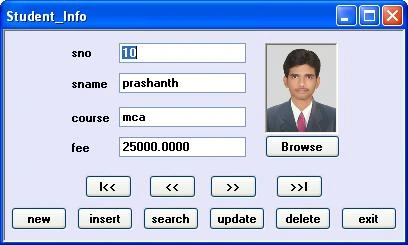
Design the form as above with 1 PictureBox control, 1 OpenFileDialog control, 4 Labels, 4 TextBoxes, and 11 Buttons.
PictureBox1 Properties
BorderStyle=Fixed3D; SizeMode=StrechImage
Note that the OpenFileDialog control appears below the form (not on the form), which can be used for browsing an image.
In order to communicate with the SQL server database, including the namespace.
In this application, we will search for a record by taking input from the InputBox. For this, we have to add a reference to Microsoft.VisualBasic.
Adding a Reference to 'Microsoft.VisualBasic'
Goto Project Menu ->Add Reference -> select 'Microsoft.VisualBasic' from the .NET tab.
In order to use this reference we have to include the namespace.
using Microsoft.VisualBasic
Converting images into binary data
We can't store an image directly in the database. For this, we have two solutions.
- To store the location of the image in the database
- Converting the image into binary data inserting that binary data into the database and converting that back to the image while retrieving the records.
If we store the location of an image in the database and suppose that image is deleted or moved from that location, we will face problems while retrieving the records. So it is better to convert an image into binary data and insert that binary data into the database and convert that back to the image while retrieving records.
We can convert an image into binary data using
- FileStream
- MemoryStream
FileStream uses file location to convert an image into binary data which we may/may not provide while updating a record.
Example
FileStream fs = new FileStream(openFileDialog1.FileName, FileMode.Open, FileAccess.Read);
byte[] photo_aray = new byte[fs.Length];
fs.Read(photo_aray, 0, photo_aray.Length);
So it is better to use MemoryStream which uses images in the PictureBox to convert an image into binary data.
Example
MemoryStream ms = new MemoryStream();
pictureBox1.Image.Save(ms, ImageFormat.Jpeg);
byte[] photo_aray = new byte[ms.Length];
ms.Position = 0;
ms.Read(photo_aray, 0, photo_aray.Length);
In order to use FileStream or MemoryStream we have to include the namespace:
using System.IO
OpenFileDialog Control
We use OpenFileDialog control in order to browse for the images (photos) to insert into the record.
Loading the constraint details into the dataTable
In this app. we use the Find() method to search a record, which requires details of the primary-key column, which can be provided using the statement:
adapter.MissingSchemaAction = MissingSchemaAction.AddWithKey;
Pointing to the current record in Table
After searching for a record, we have to get the index of that record so that we can navigate the next and previous records.
Example
rno= ds.Tables[0].Rows.IndexOf(drow);
Code
using System;
using System.Windows.Forms;
using System.Data;
using System.Data.SqlClient;
using System.Drawing;
using System.Drawing.Imaging;
using System.IO;
using Microsoft.VisualBasic;
namespace inserting_imgs
{
    public partial class Form1 : Form
    {
        public Form1()
        {
            InitializeComponent();
        }
        SqlConnection con;
        SqlCommand cmd;
        SqlDataAdapter adapter;
        DataSet ds; int rno = 0;
        MemoryStream ms;
        byte[] photo_aray;

        private void Form1_Load(object sender, EventArgs e)
        {
            con = new SqlConnection("user id=sa;password=123;database=prash");
            loaddata();
            showdata();
        }
        void loaddata()
        {
            adapter = new SqlDataAdapter("select sno,sname,course,fee,photo from student", con);
            adapter.MissingSchemaAction = MissingSchemaAction.AddWithKey;
            ds = new DataSet(); adapter.Fill(ds, "student");
        }
        void showdata()
        {
            if (ds.Tables[0].Rows.Count > 0)
            {
                textBox1.Text = ds.Tables[0].Rows[rno][0].ToString();
                textBox2.Text = ds.Tables[0].Rows[rno][1].ToString();
                textBox3.Text = ds.Tables[0].Rows[rno][2].ToString();
                textBox4.Text = ds.Tables[0].Rows[rno][3].ToString();
                pictureBox1.Image = null;
                if (ds.Tables[0].Rows[rno][4] != System.DBNull.Value)
                {
                    photo_aray = (byte[])ds.Tables[0].Rows[rno][4];
                    MemoryStream ms = new MemoryStream(photo_aray);
                    pictureBox1.Image = Image.FromStream(ms);
                }
            }
            else
                MessageBox.Show("No Records");
        }

        private void browse_Click(object sender, EventArgs e)
        {
            openFileDialog1.Filter = "jpeg|*.jpg|bmp|*.bmp|all files|*.*";
            DialogResult res = openFileDialog1.ShowDialog();
            if (res == DialogResult.OK)
            {
                pictureBox1.Image = Image.FromFile(openFileDialog1.FileName);
            }
        }

        private void newbtn_Click(object sender, EventArgs e)
        {
            cmd = new SqlCommand("select max(sno)+10 from student", con);
            con.Open();
            textBox1.Text = cmd.ExecuteScalar().ToString();
            con.Close();
            textBox2.Text = textBox3.Text = textBox4.Text = "";
            pictureBox1.Image = null;
        }

        private void insert_Click(object sender, EventArgs e)
        {
            cmd = new SqlCommand("insert into student(sno,sname,course,fee,photo) values(" + textBox1.Text + ",'" +
textBox2.TabIndex + "','" + textBox3.Text + "'," + textBox4.Text + ",@photo)", con);
            conv_photo();
            con.Open();
            int n = cmd.ExecuteNonQuery();
            con.Close();
            if (n > 0)
            {
                MessageBox.Show("record inserted");
                loaddata();
            }
            else
                MessageBox.Show("insertion failed");
        }
        void conv_photo()
        {
            //converting photo to binary data
            if (pictureBox1.Image != null)
            {
                //using FileStream:(will not work while updating, if image is not changed)
                //FileStream fs = new FileStream(openFileDialog1.FileName, FileMode.Open, FileAccess.Read);
                //byte[] photo_aray = new byte[fs.Length];
                //fs.Read(photo_aray, 0, photo_aray.Length);

                //using MemoryStream:
                ms = new MemoryStream();
                pictureBox1.Image.Save(ms, ImageFormat.Jpeg);
                byte[] photo_aray = new byte[ms.Length];
                ms.Position = 0;
                ms.Read(photo_aray, 0, photo_aray.Length);
                cmd.Parameters.AddWithValue("@photo", photo_aray);
            }
        }

        private void search_Click(object sender, EventArgs e)
        {
            try
            {
                int n = Convert.ToInt32(Interaction.InputBox("Enter sno:", "Search", "20", 100, 100));
                DataRow drow;
                drow = ds.Tables[0].Rows.Find(n);
                if (drow != null)
                {
                    rno = ds.Tables[0].Rows.IndexOf(drow);
                    textBox1.Text = drow[0].ToString();
                    textBox2.Text = drow[1].ToString();
                    textBox3.Text = drow[2].ToString();
                    textBox4.Text = drow[3].ToString();
                    pictureBox1.Image = null;
                    if (drow[4] != System.DBNull.Value)
                    {
                        photo_aray = (byte[])drow[4];
                        MemoryStream ms = new MemoryStream(photo_aray);
                        pictureBox1.Image = Image.FromStream(ms);
                    }
                }
                else
                    MessageBox.Show("Record Not Found");
            }
            catch
            {
                MessageBox.Show("Invalid Input");
            }
        }

        private void update_Click(object sender, EventArgs e)
        {
            cmd = new SqlCommand("update student set sname='" + textBox2.Text + "', course='" + textBox3.Text + "', fee='" + textBox4.Text + "', photo=@photo where sno=" + textBox1.Text, con);
            conv_photo();
            con.Open();
            int n = cmd.ExecuteNonQuery();
            con.Close();
            if (n > 0)
            {
                MessageBox.Show("Record Updated");
                loaddata();
            }
            else
                MessageBox.Show("Updation Failed");
        }

        private void delete_Click(object sender, EventArgs e)
        {
            cmd = new SqlCommand("delete from student where sno=" + textBox1.Text, con);
            con.Open();
            int n = cmd.ExecuteNonQuery();
            con.Close();
            if (n > 0)
            {
                MessageBox.Show("Record Deleted");
                loaddata();
                rno = 0;
                showdata();
            }
            else
                MessageBox.Show("Deletion Failed");
        }

        private void first_Click(object sender, EventArgs e)
        {
            rno = 0; showdata();
            MessageBox.Show("First record");
        }

        private void previous_Click(object sender, EventArgs e)
        {

            if (rno > 0)
            {
                rno--; showdata();
            }
            else
                MessageBox.Show("First record");
        }

        private void next_Click(object sender, EventArgs e)
        {
            if (rno < ds.Tables[0].Rows.Count - 1)
            {
                rno++; showdata();
            }
            else
                MessageBox.Show("Last record");
        }

        private void last_Click(object sender, EventArgs e)
        {
            rno = ds.Tables[0].Rows.Count - 1;
            showdata(); MessageBox.Show("Last record");
        }

        private void exit_Click(object sender, EventArgs e)
        {
            this.Close();
        }

     }
}
Conclusion
In this article, we learned about Inserting & Retrieving Images from SQL Server Databases without using Stored Procedures.


G DragonPosted Apr 24, 2021, 4:52 PM
What is datatype in sql server?
Zikriya MuneerPosted Jul 8, 2019, 12:26 AM
Any one can help me
Zikriya MuneerPosted Jul 8, 2019, 12:26 AM
This is not download how can i do
Vora HimansuPosted Jan 29, 2019, 11:38 AM
Declare variable photo error please solve
Indrajeet BhattacharyaPosted Dec 30, 2017, 12:50 PM
The zip file is not downloading. Please suggest.
Bunty JainPosted Jul 12, 2017, 12:19 AM
Thanks.very good article.
Pradeep KumarPosted Jun 23, 2017, 5:54 PM
I get error in below code: pictureStudent.Image = null; if (reader["image"] != System.DBNull.Value) { byte[] photo_array = (byte[])reader["image"]; MemoryStream ms2 = new MemoryStream(photo_array); pictureStudent.Image = Image.FromStream(ms2); Error: Parameter is not valid. at System.Drawing.FromStream(Stream,Stream, Boolean useEmbeddedCouorManagement, Boolean validateImageData)
john.grimanis GrimanisPosted Oct 21, 2016, 6:07 AM
Good example, thanks
kumar sPosted Sep 23, 2014, 1:23 PM
ms.Position = 0; this statement made my code to work....thank you buddy...keep it up
kumar sPosted Sep 23, 2014, 1:22 PM
ms.Position = 0;
Prashanth ChindamPosted Jan 29, 2014, 7:23 AM
Instead of saving image in binary format, save the image physically in a folder and save the image path in database with data type as nvarchar. use image url eg: http://abc.com/images/sampleimage.jpg, to display image in email content.
Filipe VilhenaPosted Jan 29, 2014, 6:54 AM
hello, I have a similar situation to what you describe here, although I need to get the image cid when getting it from database (or stream) in order to insert it in my email body, replacing the current LinkedResource which doesn't display anything. Can you help?
Santosh YadavPosted Jan 29, 2014, 1:09 AM
good article indeed, thanks..
ashok kumarPosted Jan 23, 2012, 6:32 AM
I have table like this.. SLNO UNITNO PHOTOBARCODE -------------------------------------- 1 C45678 <NULL> 2 C89678 <NULL> 3 C47878 <NULL> 4 D65678 <NULL> .... .... 1000 H45678 <NULL> I WANT TO GENERATE BARCODE FOR THE UNITNO AND WANT TO STORE THE BARCODE IMAGE IN DATABASE USING FORLOOP... PLEASE HELP ME... WHILE I USED U'R CODE...ITS SHOWS AN ERROR MESSAGE AS...."MUST DECLARE SCALAR VARIABLE @PHOTO"
sunil jadhavPosted Nov 18, 2011, 1:49 AM
sir i am doing one project in vb 6.0 so please can you give me that same code for vb 6.0 instead of vb.net
AmolPosted Oct 30, 2011, 3:38 AM
GR8 WORK!!!
Venkatesh MRPosted Apr 6, 2011, 3:03 AM
Nice example
Techni AllPosted Apr 5, 2011, 12:59 AM
Hi I ve uploaded my image binary from VC++6 to SQL server. On the web end, I am using C# commands to display these image but its not working. A possible problem may be: I am uploading the image in binary format but SQL DATAtype is IMAGE. C# is using showimage(). Your help will be highly appreciated.
Ketul RathodeditedPosted Feb 2, 2011, 10:58 PMEdited Feb 2, 2011, 11:17 PM
Does it work with Sql Express Edition or we have to install SQL server 2005 Externally..... reply immediately....
kishore kumarPosted Jan 18, 2011, 9:12 PM
hi,im kishore im saving image successfully,but while retreiving gettingerror as parameter is not valid, is there any mistake in my code? here is my code...pls help me... thank u in adv... using System; using System.Collections.Generic; using System.ComponentModel; using System.Data; using System.Drawing; using System.Drawing.Imaging ; using System.Linq; using System.Text; using System.Windows.Forms; using System.IO; using System.Data.SqlClient; namespace WindowsFormsApplication1 { public partial class Form1 : Form { SqlConnection con = new SqlConnection("user id=sa;password=kiran;database=kiran"); MemoryStream ms; public Form1() { InitializeComponent(); } private void button1_Click(object sender, EventArgs e) { openFileDialog1.ShowDialog(); pictureBox1.ImageLocation = openFileDialog1.FileName; } private void button2_Click(object sender, EventArgs e) { SqlDataAdapter da = new SqlDataAdapter("insert into img values(" + textBox1.Text + ",'" + pictureBox1.ImageLocation + "')", con); DataSet ds = new DataSet(); da.Fill(ds, "img"); ms = new MemoryStream(); pictureBox1.Image.Save(ms, ImageFormat.Jpeg); byte[] data = new byte[ms.Length]; ms.Position = 0; ms.Read(data, 0, Convert.ToInt32(ms.Length)); MessageBox.Show("Saved"); } private void button3_Click(object sender, EventArgs e) { // SqlDataAdapter da = new SqlDataAdapter("select * from img where id=" + textBox1.Text, con); SqlCommand cmd = new SqlCommand("img_ret", con); cmd.CommandType = CommandType.StoredProcedure; cmd.Parameters.AddWithValue("@id", textBox1.Text); SqlDataAdapter da = new SqlDataAdapter(cmd); DataSet ds = new DataSet(); da.Fill(ds, "img"); byte[] data = (byte[])ds.Tables["img"].Rows[0][0]; ms = new MemoryStream(data); pictureBox1.Image= Image.FromStream(ms); } } }
jagadeesh seelamPosted Jan 3, 2011, 12:18 PM
nice..,.
mahesh naniPosted Nov 1, 2010, 4:26 AM
thanks..........