

Background
After an awesome response published by me in the year 2013: Insert, Update, Delete In GridView Using ASP.Net C#. It now has more than 140 K views, therefore to help beginners I decided to rewrite the article with a step-by-step approach using ASP.NET MVC since it is a hot topic in the market today. I have written this article focusing on beginners so they can understand the basics of MVC. Please read my previous article using the following links to understand the basics of MVC.
Step 1. Create an MVC Application.
Now let us start with a step-by-step approach to the creation of a simple MVC application as in the following.
- "Start", then "All Programs" and select "Microsoft Visual Studio 2015".
- "File", then "New" and click "Project..." then select "ASP.NET Web Application Template", then provide the Project a name as you wish and click on OK. After clicking, the following window will appear.
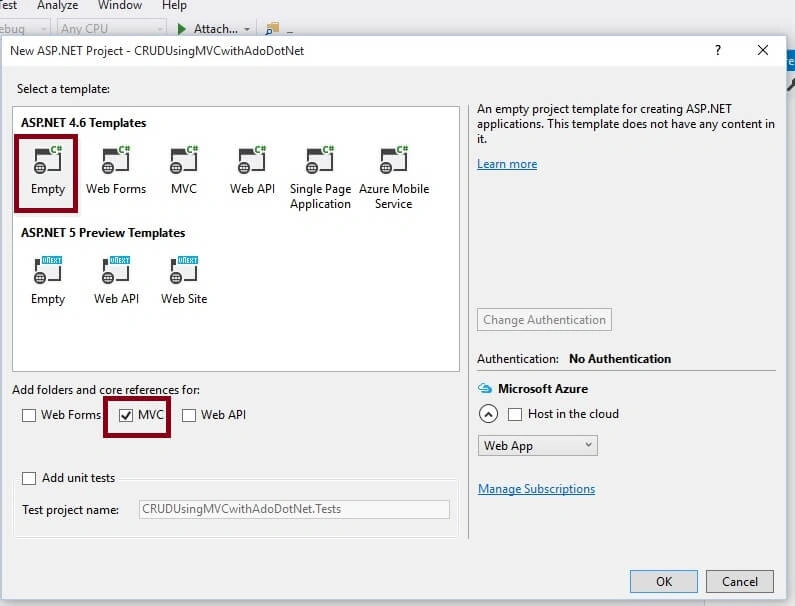
- As shown in the preceding screenshot, click on Empty template and check the MVC option, then click OK. This will create an empty MVC web application whose Solution Explorer will look like the following.
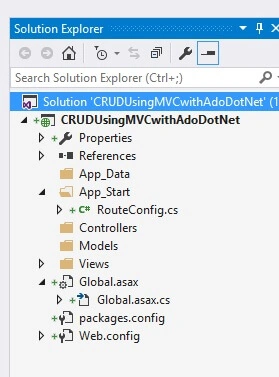
Step 2. Create Model Class.
Now let us create the model class named EmpModel.cs by right-clicking on the model folder as in the following screenshot.
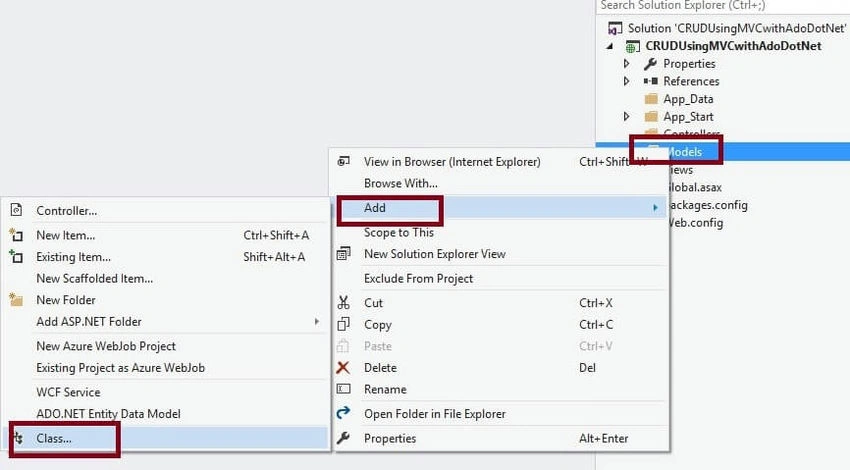
Note. It is not mandatory that the Model class should be in the Model folder, it is just for better readability you can create this class anywhere in the Solution Explorer. This can be done by creating different folder names or without folder names or in a separate class library.
EmpModel.cs class code snippet.
public class EmpModel
{
    [Display(Name = "Id")]
    public int Empid { get; set; }

    [Required(ErrorMessage = "First name is required.")]
    public string Name { get; set; }

    [Required(ErrorMessage = "City is required.")]
    public string City { get; set; }

    [Required(ErrorMessage = "Address is required.")]
    public string Address { get; set; }
}
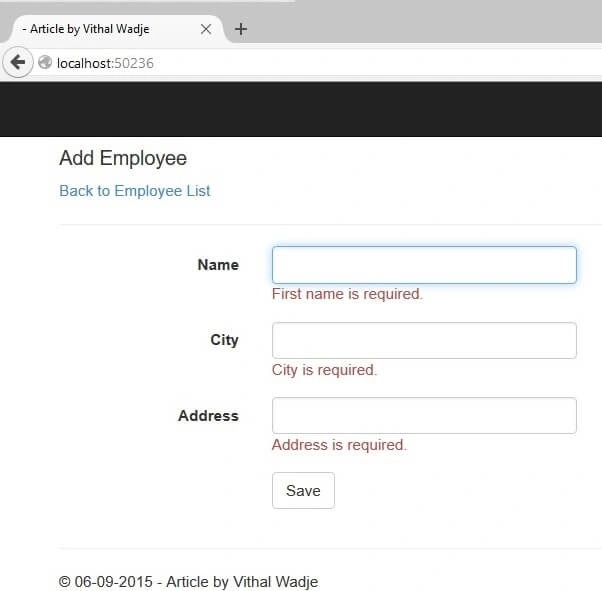
In the above model class, we have added some validation on properties with the help of DataAnnotations.
Step 3. Create Controller.
Now let us add the MVC 5 controller as in the following screenshot.
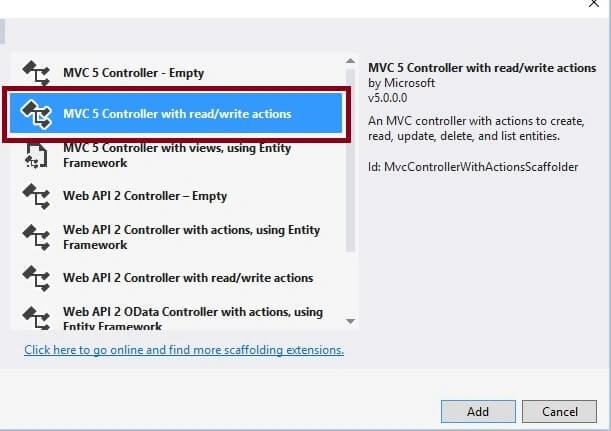
After clicking on the Add button it will show the following window. Now specify the Controller name as Employee with the suffix Controller as in the following screenshot.
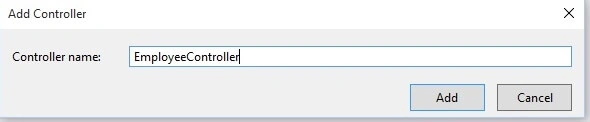
Note: The controller name must be a suffix as 'Controller' after specifying the name of the controller.
After clicking on the Add button controller is created with by default code that supports CRUD operations and later on we can configure it as per our requirements.
Step 4. Create Table and Stored procedures.
Now before creating the views let us create the table name Employee in a database according to our model fields to store the details.
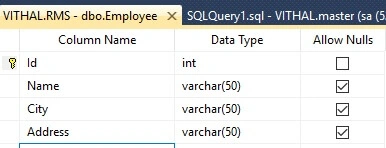
I hope you have created the same table structure as shown above. Now create the stored procedures to insert, update, view, and delete the details as in the following code snippet.
To Insert Records
CREATE PROCEDURE [dbo].[AddNewEmpDetails]
(
   @Name varchar(50),
   @City varchar(50),
   @Address varchar(50)
)
AS
BEGIN
   INSERT INTO Employee VALUES(@Name, @City, @Address)
END
To View Added Records
CREATE PROCEDURE [dbo].[GetEmployees]
AS
BEGIN
    SELECT * FROM Employee
END
To Update Records
CREATE PROCEDURE [dbo].[UpdateEmpDetails]
(
   @EmpId int,
   @Name varchar(50),
   @City varchar(50),
   @Address varchar(50)
)
AS
BEGIN
   UPDATE Employee
   SET Name = @Name,
       City = @City,
       Address = @Address
   WHERE Id = @EmpId
END
To Delete Records
CREATE PROCEDURE [dbo].[DeleteEmpById]
(
   @EmpId int
)
AS
BEGIN
   DELETE FROM Employee WHERE Id = @EmpId
END
Step 5. Create a Repository class.
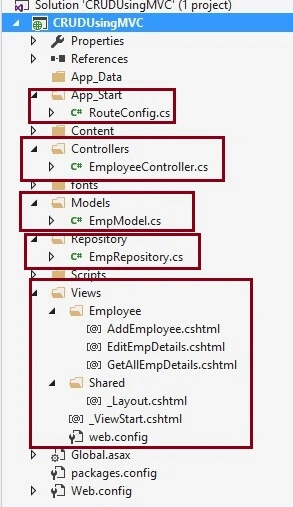
Now create a Repository folder and Add EmpRepository.cs class for database-related operations, after adding the solution explorer will look like the following screenshot.
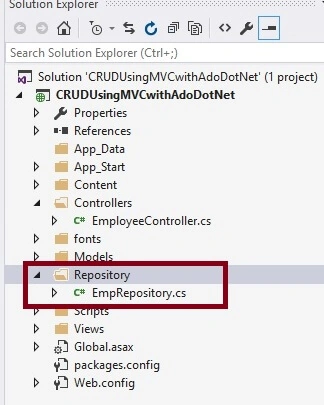
Now create methods in EmpRepository.cs to handle the CRUD operation as in the following screenshot.
EmpRepository.cs
public class EmpRepository
{
    private SqlConnection con;

    // To Handle connection related activities
    private void connection()
    {
        string constr = ConfigurationManager.ConnectionStrings["getconn"].ToString();
        con = new SqlConnection(constr);
    }

    // To Add Employee details
    public bool AddEmployee(EmpModel obj)
    {
        connection();
        SqlCommand com = new SqlCommand("AddNewEmpDetails", con);
        com.CommandType = CommandType.StoredProcedure;
        com.Parameters.AddWithValue("@Name", obj.Name);
        com.Parameters.AddWithValue("@City", obj.City);
        com.Parameters.AddWithValue("@Address", obj.Address);

        con.Open();
        int i = com.ExecuteNonQuery();
        con.Close();
        if (i >= 1)
        {
            return true;
        }
        else
        {
            return false;
        }
    }

    // To view employee details with generic list
    public List<EmpModel> GetAllEmployees()
    {
        connection();
        List<EmpModel> EmpList = new List<EmpModel>();

        SqlCommand com = new SqlCommand("GetEmployees", con);
        com.CommandType = CommandType.StoredProcedure;
        SqlDataAdapter da = new SqlDataAdapter(com);
        DataTable dt = new DataTable();

        con.Open();
        da.Fill(dt);
        con.Close();

        // Bind EmpModel generic list using dataRow
        foreach (DataRow dr in dt.Rows)
        {
            EmpList.Add(
                new EmpModel
                {
                    Empid = Convert.ToInt32(dr["Id"]),
                    Name = Convert.ToString(dr["Name"]),
                    City = Convert.ToString(dr["City"]),
                    Address = Convert.ToString(dr["Address"])
                }
            );
        }

        return EmpList;
    }

    // To Update Employee details
    public bool UpdateEmployee(EmpModel obj)
    {
        connection();
        SqlCommand com = new SqlCommand("UpdateEmpDetails", con);

        com.CommandType = CommandType.StoredProcedure;
        com.Parameters.AddWithValue("@EmpId", obj.Empid);
        com.Parameters.AddWithValue("@Name", obj.Name);
        com.Parameters.AddWithValue("@City", obj.City);
        com.Parameters.AddWithValue("@Address", obj.Address);

        con.Open();
        int i = com.ExecuteNonQuery();
        con.Close();
        if (i >= 1)
        {
            return true;
        }
        else
        {
            return false;
        }
    }

    // To delete Employee details
    public bool DeleteEmployee(int Id)
    {
        connection();
        SqlCommand com = new SqlCommand("DeleteEmpById", con);

        com.CommandType = CommandType.StoredProcedure;
        com.Parameters.AddWithValue("@EmpId", Id);

        con.Open();
        int i = com.ExecuteNonQuery();
        con.Close();
        if (i >= 1)
        {
            return true;
        }
        else
        {
            return false;
        }
    }
}
Step 6. Create Methods into the EmployeeController.cs file.
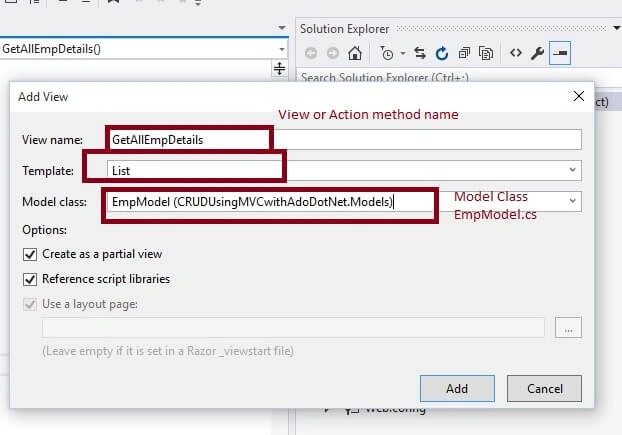
Now open the EmployeeController.cs and create the following action methods.
public class EmployeeController : Controller
{
    // GET: Employee/GetAllEmpDetails
    public ActionResult GetAllEmpDetails()
    {
        EmpRepository EmpRepo = new EmpRepository();
        ModelState.Clear();
        return View(EmpRepo.GetAllEmployees());
    }

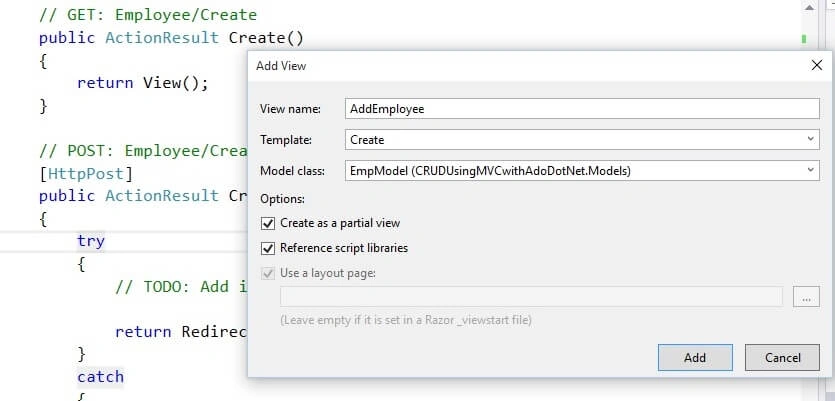
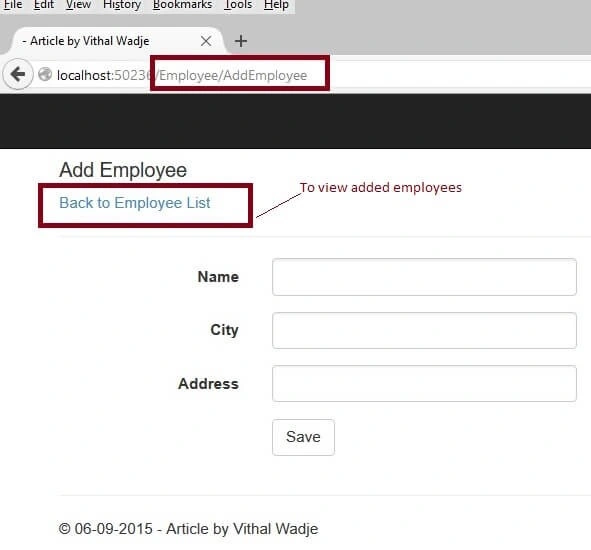
    // GET: Employee/AddEmployee
    public ActionResult AddEmployee()
    {
        return View();
    }

    // POST: Employee/AddEmployee
    [HttpPost]
    public ActionResult AddEmployee(EmpModel Emp)
    {
        try
        {
            if (ModelState.IsValid)
            {
                EmpRepository EmpRepo = new EmpRepository();

                if (EmpRepo.AddEmployee(Emp))
                {
                    ViewBag.Message = "Employee details added successfully";
                }
            }

            return View();
        }
        catch
        {
            return View();
        }
    }

    // GET: Employee/EditEmpDetails/5
    public ActionResult EditEmpDetails(int id)
    {
        EmpRepository EmpRepo = new EmpRepository();

        return View(EmpRepo.GetAllEmployees().Find(Emp => Emp.Empid == id));
    }

    // POST: Employee/EditEmpDetails/5
    [HttpPost]
    public ActionResult EditEmpDetails(int id, EmpModel obj)
    {
        try
        {
            EmpRepository EmpRepo = new EmpRepository();

            EmpRepo.UpdateEmployee(obj);
            return RedirectToAction("GetAllEmpDetails");
        }
        catch
        {
            return View();
        }
    }

    // GET: Employee/DeleteEmp/5
    public ActionResult DeleteEmp(int id)
    {
        try
        {
            EmpRepository EmpRepo = new EmpRepository();
            if (EmpRepo.DeleteEmployee(id))
            {
                ViewBag.AlertMsg = "Employee details deleted successfully";
            }
            return RedirectToAction("GetAllEmpDetails");
        }
        catch
        {
            return View();
        }
    }
}

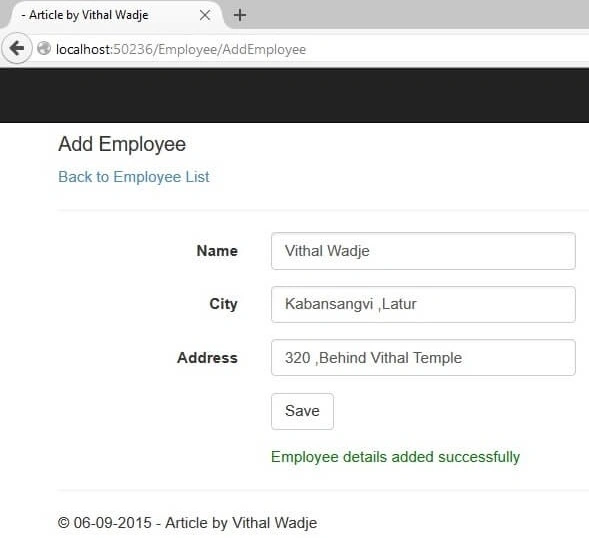
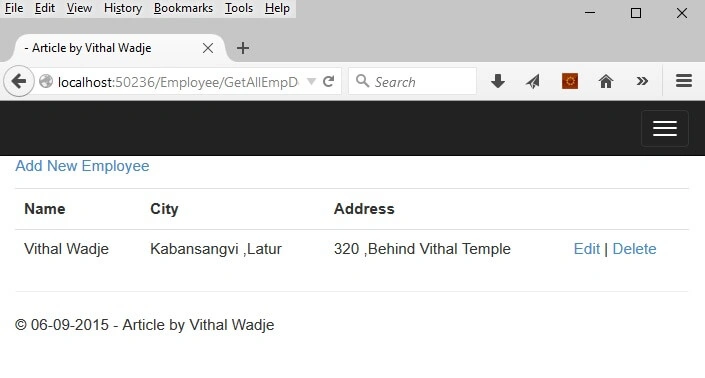
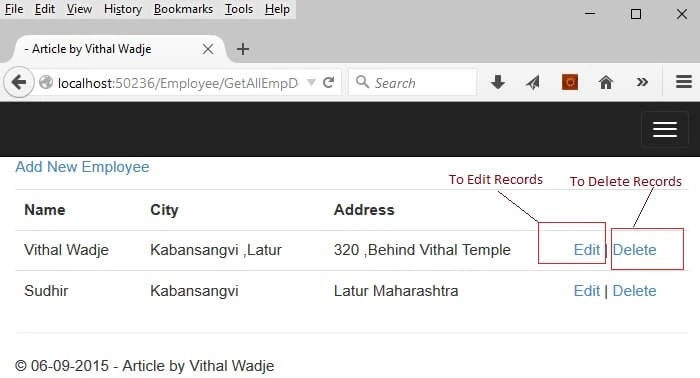
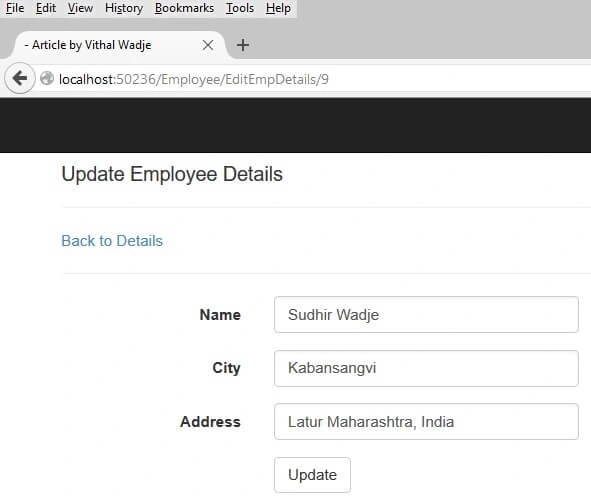
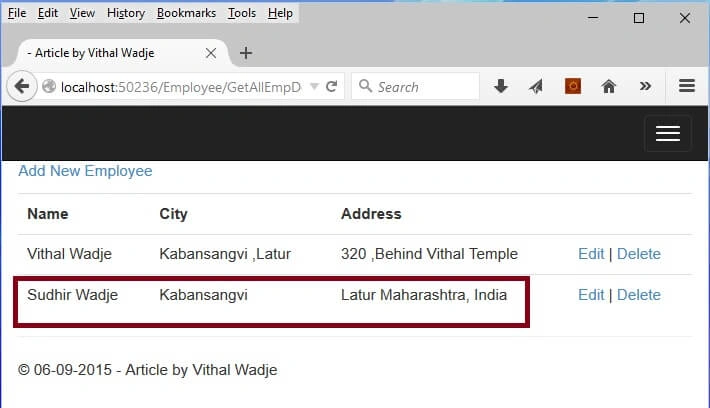
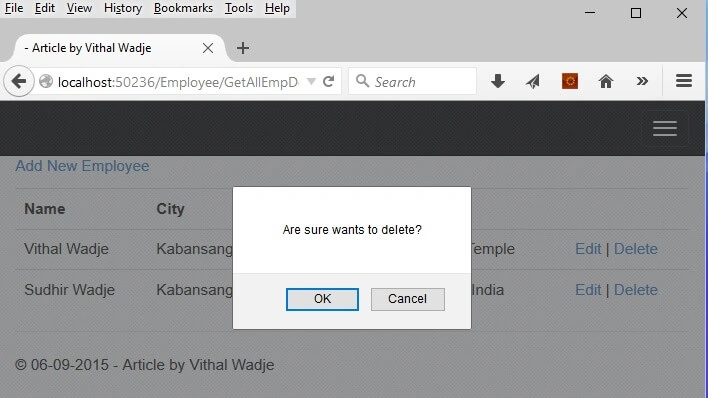
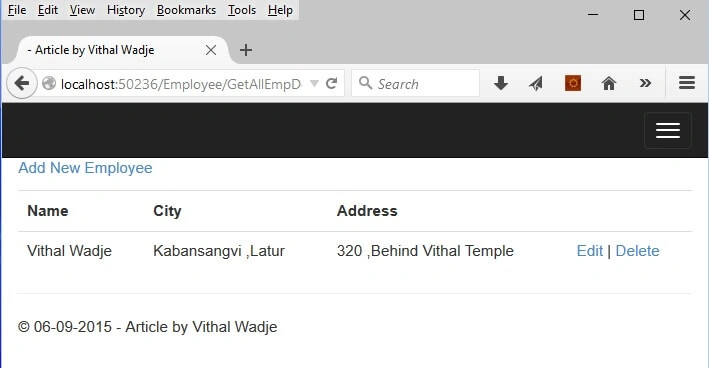
vikramPosted Nov 14, 2024, 11:51 AM
While running getting error as System.NullReferenceException: 'Object reference not set to an instance of an object.' in addemployee.cshtml.
Coder CoderPosted May 30, 2023, 8:03 AM
You can also my examples
Theodore ColumbusPosted Aug 23, 2022, 3:02 PM
This is a good exercise, except it doesn't work. I created the database in SSMS. When I try to run this I get an error that it can't open the database. Is there anyway to fix this?
Peter GalvinPosted Sep 30, 2021, 9:56 PM
The downloadable version works, The "tutorial" doesn't.
Peter GalvinPosted Sep 30, 2021, 9:53 PM
Unable to compile any of this - so many names space declarations not mentioned. Also assemblies not specified. Waste of time.
Rajesh ThampiPosted Apr 2, 2021, 8:14 AM
Thanks Vithal. I remember the times when my seniors asked me to "go to google" as answer for any doubts asked. Today, glad to see that selfless experts like you are sharing so much, so that newbies could learn, adapt and excel. Accept my heartfelt gratitude for the article and the solution. ??
Jonathan NovackPosted Jun 1, 2020, 8:56 AM
I'm normally a bit reluctant to use too many stored procedures. They are a bad place to stash too much business logic, harder to debug, and more obscure. Especially those 1,000 line stored procedures. But, for short CRUD-like functionality, it is good stuff. In Java, you can create a Prepared Statement and get as much or more benefit as you do with a db stored procedure, but C# has no way to bypass a lot of built-in overhead inherent in the framework (my biggest bugaboo with the .NET framework - too much unavoidable overhead. This coming from a programmer who has been doing C and assembly on PCs since 1980, bypassing DOS and BIOS and coding directly to metal on the early machines ;) .
Jonathan NovackPosted Jun 1, 2020, 8:37 AM
Nice to see MVC Controller & View approach. Too many C# programmers are still living in the WebForm/WebPage world with C# embedded in the client pages. I'm a big fan of the .cshtml server-side web-page building to make it a bit harder for anybody who knows how to display source on his browser to gather business information.
rajendra rawatPosted Jan 6, 2020, 1:50 PM
Good article covering the basic crud features.
Ravi SPosted May 8, 2019, 5:44 AM
Where can i add connectionstring.it is not taken any data please help me out
CHUAH TEIKWEIPosted Jan 27, 2019, 9:56 PM
How to add search , paging , sorting function ?
Rajashekar KPosted Jan 20, 2019, 10:00 AM
"the name 'Html' does not exist in the current context" Error showing in View Page , how to solve this
Dharmendra KumarPosted Oct 4, 2018, 12:57 AM
Good Article Can you Pls tell me WebApi Article After crud operation?
Former memberPosted Sep 13, 2018, 4:03 AM
Hi please help me in writing view details function code to view details of specific employee. Tried to update the code In repository and controllers but unable to get desired result.
Sankeerth MaragantiPosted Aug 10, 2018, 2:06 AM
Please help me out how acn we solve this issuse
Sankeerth MaragantiPosted Aug 10, 2018, 2:06 AM
The parameters dictionary contains a null entry for parameter 'Uid' of non-nullable type 'System.Int32' for method 'System.Web.Mvc.ActionResult Edit(Int32)' in 'MongoTracking.Controllers.SkillsController'. An optional parameter must be a reference type, a nullable type, or be declared as an optional parameter.Parameter name: parameters
Eduardo IIPosted Jan 23, 2018, 6:14 AM
I hope you can create a related article "LogIn Operations In ASP.NET MVC 5 Using ADO.NET" and passing data over different pages or controller via TempData or Session. Thanks...
Nooh shaikhPosted Jul 10, 2017, 9:09 AM
Plz give me solution
Nooh shaikhPosted Jul 10, 2017, 9:08 AM
(This type of error coming) An exception of type 'System.NullReferenceException' occurred in CRUD Using MVC WithAdoDotNet.dll but was not handled in user code
Avinash ThakurPosted Apr 28, 2017, 1:34 AM
Nice Article sir;)
Zaheer BegPosted Jan 21, 2017, 4:38 AM
Thanks Sir..Nice and Simple 4 Beginner...Keep Uploading...
saichPosted Oct 28, 2016, 11:14 AM
Hello, in the above example is ID column an identity column? thanks
Vithal WadjePosted Feb 7, 2016, 9:16 AM
Thanks Shubham sir
Vithal WadjePosted Feb 7, 2016, 9:16 AM
EL refer my other articles
Shubham KumarPosted Feb 6, 2016, 6:11 AM
nice sir
El Not To WorryPosted Nov 5, 2015, 9:20 AM
Would you have an example, using same concept on how to bind a dropdownlistfor
Vithal WadjePosted Sep 14, 2015, 11:41 AM
Thanks sir
ROHAN THAKURPosted Sep 14, 2015, 7:33 AM
gud one sir ji...
Vithal WadjePosted Sep 8, 2015, 2:39 PM
yes Pc Patel sir there are many more option to avoid heavy entity framework wait for my future articles
Phoolchand PatelPosted Sep 8, 2015, 7:18 AM
Very good article Vithal sir, this will help a lot to who don't want to choose entity framework.
Vithal WadjePosted Sep 7, 2015, 11:49 AM
Thanks Shridhar Sharma sir
Vithal WadjePosted Sep 7, 2015, 11:48 AM
Thanks Debasis Saha sir
Vithal WadjePosted Sep 7, 2015, 11:47 AM
Thanks Amol Jadhao sir
Shridhar SharmaPosted Sep 7, 2015, 11:03 AM
very nice article Vithal sir. Thanks for sharing.
Debasis SahaPosted Sep 7, 2015, 9:42 AM
Good One..
Amol JadhaoPosted Sep 7, 2015, 5:35 AM
Great...!!!
Vithal WadjePosted Sep 7, 2015, 4:10 AM
Thanks Abhishek Singh sir
Abhishek KumarPosted Sep 7, 2015, 3:38 AM
Very nicely explained ..Thanks for sharing Vithal ..
Vithal WadjePosted Sep 7, 2015, 12:52 AM
Thanks Rahul Saxena sir
Rahul Kumar SaxenaPosted Sep 7, 2015, 12:24 AM
Good one
Vithal WadjePosted Sep 6, 2015, 2:57 PM
Thanks Rakesh Chavda sir
RakeshPosted Sep 6, 2015, 2:08 PM
Good Explain Sir
Vithal WadjePosted Sep 6, 2015, 1:52 PM
Thanks Santhakumar Munuswamy sir
Vithal WadjePosted Sep 6, 2015, 1:52 PM
Thanks Karthikeyan K sir
Vithal WadjePosted Sep 6, 2015, 1:52 PM
Thanks Rajeesh Menoth sir
Vithal WadjePosted Sep 6, 2015, 1:51 PM
Thanks Shubham Kumar sir
Vithal WadjePosted Sep 6, 2015, 1:51 PM
Thanks Pankaj Kumar Choudhary sir
Santhakumar MunuswamyPosted Sep 6, 2015, 1:07 PM
Good one. Thanks for sharing
Karthikeyan KPosted Sep 6, 2015, 12:52 PM
Awesome sir...Thanks for sharing :)
Rajeesh MenothPosted Sep 6, 2015, 12:17 PM
Great..Good One
Shubham KumarPosted Sep 6, 2015, 11:48 AM
Thank you sir
Pankaj Kumar ChoudharyPosted Sep 6, 2015, 11:23 AM
Nice Explain Sir............